Linking Checkbox value to a MySQL table record
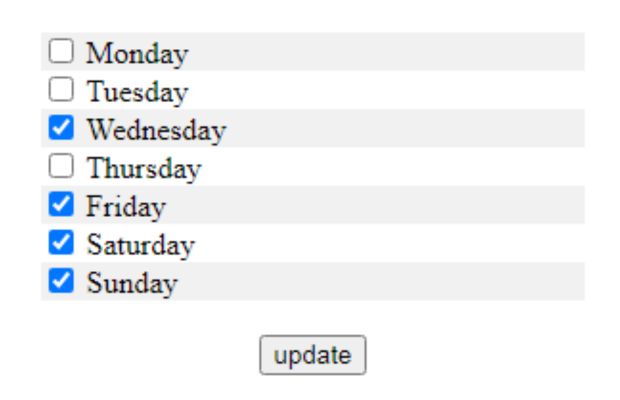
Check box can be linked to records in a database table. This way we can keep the checkbox status checked or not based on the data we receive from the table. We can also read the checkbox status and update the same based on changes. Let us understand this with an example.
Out of the seven days in a week we will display all the days and a checkbox for each day. User has to submit the choice of the days to the system. Next time when they visit then the same checked day status will be displayed and user can check or uncheck any days. The status is stored in MySQL ( can be any other database also) table.
Example
In a hotel you can display a menu to the guest and ask them to select their favorite dishes. We can save the user choice and display the selected items to the same guest in his next visit. Guest can alter the choice and update the record.Here we will try with the code for selecting weekdays from a days list of checkboxes. We will select the days and on update the record will be stored in a table. While displaying the weekdays we will display by taking the values from a table.
Demo of checkbox status connected to database
Here we will store values of the days ( in 1 to 7 ) by separating them by comma (,) in a table. We could have kept the weekdays in an array for simplicity but in a real project it is most likely that data will be stored in a table. So let us use one table to store weekdays and its number. Here in total we have used two tables, one stores the weekdays and its numbers (plus_weekdays) and the other table stores the userid and its selection of weekdays (plus_week). Here also we have used one record for all our tutorial and that is for userid smo. Now let us first collect the selection of userid smo stored in our table.PDO connection to MySQL table
Collecting data from MySQL table
$count=$dbo->prepare("SELECT days FROM plus_week WHERE userid='smo' ");
if($count->execute()){
//echo " Success <br>";
$row = $count->fetch(PDO::FETCH_OBJ);
}$days_array=explode(",",$row->days);$qt="SELECT * FROM plus_weekdays";echo "<form method=post action=''><input type=hidden name=todo value=submit_form>";
echo "<table border='0' width='50%' cellspacing='0' cellpadding='0' align=center>";
$st="";
foreach ($dbo->query($qt) as $noticia) {
if(@$bgcolor=='#f1f1f1'){$bgcolor='#ffffff';}
else{$bgcolor='#f1f1f1';}
if(in_array($noticia['day_no'],$days_array)){$st="checked";}
else{$st="";}
echo "<tr bgcolor='$bgcolor'>
<td class='data'><input type=checkbox name=days_array[] value='$noticia[day_no]' $st> $noticia[days]</td></tr>";
}
echo "</table>
<input type=submit value=update></form>
</center>";Updating user selection to Database table
@$todo=$_POST['todo']; // take care of register global if off
if(isset($todo) and $todo=="submit_form"){
$days_array=$_POST['days_array'];
$tag_string="";
while (list ($key,$val) = @each ($days_array)) {
//echo "$val,";
$tag_string.=$val.",";
}
$tag_string=substr($tag_string,0,(strLen($tag_string)-1));// remove the last , from string
$sql=$dbo->prepare("UPDATE plus_week SET days=:tag_string where userid='smo'");
$sql->bindParam(':tag_string',$tag_string,PDO::PARAM_STR);
if($sql->execute()){
echo "Data Updated<br>";
}
}else{
//print_r($sql->errorInfo()); // if any error is there it will be posted
}Zip file to download the Checkbox database script..
PHP Form Managing Radio button using PHP
Subscribe to our YouTube Channel here
This article is written by plus2net.com team.
https://www.plus2net.com

