Displaying records in PHP from MySQL table
| id | name | class | mark |
|---|---|---|---|
| 1 | John Deo | Four | 75 |
| 2 | Max Ruin | Three | 85 |
| 3 | Arnold | Three | 55 |
| 4 | Krish Star | Four | 60 |
| 5 | John Mike | Four | 60 |
| 6 | Alex John | Four | 55 |
| 7 | My John Rob | Fifth | 78 |
Watch this Video Tutorial about this script
Before starting please ensure that you have connected to MySql database and also check the article on PHP MySQL query to know how to execute MySql queries by using PHP
Let us first start by storing the query in a variable and then executing it
MySQLI database connection file
Example : Object Oriented Style
<?Php
require "config.php";// Database connection file.

$query="select * from student LIMIT 0,5 ";

//Variable $connection is declared inside config.php file & used here
if ($result_set = $connection->query($query)) {
while($row = $result_set->fetch_array(MYSQLI_ASSOC)){
echo $row['id'],$row['name'],$row['class'],$row['mark']."<br>";
}
 $result_set->close();
}
?>
More about the above code is here.
| $connection | Connection object Declared inside config.php file |
| $result_set | query() returns True of False based on success or failure of Query. On success it returns mysqli_result object. |
| fetch_array | Returns row of data from result set as array of string. NULL is returned if no more row is available to return. |
The code above will print name , class and mark records and you can see we have used <br> tag to give one line break after each record. This can be formatted well to display inside a table.
| id | name | class | mark | sex |
|---|---|---|---|---|
| 1 | John Deo | Four | 75 | female |
| 2 | Max Ruin | Three | 85 | male |
| 3 | Arnold | Three | 55 | male |
| 4 | Krish Star | Four | 60 | female |
| 5 | John Mike | Four | 60 | female |
<?Php
require "config.php";// Database connection file.

$query="select * from student LIMIT 0,5 ";
if ($result_set = mysqli_query($connection,$query)) {
while($row = $result_set->fetch_array(MYSQLI_ASSOC)){
echo $row['id'],$row['name'],$row['class'],$row['mark']."<br>";
}
 $result_set->close();
}
?>
Using MySQLi
MySQLi connection<?Php
require "config.php";// Database connection
if($stmt = $connection->query("SELECT id, name ,class, mark FROM student")){
echo "No of records : ".$stmt->num_rows."<br>";
while ($row = $stmt->fetch_assoc()) {
echo $row['id'],$row['name'],$row['class'].$row['mark']."<br>";
}
}else{
echo $connection->error;
}
?>Using PDO
PDO connectionrequire "config.php"; // Database Connection
////////////////
/////// Display records /////
$sql="SELECT id,name,class,mark FROM student LIMIT 0,5 ";
echo "<table>
<tr><th>id</th><th>Name</th><th>Class</th><th>Mark</th></tr>";
foreach ($dbo->query($sql) as $row) {
echo "<tr ><td>$row[id]</td><td>$row[name]</td><td>$row[class]</td><td>$row[mark]</td></tr>";
}
echo "</table>";Displaying single record
From the above code we can create links to display full details of the record. We will carry unique id of the record through query string and then display the single record.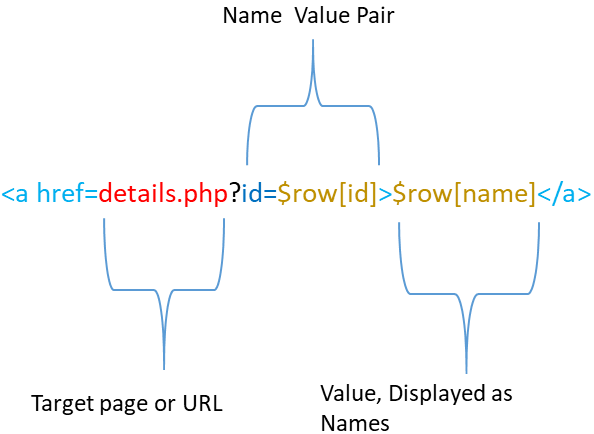
Displaying single record per page
Breaking number of records to multiple pages
When our output have more number of records to display and we want to display few records ( say 10 only ) per page then we can use Paging concept to limit the number of records per page. We will add navigational links to move between pages to display all records.Breaking number of records by PHP paging
Filtering records.
By adding SQL commands like WHERE conditions we can filter data as per our requirements. Let us find out the records of class Four only.$query="select * from student WHERE class='Four'";PHP MySQL Query with Error message
Subscribe to our YouTube Channel here
This article is written by plus2net.com team.
https://www.plus2net.com

| mariel | 16-02-2012 |
| thank you...it works.. | |
| Simon | 22-02-2012 |
| Thanks dude, this tutorial helped me a lot. | |
| Atar | 25-05-2012 |
| Hi can you tell me how to insert date month and year combine in databese | |
| Venedict Francisco | 07-09-2013 |
| how can i post or display data information from the two different table? | |
| smo1234 | 09-06-2015 |
| You can always combine more than one table and display information. You can select multiple tables in a select statement and join more than two tables by using LEFT join Check SQL section for more details. | |
