mysql_field_name Functions to get name of the fields of a table
By using the simple query 'SHOW COLUMNS FROM table' we can get the column names. This query will list out the column names. To display all the records of a table we will use this to show column names. Here is the sample code.$result = $dbo->query("SHOW COLUMNS from student");
echo "<table><tr>";
//// Display column head ///
while ($row = $result->fetch(PDO::FETCH_NUM)) {
echo "<th>$row[0]</th>";
}
$count=$dbo->prepare("select * from student");
$count->execute();
//echo "Number of Columns : ". $count->columnCount();
$no_of_columns=$count->columnCount(); // store it in a variable
<?Php
require "config.php"; // Database Connection
$result = $dbo->query("SHOW COLUMNS from student");
echo "<table><tr>";
//// Display column head ///
while ($row = $result->fetch(PDO::FETCH_NUM)) {
echo "<th>$row[0]</th>";
}
///Find out number of columns ////
$count=$dbo->prepare("select * from student");
$count->execute();
//echo "Number of Columns : ". $count->columnCount();

$no_of_columns=$count->columnCount(); // store it in a variable
///// Header is over, now show records ////
$data=$dbo->prepare("select * from student");
$data->execute();
while($result=$data->fetch(PDO::FETCH_NUM)){
echo "<tr>";
for($j=0;$j<$no_of_columns;$j++){
echo "<td>$result[$j]</td>";
} // end of for loop displaying one row
echo "</tr>";
} // end of while loop
echo "</table>";
?>
This old MySQL extension was deprecated in PHP 5.5.0 and was removed in PHP 7
Use mysqli_fetch_field_direct() in place of mysql_field_name().
Use mysqli_fetch_field_direct() in place of mysql_field_name().
mysql_field_name
The function mysql_field_name returns the name of the field we supply as field index. For example let us use one simple table student where we have four columns ID, name, class & mark. These four columns name we have specified while creating or modifying the table. We can get these table names by using mysql_field_name function.Here is the syntax
mysql_field_name ( $result , int $field_index )
If we don't know the index of the field or don't know how many fields are there in a table then we can use mysql_num_fields function. Once we know the total number of fields in a table then we can use them as field index to get the field name.
Here is the code for displaying the field names of any table. ( It is assumed that you have active connection to mysql and database selection is done )
$q=mysql_query("select * from student order  by  id ");
$num_fields = mysql_num_fields($q);

echo "<table><tr>";

for ($i=0; $i < $num_fields; $i++)
{ echo '<th>'.mysql_field_name($q, $i).'</th>'; }

echo "</tr></table>";
The output of the above code is here for our student table.
id name class mark
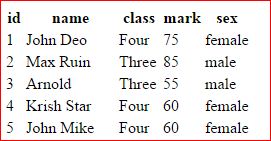
Now let us add data also here and display all the records along with the table headers , here is the full code.
$q=mysql_query("select * from student order  by  id ");
$num_fields = mysql_num_fields($q);

echo "<table><tr>";

////Field name display starts////
for ($i=0; $i < $num_fields; $i++)
{ echo '<th>'.mysql_field_name($q, $i).'</th>'; }
/// Field name display ends /////

/// Data or Record display starts /////
while($nt=mysql_fetch_row($q)){
echo "<tr >";
while (list ($key, $val) = each ($nt)){echo "<td>$val</td>";}
echo "</tr>";
}
////// End of data display ///////
echo "</tr></table>";
PHP MySQL functions mysql_fetch_length() : Length of Data MySQL Error
Subscribe to our YouTube Channel here
This article is written by plus2net.com team.
https://www.plus2net.com

| Not known | 28-11-2009 |
| The above code duplicates the value for each cell. Any fix? | |
| smo | 15-01-2010 |
| Above code works perfectly. No problem. | |
 SQL Video Tutorials