SQL Introduction
Platforms to lean SQL and copy SQL Dump to create sample student table with records and basics
Once our database and script installation is over then we can learn how to manage Database .
SQL ( Structured Query Language ) is one of the important tool for programmers. Sql is a part of the database management tool.
Types of SQL commands
DDL - Data Definition Language
DDL is used to define and manage the structure of a database and its objects.
CREATE, DROP, ALTER, TRUNCATE , COMMENT , RENAMEDML - Data Manipulation Language
DML is concerned with modifying and manipulating data stored in a database.
INSERT, UPDATE, DELETEDQL - Data Query Language
DQL is specifically designed for querying and retrieving information from databases.
SELECTDCL - Data Control Language
DCL includes commands that are responsible for granting or revoking permissions, privileges, and roles to users and roles, thus ensuring data security and access control
GRANT , REVOKETCL - Transaction Control Language
TCL is used for managing transactions within a database. A transaction is a sequence of one or more database operations (such as data manipulation or data definition) that are executed as a single unit of work.
COMMIT, ROLLBACK, SAVEPOINT, SET TRANSACTION
DQL - Data Query Language
| Function | Description |
|---|---|
| SELECT | Collect rows from Table |
| WHERE | Add condition to collect rows from the table |
| BETWEEN | Condition to get Rows from a range of values |
| CASE | Returns first matching condition with Else if not matched |
| COUNT | Number of rows with matching conditions |
| CONCAT | Join strings or column data |
| DISTINCT | Unique records |
| GROUP BY | Grouping data and counting |
| GROUP_CONCAT | Grouping Concatenated non-NULL values |
| HAVING | Grouping with condition |
| IS | Checks data against Boolean values |
| IF | Checking Condition with Group By |
| INNER JOIN | Join tables |
| IN | Rows Matching a List of data |
| Left join | Joining two tables and getting matching records with unique combination |
| Limit | Getting limited records with starting and ending limit |
| Like | Matching record with wildcard and formatting |
| Locate | Matching record and getting position of the search string |
| MAX | Highest number of a column ( math functions: min, sum, average etc ) |
| NULL value | Missing or unknown data |
| Over() | Grouping window function using over() and partition |
| Order By | displaying A to Z or Maximum to Minimum data |
| OR AND | Logical operators to use in a query |
| Rand | Random records from a table |
| Replace | Updating part of data |
| REGEXP | Regular expression to match pattern in string data |
| Subqueries | Query inside a query |
| Union | Joining tables and getting records |
There are many databases available from different vendors. For web applications MSSQL, MySQL, SQLite are mostly used. Oracle is very popular among enterprise users. MySQL community server can be downloaded from mysql.net and it is free.
Combination of PHP ( scripting language ) and MySQL ( database server ) is the most popular in the world today among all web applications.
What is SQL
Sql is a common language to manage all the operations for a database. There are different SQL commands available to manage the database. You need not start reading or take training on all the commands at a time, you can use this site as a referance and read all our free tutorials on SQL.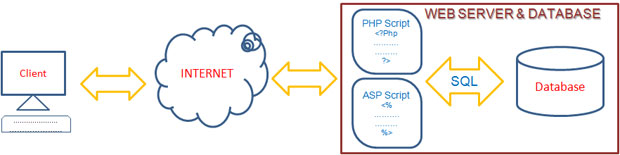
Now let us start with simple query to create table to store our student records. Then we will use insert query to add few records. Don't worry to understand all the meanings of the Query at this stage. Use this SQL to create the table.
CREATE TABLE student ( id int(2) NOT NULL auto_increment,  name varchar(50) NOT NULL default '',
class varchar(10) NOT NULL default '', mark int(3) NOT NULL default '0',
UNIQUE KEY id (id) ) TYPE=MyISAM;
Adding records
Let us fill the tables with some data. Here is the SQL to insert the data to the table. We need not worry at this stage how this SQL works as we will discuss that in other pages. You can just copy and paste this SQL code in your SQL window to insert some records to the tables.INSERT INTO student VALUES (1, 'John Deo', 'Four', 75);
INSERT INTO student VALUES (2, 'Max Ruin', 'Three', 85);
INSERT INTO student VALUES (3, 'Arnold', 'Three', 55);
INSERT INTO student VALUES (4, 'Krish Star', 'Four', 60);
INSERT INTO student VALUES (5, 'John Mike', 'Four', 60);
INSERT INTO student VALUES (6, 'Alex John', 'Five', 55);Installation of Database Tables & records of a Database Managing MySQL SELECT Query
Subscribe to our YouTube Channel here
This article is written by plus2net.com team.
https://www.plus2net.com

| alvin | 15-01-2010 |
| nice tutorials | |
| Randy Orton | 05-07-2010 |
| What is diferrence among SQL,MySQL and Oracle. I wanna Know that..! | |
| Neha | 23-08-2010 |
| these are different database servers made by different companies. | |
| Wathum Nestore | 27-08-2010 |
| I like what this site gives to the public! | |
| Marc | 30-05-2012 |
| Need a step by step guide to the selection query and the rest of the most common queries and how to build put them all together | |
| sunil | 10-11-2012 |
| i have just one word for this tutorial "awesome". | |
 SQL Video Tutorials