On this page (Show / Hide page sections)
1. Spotting the Traffic Anomaly in GA4
During routine monitoring—especially around active Google Core Updates—sudden vertical jumps in daily active users warrant immediate verification. Rather than steady organic growth, bot floods produce sharp, unnatural spikes that surge and collapse within a few days.
Daily Traffic Trend Showing Sudden Spikes
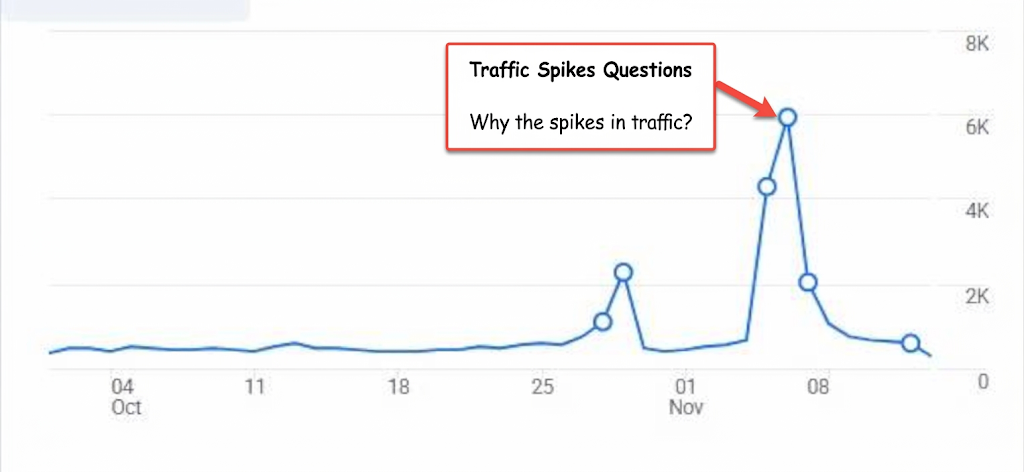
Baseline traffic remained steady below 1,000 daily sessions throughout October before spiking abruptly to over 6,000 sessions in early November.
2. Checking GA4 Automated Anomaly Alerts
Google Analytics 4 automatically flags statistical deviations on the home dashboard. Reviewing these anomaly cards immediately reveals which browser, country, and channel group drove the unexpected jump.
GA4 Automated Anomaly Detection Cards

GA4 flagged a surge in Direct sessions from an expected 400 to ~3.1k on November 6, 2026, concentrated heavily in Chrome browser traffic originating from United States data centers.
3. Correlating Direct Traffic with Poor Engagement
Opening Reports → Acquisition → Traffic acquisition exposes the clearest signature of non-human traffic: high session volume paired with almost zero engagement time.
Traffic Acquisition Report: Direct Channel Breakdown
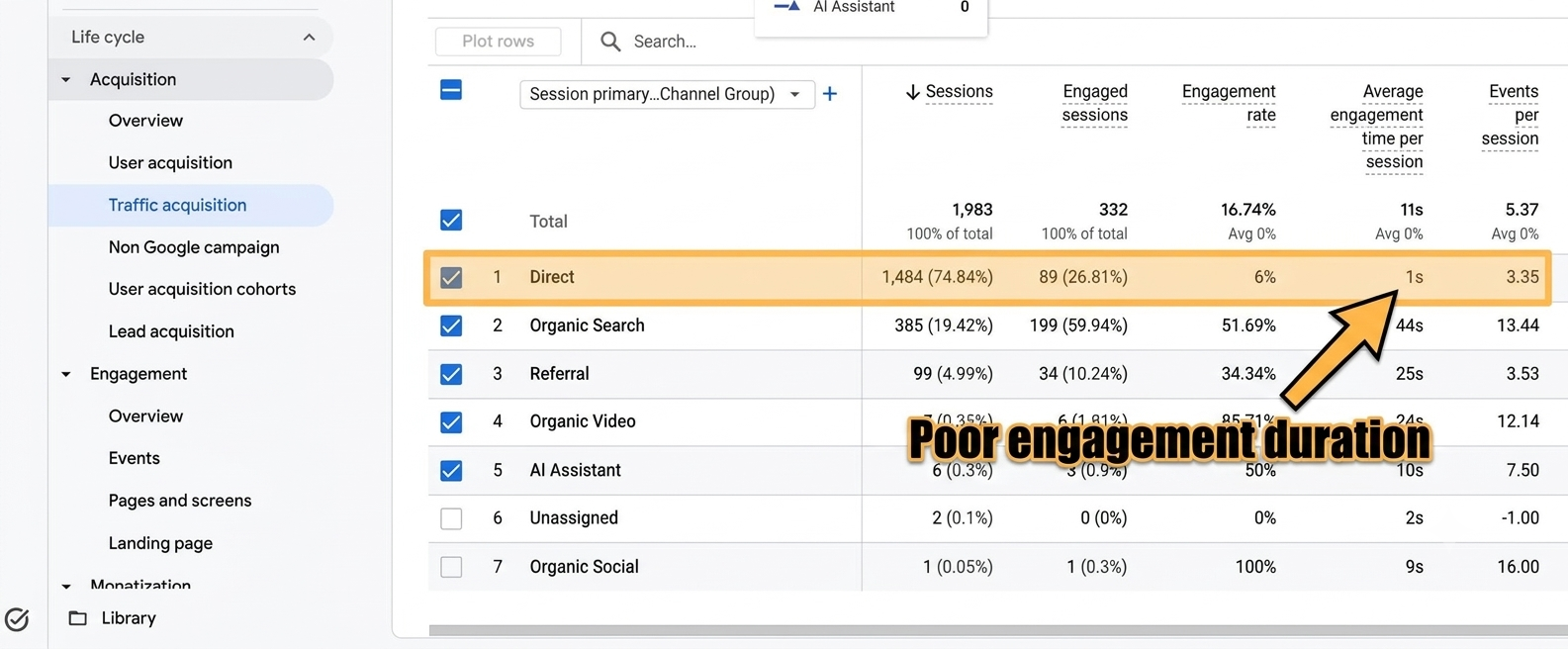
While Organic Search maintained a healthy 51.69% engagement rate and 44s average duration, Direct traffic accounted for 74.84% of sessions with only a 6% engagement rate and 1s average engagement duration.
4. Isolating the Spam Source (aocr.org)
To uncover what hides behind the "Direct" and "Referral" buckets, add Session source as a secondary dimension in Acquisition → User acquisition. This pinpoints the exact domains injecting traffic into your property.
User Acquisition Drill-Down Identifying aocr.org
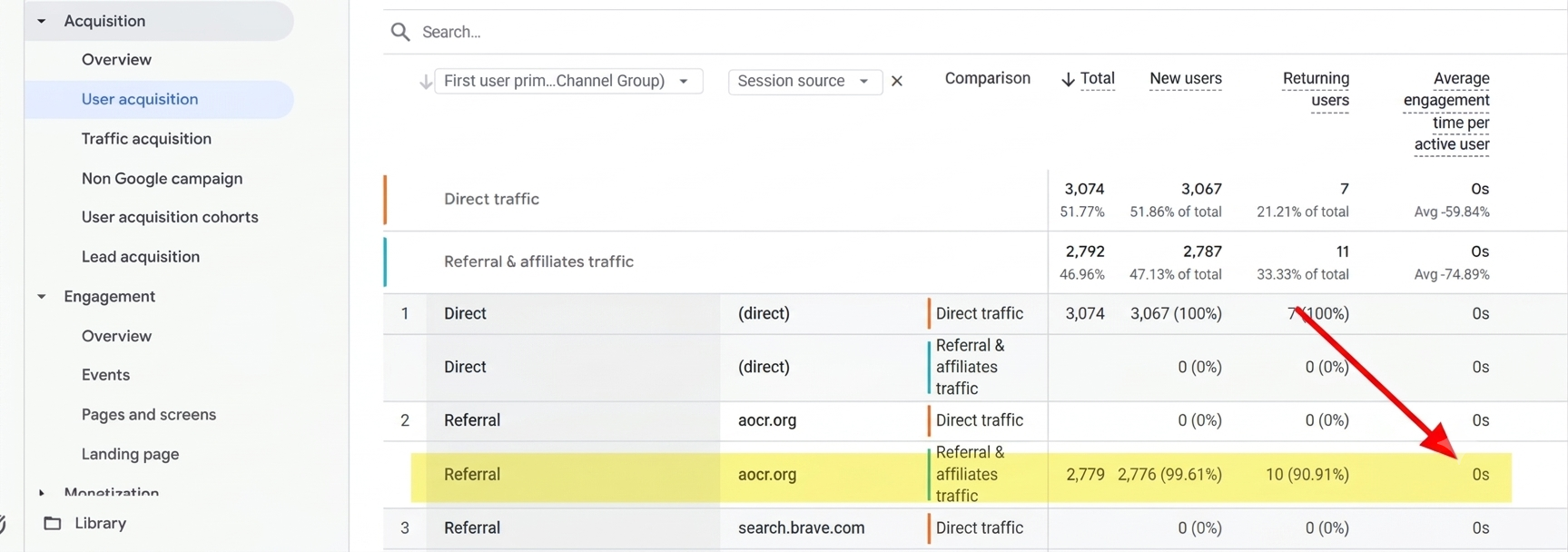
Adding Session source exposes aocr.org generating 2,779 total users (99.61% new users) with an Average engagement time per active user of 0s.
5. Root Cause: ByteSpider & Spoofed Referrer Headers
Investigating aocr.org confirms that the domain itself is not launching an attack. Instead, automated web crawlers forge their HTTP Referer headers to bypass simple bot filters or pollute analytics logs.
Search Diagnosis: Spoofed Crawler Traffic
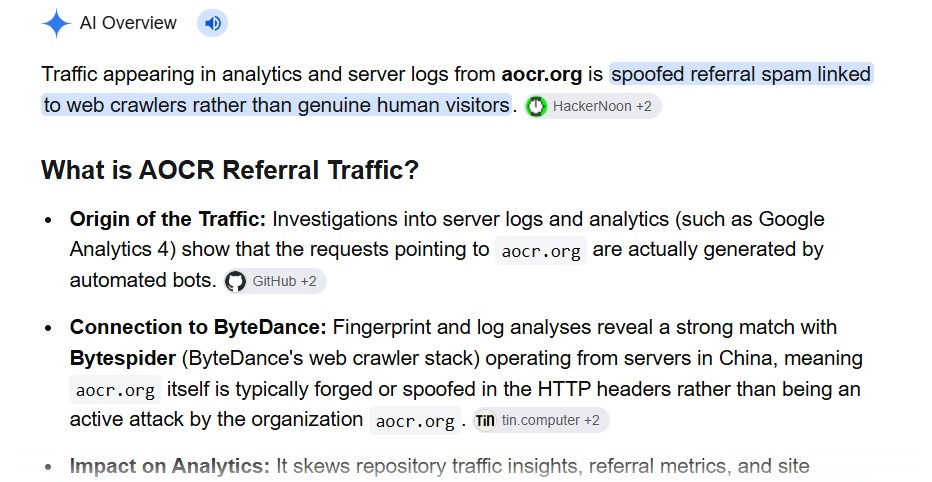
Server log and fingerprint analyses link aocr.org referrer headers to automated bot stacks like ByteSpider. Because the HTTP header is forged at request time, blocking the legitimate aocr.org domain does not stop the underlying crawler IP ranges.
6. How to Filter & Block Referral Spam
To prevent spoofed crawlers from distorting your site-wide engagement metrics and wasting server resources, apply both analytics-level exclusions and server-level blocks:
- Exclude Unwanted Referrals in GA4: Go to Admin → Data Streams → Configure tag settings → Show more → List unwanted referrals and add
aocr.orgusing the Referral domain contains match type. - Filter Exploration Reports: In custom GA4 Explorations, apply a filter excluding
Session sourcematchingaocr.organd sessions whereEngaged sessions = 0when evaluating real content performance. - Block Aggressive Crawlers via
robots.txtor.htaccess: If server access logs confirm high-frequency scraping byBytespider, disallow the user agent inrobots.txtor return a403 Forbiddenstatus at the web server level.
.htaccess Rule to Block Spoofed Referrer & Aggressive Bots
# Block spoofed aocr.org referrer header
RewriteEngine On
RewriteCond %{HTTP_REFERER} aocr\.org [NC]
RewriteRule .* - [F,L]

# Block aggressive Bytespider user-agent scraping
RewriteCond %{HTTP_USER_AGENT} Bytespider [NC]
RewriteRule .* - [F,L]
7. Frequently Asked Questions (FAQ)
Does aocr.org referral spam hurt my Google Search rankings?
No. Google Search rankings are not directly penalized by third-party referral spam recorded inside GA4. However, heavy bot scraping can consume server bandwidth and skew your internal engagement audits if you do not filter it out.
Why does spoofed bot traffic also appear under "Direct" traffic?
When automated scripts hit deep URLs directly without sending an HTTP Referer header—or when privacy/redirect stripping removes the header—GA4 classifies those hits as Direct traffic, resulting in 0s–1s engagement spikes.