SQL PHP HTML ASP JavaScript articles and free scripts to download
 

How to create new table in Enterprise Manager of MSSQL

To create a table in MSSQL go to enterprise manager. Expand the left + symbols and open all the relevant sub nodes. Finally you will reach the table object. Right click and then click new table.

If you have worked in MS Access before then this page will be familiar to you. Just enter the column names and create the table.
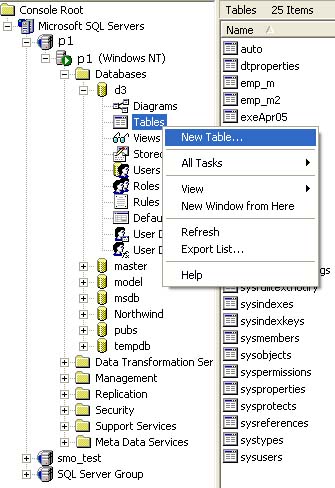


Creating New table using Enterprise Manager
Further readings
Connecting string for MSSQL database in VBScript
Checking if matching record exist inside MSSQL table
Creating New Table using MSSQL Enterprise Manager
Displaying Records of a MSSQL table by looping
Creating Auto Increment Identity field for generating unique record number
Getting the Auto Increment Identity field value for just inserted record

 
Scripts
PHP
JavaScript
All ASP Tutorials
Popular Tutorials
Managing two drop downs
ASP Tutorials
Date and time
Declaring array
Form in ASP
Server.MapPath
Date Time & MSSQL
Select Query
File System Object
Subscribe
Submit your email address and receive article and product notifications. Your email is safe with us.
