Passing Data from Child Window to Parent Window
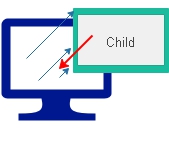
A child window can pass a user-entered value back to the window that opened it through window.opener, provided the opener still exists and same-origin access is allowed.
On this page
Access the opener window Top ↑
The original tutorial used the named form expression below. It still illustrates the object path:
window.opener.document.f1.p_nameModern code is usually clearer with element IDs:
const parentInput = window.opener.document.getElementById("p_name");
parentInput.value = "Any value";Demo: pass data from child to parent Top ↑
demo on passing data from Child to Parent window
Complete source code Top ↑
Parent window source
<!doctype html>
<html lang="en">
<head><meta charset="utf-8"><title>Parent Window</title></head>
<body>
<form name="f1">
  <label>Your Name <input type="text" name="p_name" id="p_name"></label>
  <a href="child3.html" id="openChild">Click here to open the child window</a>
</form>
<script>
document.getElementById("openChild").addEventListener("click", (event) => {
  event.preventDefault();
  window.open("child3.html", "Ratting", "width=550,height=170,left=150,top=200,toolbar=1,status=1");
});
</script>
</body>
</html>
Child window source
<!doctype html>
<html lang="en">
<head><meta charset="utf-8"><title>Child Window</title></head>
<body>
<form name="frm">
  <label>Your name <input type="text" name="c_name" id="c_name" value="test"></label>
  <button type="button" id="sendValue">Submit</button>
</form>
<script>
document.getElementById("sendValue").addEventListener("click", () => {
  if (window.opener && !window.opener.closed) {
    const parentInput = window.opener.document.getElementById("p_name");
    if (parentInput) parentInput.value = document.getElementById("c_name").value;
  }
  window.close();
});
</script>
</body>
</html>
Passing multiple values Top ↑
The original page also shows two values being copied back. That facility remains, with explicit element IDs so the fields are unambiguous.
// Parent page
<input type="text" id="n1" name="p_name">
<input type="text" id="n2" name="p_name2">

// Child page JavaScript
const openerDocument = window.opener?.document;
if (openerDocument) {
  openerDocument.getElementById("n1").value = document.getElementById("c_name").value;
  openerDocument.getElementById("n2").value = document.getElementById("c_name2").value;
}
window.close();
Same-origin requirement and null checks Top ↑
Direct DOM access through window.opener.document requires compatible same-origin pages. Always check that window.opener exists and is not closed. For different origins, use window.postMessage() instead of direct DOM access.
Passing data from Parent to Child Window
Window object Reference Window refreshing Parent window from Child

Subhendu Mohapatra
Author & Instructor at plus2net
I write and maintain practical tutorials on Python, PHP, SQL, JavaScript, HTML, jQuery, and web development at plus2net. The tutorials focus on clear explanations, working examples, and code that readers can test and adapt while learning.


Subscribe to our YouTube Channel here

| Puneet | 29-03-2014 |
| very nice example! Thanks. | |
| Oscar | 17-09-2014 |
| Excellent!!! It works!!! | |
| Anil | 02-04-2015 |
| how can i pass the value from child window if the parent window has the table instead of text box .... | |
| smo | 02-04-2015 |
| I think you are saying passing value to a database table. Here after getting the data in the text box you have to submit the form with new data to store in a database table. You can even directly store then in a table by using JQuery or Ajax. Some more tutorials on this line is going to be added. | |
| saeid | 30-07-2015 |
| thanx man ... you made my day ;) that`s a brilliant example .... | |
| Priank | 06-10-2015 |
| Good Ex. I have situation where in Parent Opens a chil window for Gmail Login. I get email id and then submit it to my application and redirect the parent to the new URL. I am using window.opener.document.location.href for redirection, however limitaion is it supports GET and I want data in POST. Is their a solution/suggestion for me to get around this issue. Thanks beforehand. | |
| smo1234 | 06-10-2015 |
| You can <a href=../html_tutorial/submit-new.php>submit form to a new window</a>. | |
| nidhi singh | 25-07-2016 |
| Parent File name is index.html and child file name is child3.html . i paste the same code but open the pop up window . after submit .nothing happen.what will do? | |
| smo1234 | 26-02-2017 |
| What is the error message you are getting ? Press Ctrl + Shift + J keys ( same time ) to get the JavaScript error window. | |
13-11-2022 | |
| Excellent!!! It works!!! | |