IIS7 configuring to run PHP scripts
Legacy IIS 7 / PHP 5 configuration reference
This page documents an older IIS 7 and PHP 5 workflow. Keep it for historical/reference value, but for current IIS installations use a supported PHP Windows build with FastCGI; IIS normally uses the Non-Thread-Safe build and php-cgi.exe.
php -vLegacy page: The detailed steps below describe older PHP 5 / IIS versions. Keep them for historical systems; do not use them as the default setup for a new server.
https://localhost/https://127.0.0.1/To open IIS admin panel, go to settings > Control Panel > Administrative tools > Internet Information Services
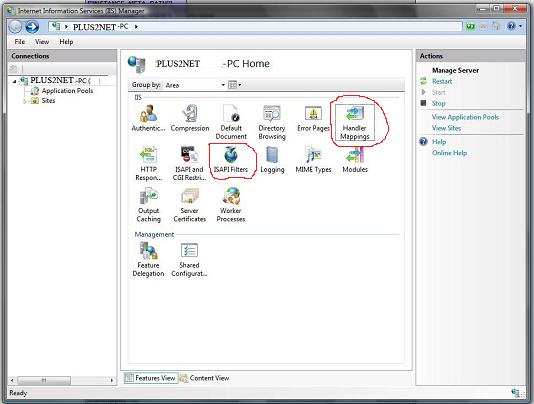
Mapping Handler
Go to Mapping Handler button, you will see all the mappings done so far. In the right side Action area click Add Script Map.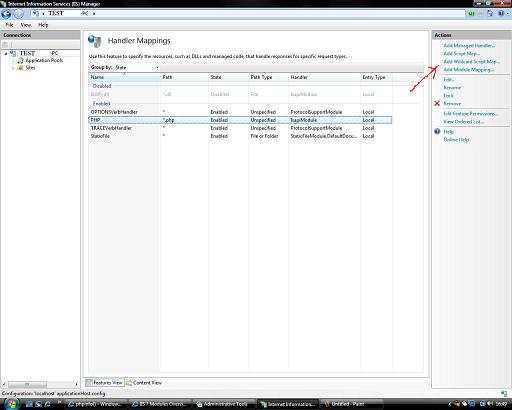
Adding PHP dll to IIS
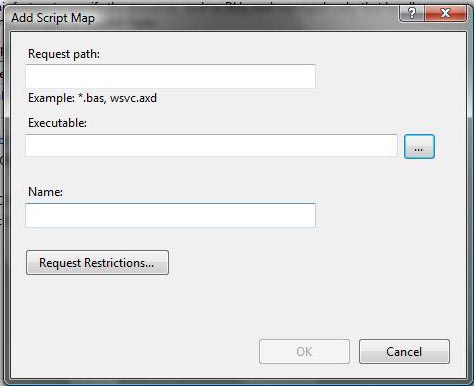
In the request path write *.phpIn the executable browse to your PHP folder upto the file name php5isapi.dll . This is your dll file which IIS will point to execute PHP scripts.
Based on the PHP installed directory your path may vary, here is one example
C:\Program Files\PHP\php5isapi.dll
Now enter PHP as name and click OK.
Adding to Modules List
While adding PHP script to our Script Map in IIS we may face an error message asking Asapi Module must be in our Modules list first. To add this or any other module to our list we must have to go to our Windows features on or off panel.Go like this.
Control Panel > Programs and features > Turn Windows feature on or off A small window will open with all the available features .
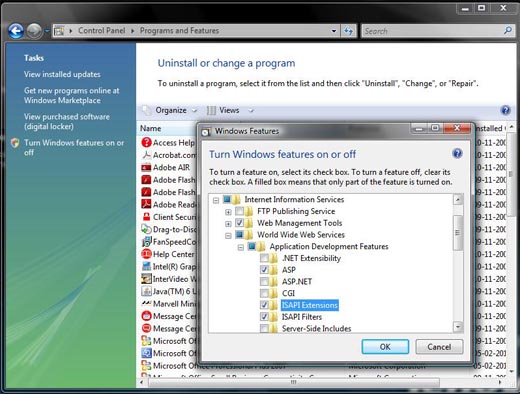
Internet Information Services
World Wide Web Services
Application Development Features
You will be presented with features which you can turn on or off. Check ASAPI Extensions and click OK. With this you have added Asapi module to module list. After this you can again add PHP script by returning to our IIS7 admin panel explained above.
Now to check your PHP installation you can use phpinfo function.
Introduction to PHP Printing numbers using loop in PHP

Subhendu Mohapatra
Author & Instructor at plus2net
I write and maintain practical tutorials on Python, PHP, SQL, JavaScript, HTML, jQuery, and web development at plus2net. The tutorials focus on clear explanations, working examples, and code that readers can test and adapt while learning.
Connect:


Subscribe to our YouTube Channel here
This article is written by plus2net.com team.
https://www.plus2net.com

