Passing variables with data between pages using URL

 There are different ways by which values of variables can be passed between pages. One of the ways is to use the URL to pass the values or data.
Advantage of using URL to pass variables
Here the biggest advantage is we can pass data to a different site even running at different servers. Any scripting language like ASP, JSP, PHP or Perl running at receiving end can process and collect the value from the query string or from the URL.- Easy to save the URL or bookmark it for frequent use.
- Copy the URL and send it to a friend to refer.
Security Concerns: Protecting Data in Transit
Here one main concern is the data gets exposed in address bar of the browser and can be easily accessible by using browser history. So it is not a good idea to pass sensitive data like password,personal information or confidential business data through the URL to different pages or different sites.
Interception:
Attackers can intercept data being passed through URL parameters by using packet sniffing tools or man-in-the-middle attacks. This allows them to access and steal sensitive information.Tampering:
Attackers can also tamper with data being passed through URL parameters by modifying the values before they reach the intended recipient. This can lead to unauthorized access, data manipulation, or even system compromise.Phishing Attacks:
Malicious actors can create phishing websites that use URL parameters to trick users into entering sensitive information, such as passwords or credit card numbers. These attacks can lead to identity theft or financial fraud.
Passing variable with data to different pages
Here is an example of passing data through URL within a site.
<a href='page2.php?id=2489&user=tom'>link to page2</a>echo $_GET['id']; // Output: 2489
echo $_GET['user']; // Output: tomThe address of page2.php can be replaced with any site name and the same data can be passed to another site running in any server. Like this
Passing data outside
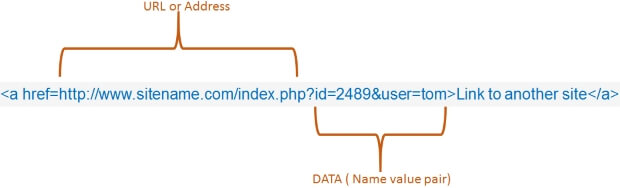
<a href="https://www.sitename.com/index.php?id=2489&user=tom">Link to another site</a>You can see in the above case the values can be posted to another site. Note that after the page name we are using question mark ( ? ) to start the variable data pair and we are separating each variable data pair with one ampersand ( & ) mark.
Submitting form values through GET method
A web form when the method is set to GET method, it submits the values through URL. So we can use one form to generate an URL with variables and data by taking inputs from the users. The form will send the data to a page within the site or outside the site by formatting a query string.<form method="GET" action="https://www.anysite.com/index.php">
Submitting a form through POST method
By post method of form submission we can send more number or length of data. Sensitive information like password does not get exposed in URL by POST method, so our login forms we should use POST method to submit data. This is how we collect data submitted by POST method in PHP$id = $_POST['id'];
$password = $_POST['password'];
Difference between GET and POST
| issues | GET | POST |
|---|---|---|
| Browser History | Data remain in Browser History | Data Not available in Browser History |
| Bookmark | URL with Data can be bookmarked | No data is available in URL to bookmark the page |
| Data Length Restriction | The restriction (of URL ) is applicable | No Restriction |
| cached | Can be cached | No meaningful caching |
| Sensitive Data | Data like password , pin etc. are exposed through URL so they should not be passed using GET method | Better than GET method as data is not exposed through URL |
Collecting data submitted by either GET or POST method
If a page is receiving a data which can come in any one of the method GET or POST then how to collect it ? Here we are not sure how to collect the data. So we will use like this.$id = $_REQUEST['id'];
$password = $_REQUEST['password'];
Every scripting language pages has its own way of receiving the data from the URL
While receiving the data based on the server settings the values will be available to the pages. Here in a server running PHP will have to see the global settings of the server on how to collect the data.$id = $_GET['id'];
$user = $_GET['user'];
Id = Request.QueryString("id")
User = Request.QueryString('user')
Passing data within the site using URL
The same principle is used like above to send the data within the site using URL. A query sting can be formatted with a link or a form can be used with get method to pass variables between pages.Passing the data between the site through URL
Like above data can be passed to different pages of sites using URL . The best use is directly linking to a page dip inside another site by formatting a query sting. Like this<a href="https://www.sitename.com/viewtopic.php?id=5248">Linking to a topic</a>Passing variables through query string
In many applications we need to pass variables through query string. For example we want to display the product details where product ID is to be passed in query string through a variable. The product ID can be collected from a table so we don't know what is the value but we can use the variable which stores the product ID.For example let us say we have collected product id from the product table. Read the tutorial on how to collect data from table. Our link with query string will have something like this.
$pid = $nt['product_id'];
echo "<a href=product-detail.php?product_id=$pid>Product Details</a>";
echo "<a href='product-detail.php?product_id={$nt['product_id']}'>Product Details</a>";Change of data while passing through URL
There is a problem in sending data other than plain text through browser. Empty space and some characters like & if present in the data , will create problem. To maintain the data integrity we have to encode the data before sending them though URL and then decode them again to get back the original data. In PHP encode command is used and in ASP VBScript the command is Server.URLEncode(string)Security issues while posting data through URL
The most common type of security problem in using data from URL is injection attack. We must sanitize the date before using inside our script or generating any query to manage database.Questions
- How do you pass variables from one page to another using the GET method in PHP?
- What is the difference between the GET and POST methods in PHP when it comes to passing variables between pages?
- How do you retrieve the value of a variable passed through the URL using the GET method?
- How do you pass sensitive data securely between pages using the POST method in PHP?
- Can you pass an array of variables between pages using the GET method in PHP? If so, how?
- What are the limitations on the amount of data that can be passed through the URL using the GET method?
- How do you access the values of variables passed through the POST method in PHP?
- Is it possible to pass variables between pages without displaying them in the URL?
- Can you pass variables between pages using sessions or cookies instead of the GET or POST method? If yes, how?
- What are some best practices for handling and sanitizing user input when passing variables between pages?
Declaring variables Cookies to store Information
PHP
Subscribe to our YouTube Channel here
This article is written by plus2net.com team.
https://www.plus2net.com

| ash | 28-07-2009 |
| How to pass a file via URL. Eg a file is uploaded in using doGet() and in doPost it is collected using request.getInputStream() | |
| kashif murtaza | 23-10-2009 |
| thanks for help... it's good for understanding concept of href.. | |
| campsmore | 08-02-2010 |
| Can you use the data variable that was passed in the URL in an "include" statement to display information inside the current page that is related to the data in the variable? | |
| ruby | 14-02-2010 |
| how to data transfer between two members in login concept | |
| BigDave | 27-05-2010 |
| In the first example, what if, instead of sending Tom, I need to send the value of a variable? | |
| ramchan | 23-07-2010 |
| I need a help in PHP of passing a content of search result from one web site to another web site. I am not having any idea about this can u help me sir. | |
| Sashi | 18-08-2010 |
| How can i rethieve the mode/id values into an xsl page of the following url line... http. localhost/updatingXML/tool_Edit.asp?mode=view&id=2 | |
| smo | 22-08-2010 |
| In ASP the get method of collecting data | |
| jessica | 23-08-2010 |
| how can i pass values with a drop down menu which contains a list of manufacturers name.i want the code to display a value of a variable each time a manufacturer name is selected through the drop down | |
| JohnR | 12-10-2010 |
| What PHP code do I use to Post form data to a MYSQL database and at the same time send only some form values to another web page hosted on a different URL.? Thanks! | |
| siva | 13-12-2010 |
| i can understood the $_POST, but how $_GET works , | |
| adi | 11-09-2011 |
| which menthod gets executed when we click on hyperlink? | |
| Power Wong | 25-01-2012 |
| adi, should be $_GET method. For example, the url is: xxxxxx/my_prog.php?my_id=1234 Then inside my_prog.php, you can use $_GET[my_id] to get the 1234 like the below $my_var = $_GET[my_id] | |
| David | 22-03-2012 |
| I have 2 separate php environments which I like to have a pass-through of registration and login built. Any help will greatly be appreciated. | |
| debabrata puthal | 07-04-2012 |
| create a form with 2 fields that is username and password then make the server side validation chec if the fields and blank or not,then compare your username and password with server username,password,if equal display on page valid user or display invalid user. | |
| tripti | 06-06-2012 |
| i need to get how to send an ip address value to ip2location text box to evaluate the location n return it | |
| Jobaiyet | 02-03-2014 |
| How use a php variable in various page??? | |
| Dhivya | 12-09-2014 |
| how to pass a variable in one page to other using get method but that passing variable should not shown in the url i tried more method i donn't know is it possible if it possible meance pls post | |
| Rhys | 23-10-2014 |
| Thank you. =) | |
| Mohammad Ismail | 15-09-2015 |
| i neeed to link first two dropdown boxes and next two dropdown boxes bt they should not be related to each other. . .and also when i perform first one box second box sholud display untill then second box should nt display any info. . plsss help me out | |
02-12-2019 | |
| i need to post data one page to another page. i did post data by using jqueryajax and next page i created session but can't work... how to solve this......... | |
02-03-2020 | |
| hello hii, how can i run html code in url bar for ex. http://website.com/<h1>cotent</h1> this code is not execute | |
04-03-2020 | |
| You can't run html code at URL bar, you can pass them as variable and display them inside the page. | |
28-04-2021 | |
| Thank You so Much! Litteraly, I am newbie and searching for Alternative to HTML Form..... This is too useful | |
28-08-2021 | |
| how i can pass id with post in php please help me | |
