PHP5 in Vista OS for IIS7
Legacy PHP 5 / IIS 7 installation reference
The screenshots and installer steps below describe PHP 5 on IIS 7 and are preserved as historical material. For current IIS, install a supported PHP Windows build and configure it through FastCGI rather than following old PHP 5 installer screens.
php -vLegacy page: The detailed steps below describe older PHP 5 / IIS versions. Keep them for historical systems; do not use them as the default setup for a new server.
It is advisable to run IIS before installing PHP. You can download current version of PHP from php.net/downloads.php page. You can download with installer. For example you can download PHP 5.2.12 installer link. The link may vary depending on the version you are downloading.
Setup Wizard
You can start installing PHP like any other windows installation. You will get the setup wizard which will guide you through installation process.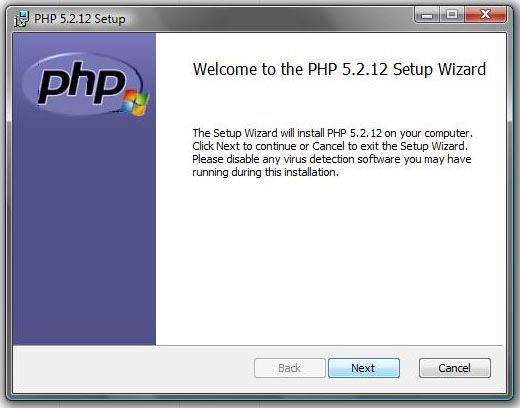
Web Server Setup
On this screen you will be prompted to select the web server you wish to setup. Out of a list to select we have to select IIS ASAPI module.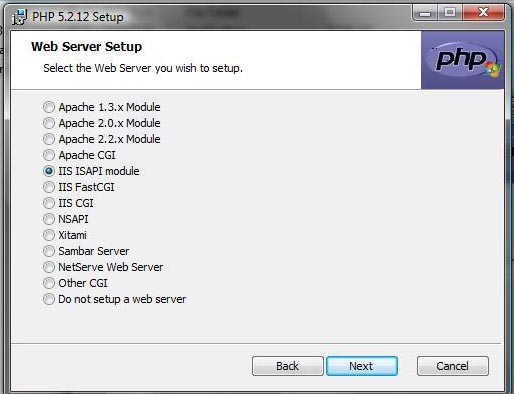
Choose Items to Install
We will be asked to select features which we will be installing. Here you can expand each feature shown in screen shots. If you have a plan to use MySQL then you must install this feature. Similarly GD library supports you need to add if you are going to work in graphics. Based on your requirements you can go ahead and install the features you wish to have.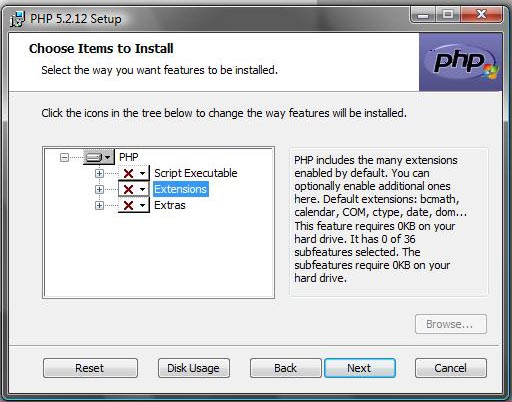
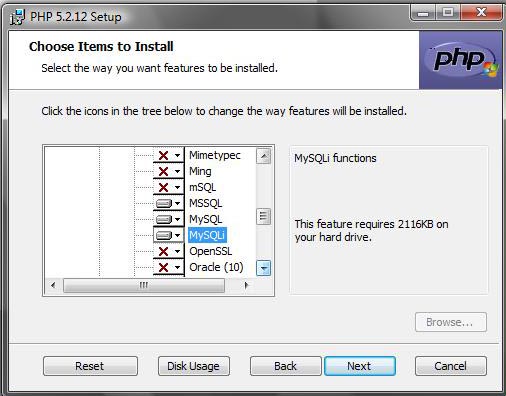
However the installation process has became easy with the windows installer. If this is done properly then you may not have to work with php.ini file to do the manual setup.
Now let us check or configure our IIS the web server to execute our php scripts.
Guide to installation and How to write our first PHP Script

Subhendu Mohapatra
Author & Instructor at plus2net
I write and maintain practical tutorials on Python, PHP, SQL, JavaScript, HTML, jQuery, and web development at plus2net. The tutorials focus on clear explanations, working examples, and code that readers can test and adapt while learning.
Connect:


Subscribe to our YouTube Channel here
This article is written by plus2net.com team.
https://www.plus2net.com

