Installing PHP in IIS on Window platforms
Legacy IIS installation notes
This tutorial is retained for older IIS/PHP installations. For a new IIS setup, use current Windows PHP binaries and FastCGI, then verify the active PHP runtime from the command line or with phpinfo() on a protected development page.
php -vLegacy page: The detailed steps below describe older PHP 5 / IIS versions. Keep them for historical systems; do not use them as the default setup for a new server.
Read on how to set up a website in local computer using IIS
PHP 5 installation process is shown in part II of this tutorial. You can see screen shots of changes required in PHP 5 installation.
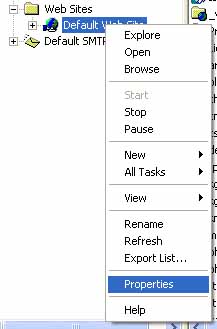 Start>control panel>administrative tools>Internet Information Service
Expand the + buttons on the left side area if any and Right click the label saying default web site. You will get a list of items in the menu and then go to properties section.
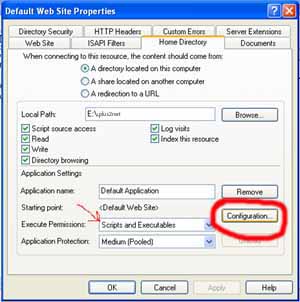 In the property section select go to Home Directory tab ( at the top )
and click the button Configuration. Here we are trying to tell IIS to
execute php.exe script for all file extensions of PHP.
In the property section select go to Home Directory tab ( at the top )
and click the button Configuration. Here we are trying to tell IIS to
execute php.exe script for all file extensions of PHP.
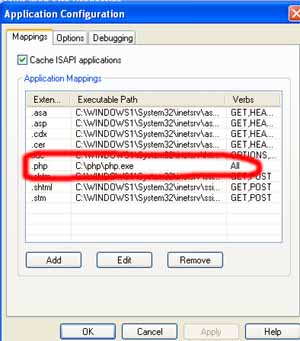
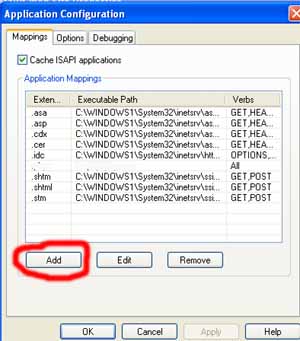 Once we click the configuration button we will get one window with existing file
extension and corresponding executable applications. Here we have to
add our required application to the list so we have to click the Add
button to add our php extension.
Once we click the configuration button we will get one window with existing file
extension and corresponding executable applications. Here we have to
add our required application to the list so we have to click the Add
button to add our php extension.
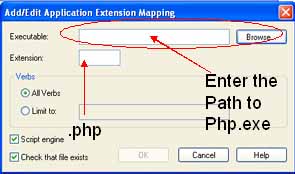 After clicking Add button we will get an window to inter the path and
extension. We can enter the path details by using the browse button.
In the extension field we will enter .php ( dot php ). Click OK and
you will see the executable path added to the list for the .php
extension. Now select the script and executables on the execute
permissions. Click OK and to close the main property window click OK
again. That's all ..
After clicking Add button we will get an window to inter the path and
extension. We can enter the path details by using the browse button.
In the extension field we will enter .php ( dot php ). Click OK and
you will see the executable path added to the list for the .php
extension. Now select the script and executables on the execute
permissions. Click OK and to close the main property window click OK
again. That's all ..
This will configure IIS to run PHP with php file extensions.
Introduction to PHP Collect php.ini settings by using ini_get() Guide to installation and How to write our first PHP Script

Subhendu Mohapatra
Author & Instructor at plus2net
I write and maintain practical tutorials on Python, PHP, SQL, JavaScript, HTML, jQuery, and web development at plus2net. The tutorials focus on clear explanations, working examples, and code that readers can test and adapt while learning.
Connect:


Subscribe to our YouTube Channel here
This article is written by plus2net.com team.
https://www.plus2net.com

| shreyas rane | 26-02-2010 |
| thanks | |
| gajendra | 05-09-2010 |
| I want to know more in detail about web site hosting inside my company domina,Can some on eplease help me? | |
| Gulam shakeel ahmed | 28-05-2013 |
| I do this IIS in my computer and set it up.I feel happy. Thank you. | |
