Java String indexOf(): Locating Character & Substring Positions
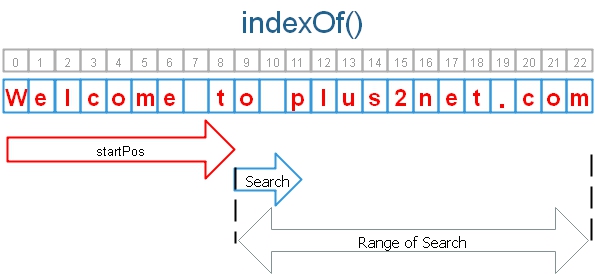
The String.indexOf() method searches a string from left to right and returns the zero-based index of the first occurrence of a specified character or substring, returning -1 if not found.
Forward Searching & Substring Navigation: To search backward from the end of a string, explore lastIndexOf(). To extract characters by index position, see charAt(). For substring slicing, explore substring(). For boolean presence checks, see contains(), or measure length with length().
1. Syntax & The Four Overloaded Signatures 🔝
Java provides four overloads in java.lang.String to support character and substring searches with optional start positions:
 // 4 Overloaded signatures of indexOf() in java.lang.String
public int indexOf(int ch)
public int indexOf(int ch, int fromIndex)
public int indexOf(String str)
public int indexOf(String str, int fromIndex)| Signature | Search Target | Start Offset Behavior |
|---|---|---|
indexOf(int ch) |
Single character (or Unicode code point) | Starts searching from beginning index 0. |
indexOf(int ch, int fromIndex) |
Single character | Starts searching at index fromIndex forward. |
indexOf(String str) |
Substring text sequence | Starts searching from beginning index 0. |
indexOf(String str, int fromIndex) |
Substring text sequence | Starts searching at index fromIndex forward. |
2. Basic Character Search 🔝
When searching for a character, Java scans from index 0 and returns the first matching index. If missing, it returns -1:
String str = "Welcome to plus2net.com";

System.out.println("First 'e': " + str.indexOf('e'));    // 1
System.out.println("First '2': " + str.indexOf('2'));    // 15
System.out.println("Missing 'z': " + str.indexOf('z'));  // -1
Terminal Output:
First 'e': 1
First '2': 15
Missing 'z': -1
3. Character Search with fromIndex Offset 🔝
By supplying a fromIndex parameter, you skip earlier matches to locate repeated occurrences of a character:
String str = "Welcome to plus2net.com";

System.out.println("Search from index 0: " + str.indexOf('e', 0));  // 1
System.out.println("Search from index 2: " + str.indexOf('e', 2));  // 6
System.out.println("Search from index 7: " + str.indexOf('e', 7));  // 19
Terminal Output:
Search from index 0: 1
Search from index 2: 6
Search from index 7: 19
4. Searching for Substring Sequences 🔝
When you pass a String argument, indexOf() locates the starting index of the full substring sequence:
String text = "Welcome to plus2net.com";

System.out.println("Position of 'co':   " + text.indexOf("co"));    // 3 (in 'Welcome')
System.out.println("Position of 'plus': " + text.indexOf("plus"));  // 11
System.out.println("Position of 'java': " + text.indexOf("java"));  // -1
Terminal Output:
Position of 'co':   3
Position of 'plus': 11
Position of 'java': -1
5. Substring Search with fromIndex Offset 🔝
Combining substring search with fromIndex allows stepping over earlier words to find subsequent occurrences:
String text = "Welcome to plus2net.com";

System.out.println("First 'co':             " + text.indexOf("co"));     // 3
System.out.println("'co' starting from 4:   " + text.indexOf("co", 4));  // 20 (in '.com')
System.out.println("'com' starting from 4:  " + text.indexOf("com", 4));  // 20
Terminal Output:
First 'co':             3
'co' starting from 4:   20
'com' starting from 4:  20
6. indexOf() vs. lastIndexOf(): Search Directions 🔝
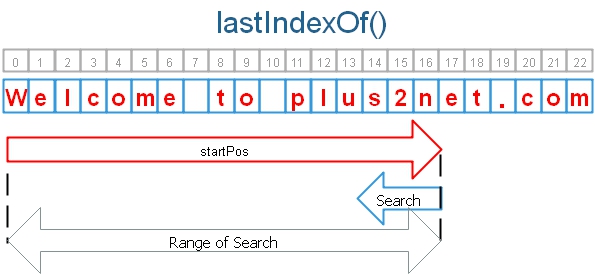
While indexOf() scans left-to-right from the beginning, lastIndexOf() scans right-to-left from the end:
| Feature | str.indexOf(...) |
str.lastIndexOf(...) |
|---|---|---|
| Search Direction | Forward (Left to Right). | Backward (Right to Left). |
| Default Offset | Starts at index 0. |
Starts at str.length() - 1. |
| Returned Position | Index of the first occurrence. | Index of the last occurrence. |
String sentence = "Java is powerful and Java is fast";

 // indexOf() searches from left to right
System.out.println("First 'Java': " + sentence.indexOf("Java"));      // 0

 // lastIndexOf() searches from right to left
System.out.println("Last 'Java':  " + sentence.lastIndexOf("Java"));  // 20
Terminal Output:
First 'Java': 0
Last 'Java':  20
7. Production Recipe: Finding All Match Positions in a Loop 🔝
To locate every occurrence of a word throughout a document, advance fromIndex on each iteration inside a while loop:
String content = "cat bat cat rat cat";
String target = "cat";
int count = 0, index = 0;

while ((index = content.indexOf(target, index)) != -1) {
    System.out.println("Found at index: " + index);
    count++;
    index += target.length();  // Advance past match
}
System.out.println("Total: " + count);
Terminal Output:
Found at index: 0
Found at index: 8
Found at index: 16
Total: 3
8. Practical Recipe: Parsing Email Usernames & Domains 🔝
A classic real-world application of indexOf() is combining delimiter searches with substring() to split structured text:
String email = "support@plus2net.com";
int atIndex = email.indexOf('@');
int dotIndex = email.indexOf('.', atIndex);

if (atIndex != -1 && dotIndex != -1) {
    System.out.println("Username: " + email.substring(0, atIndex));
    System.out.println("Domain:   " + email.substring(atIndex + 1));
}
Terminal Output:
Username: support
Domain:   plus2net.com
9. Common Developer Pitfalls & Traps 🔝
The Index 0 Truthiness Trap
Never write if (str.indexOf("target") > 0). If the match occurs at the very start of the string (index 0), this condition evaluates to false! Always check != -1.
Infinite Loop when fromIndex is Not Incremented
When searching inside a while loop, you must increment the offset past the match: index = pos + target.length(). Re-searching from pos causes an infinite loop on the same match.
10. Complete Compilable Java Program 🔝
You can compile and run this complete verification class locally in any Java development environment:
public class StringIndexOfFullDemo {
    public static void main(String[] args) {
        String data = "user:admin@plus2net.com";

         // 1. Locate delimiter ':'
        int colon = data.indexOf(':');
        if (colon == 4) {
            System.out.println("Check 1 Passed: Colon found at index 4.");
        }

         // 2. Locate '@' starting from colon position
        int atSign = data.indexOf('@', colon);
        if (atSign == 10) {
            System.out.println("Check 2 Passed: At-sign found at index 10.");
        }

         // 3. Confirm missing search returns -1
        int missing = data.indexOf("guest");
        if (missing == -1) {
            System.out.println("Check 3 Passed: Missing term returned -1.");
        }

        System.out.println("All String.indexOf() tests passed successfully!");
    }
}
Terminal Output:
Check 1 Passed: Colon found at index 4.
Check 2 Passed: At-sign found at index 10.
Check 3 Passed: Missing term returned -1.
All String.indexOf() tests passed successfully!
11. Frequently Asked Questions (FAQ) 🔝
What happens if fromIndex is negative?
If fromIndex < 0, Java treats it as 0 and searches the entire string from the beginning without throwing an exception.
What happens if fromIndex exceeds the string length?
If fromIndex >= length(), indexOf() returns -1, except when searching for the empty string "", which returns length().
Is String.indexOf() case-sensitive?
Yes. "hello".indexOf("H") returns -1. To perform a case-insensitive search, normalize both strings with toLowerCase() first.
What does indexOf("") return?
Searching for an empty string "" returns 0 (or fromIndex if specified, up to length()).
Further Reading & Related Tutorials 🔝
- Java String lastIndexOf() Method — Searching backward from right to left.
- Java String charAt() Method — Extracting character at a known index position.
- Java String substring() Method — Slicing and extracting string sections.
- Java String contains() Method — Simple boolean presence testing.
- Java String length() Method — Measuring string character count.
- Java String equals() Method — Exact case-sensitive equality checking.
- Java String Master Index — Complete reference of built-in String methods.
Java

Subhendu Mohapatra
Author & Instructor at plus2net
I write and maintain practical tutorials on Python, PHP, SQL, JavaScript, HTML, jQuery, and web development at plus2net. The tutorials focus on clear explanations, working examples, and code that readers can test and adapt while learning.


