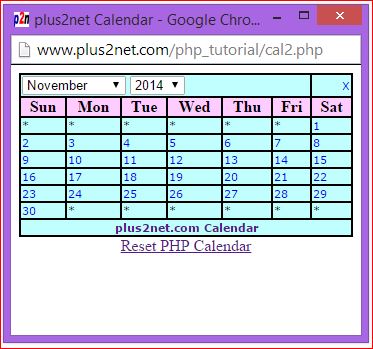
Here is the PHP calendar script to develop your own
calendar like above. To develop this script various PHP date functions are used and
please read PHP date format to know how best to use these function to develop a
PHP calendar script. This code is further developed to generate PHP yearly
calendar and can be a part of and advance PHP script for a event with a calendar
requirement. The script can be used to navigate to any month or year.
You can generate one html calendar for you web site or script if you don't want to use php.
Here is the output and the PHP calendar script.
Click here to open the calendar window(Week starting from Sunday)
Click here to open the calendar window(Week starting from Monday)
How the PHP Calendar script works?
This Script will use php built in functions. This calendar opens in a small window with dropdown listbox to select month and year. We will set the variables to select range of years to appear as option in dropdown listbox. Here they are
$start_year=2000; // Starting year for dropdown list box

$end_year=2020;  // Ending year for dropdown list box
We have two JavaScript functions inside our script. One is used to pass the selected date value from calendar window to main calling page. Other one is used to reload the page by taking selected value from month and year dropdown list box.
Function post_value() receives three parameters , month ,date and year from the calendar cell and posted the same value to parent window. You can read more on passing value to parent window here.
function post_value(mm,dt,yy){

opener.document.f1.p_name.value = mm + "/" + dt + "/" + yy;

/// cheange the above line for different date format

self.close();
}
Function reload(form) collects month and year value from the dropdown list box and using that it prepare the query string. With the query string the page is reloaded.
function reload(form){

var month_val=document.getElementById('month').value; // collect month value

var year_val=document.getElementById('year').value;      // collect year value

self.location='cal2.php?month=' + month_val + '&year=' + year_val ; // reload the page

}
There is a style associated with the page, you can change the style to change the display style of calendar.
We will collect month and year from query string and pass the value to script.
@$month=$_GET['month'];

@$year=$_GET['year'];
Calendar script always requires two variables, one is month and other one is year. If these values are not available (from query string as selected by users) then we will use present month and year as default value.
if(!($month <13 and $month >0)){
$month =date("m");  // Current month as default month
}

if(!($year <=$end_year and $year >=$start_year)){
$year =date("Y");  // Set current year as default year
}
After getting date about year and month we have to find out the number of days present in the month. There is a built in function cal_days_in_month available to get this.
$no_of_days = cal_days_in_month(CAL_GREGORIAN, $month, $year);//calculate number of days in a month
Week day of first day of the month.
We are displaying calendar as a matrix with multiple rows starting from Sunday at left side first column. If our first day of the month starts from Friday then we have to start adding day numbers from 6th cell by leaving blank the first five cells.
$j= date('w',mktime(0,0,0,$month,1,$year)); // This will calculate the week day of the first day of the month
Monday as starting day of the week
This calendar script is developed with starting day of the week as Sunday. To change this to Monday we have to adjust the $j value which holds the weekday value of the first day of the month. The value changes from 0 for Sunday and to 6 for Saturday. We have to add these two lines to make the week began from Monday
$j= date('w',mktime(0,0,0,$month,1,$year)); // This will calculate the week day of the first day of the month
//echo $j;// Sunday=0 , Saturday =6
//// if starting day of the week is Monday then add following two lines ///
$j=$j-1;
if($j<0){$j=6;}  // if it is Sunday //
//// end of if starting day of the week is Monday ////
In addition to this Top row of the table to be changed to display week day name starting from Monday and ending on Sunday.
Inside your zip file ( download at the end of this page ) cal3.php file is included which shows calendar where week starts from Monday
Similarly after last date of the month we have to blank the days left in the calendar matrix. For this we will use php string function str_repeat to multiply the blank cells number of times decided by starting day of the month and ending date of the month.
$adj=str_repeat("<td bgcolor='#ffff00'>* </td>",$j); // Blank starting cells of the calendar
$blank_at_end=42-$j-$no_of_days; // Days left after the last day of the month
if($blank_at_end >= 7){$blank_at_end = $blank_at_end - 7 ;}
$adj2=str_repeat("<td bgcolor='#ffff00'>* </td>",$blank_at_end); // Blank ending cells of the calendar
Here the number 42 ( 7 x 6 ) is the maximum number of cells of the calendar full filling any year - months requirement.
Displaying Month and Year Dropdown list
We will display month selection dropdown list with month name as Text and month number as option. So we will use for loop to display numbers staring from 1 to 12 ( total 12 months ). By using incremental value of variable inside for loop we will display Month name and month number.
In the above code we used createFromFormat function to create date object.
Similarly to display year list we will use for loop. At the staring of the script we asked for two variables to set. Based on these variables $start_year and $end_year we will use for loop to display the year dropdown list.
Both our dropdown lists will use onChange event handler to trigger JavaScript function reload() to refresh the page when ever user changes its selection of month or year.
Displaying the Calendar
With all these information we will display a table having 7 columns. The header cell of the table will have name of the weekdays starting from Sunday as first column at left side.
To display the numbers ( date ) in the calendar cell we will use one for loop. The loop will start from 1 and continue till total number of days present in a month ( variable $no_of_days )
for($i=1;$i<=$no_of_days;$i++){
$pv="'$month'".","."'$i'".","."'$year'";
echo $adj."<td><a href='#' onclick="post_value($pv);">$i</a>"; // This will display the date inside the calendar cell
echo " </td>";
$adj='';
$j ++;
if($j==7){echo "</tr><tr>"; // start a new row
$j=0;}
}
Inside the for loop we will add hyper link to each number ( day ) of the calendar to carry the month , date and year to parent window by using JavaScript function post_value();
$pv="'$month'".","."'$i'".","."'$year'";
echo $adj."<td><a href='#' onclick="post_value($pv);">$i</a>"; // This will display the date inside the calendar cell
Before starting of this loop will display the data stored in $adj to block the blank cells before 1st day of the month. Similarly we will display $adj2 which stores the blank cells after the last date of the month.
Here is the full code to display calendar. You can download the zip file at the end.
<?Php
//// Settings, change this to match your requirment //////
$start_year=2015; // Starting year for dropdown list box
$end_year=2030; // Ending year for dropdown list box
////// end of settings ///////////
?>
<!doctype html public "-//w3c//dtd html 3.2//en">
<html>
<head>
<title>plus2net Calendar</title>
<link rel="canonical" href="https://www.plus2net.com/php_tutorial/cal2.php"/>
<script langauge="javascript">
function post_value(mm,dt,yy){
opener.document.f1.p_name.value = mm + "/" + dt + "/" + yy;
/// cheange the above line for different date format
self.close();
}
function reload(form){
var month_val=document.getElementById('month').value; // collect month value
var year_val=document.getElementById('year').value; // collect year value
self.location='cal2.php?month=' + month_val + '&year=' + year_val ; // reload the page
}
</script>
<style type="text/css">
table.main {
width: 100%;
border: 1px solid black;
background-color: #9dffff;
}
table.main td {
font-family: verdana,arial, helvetica, sans-serif;
font-size: 11px;
}
table.main th {
border-width: 1px 1px 1px 1px;
padding: 0px 0px 0px 0px;
background-color: #ccb4cd;
}
table.main a{TEXT-DECORATION: none;}
table,td{ border: 1px solid #ffffff }
</style>
</head>
<body>
<?Php
@$month=$_GET['month'];
@$year=$_GET['year'];
if(!($month <13 and $month >0)){
$month =date("m"); // Current month as default month
}
if(!($year <=$end_year and $year >=$start_year)){
$year =date("Y"); // Set current year as default year
}
$d= 2; // To Finds today's date
//$no_of_days = date('t',mktime(0,0,0,$month,1,$year)); //This is to calculate number of days in a month
$no_of_days = cal_days_in_month(CAL_GREGORIAN, $month, $year);//calculate number of days in a month
$j= date('w',mktime(0,0,0,$month,1,$year)); // This will calculate the week day of the first day of the month
//echo $j;
$adj=str_repeat("<td bgcolor='#ffff00'>* </td>",$j); // Blank starting cells of the calendar
$blank_at_end=42-$j-$no_of_days; // Days left after the last day of the month
if($blank_at_end >= 7){$blank_at_end = $blank_at_end - 7 ;}
$adj2=str_repeat("<td bgcolor='#ffff00'>* </td>",$blank_at_end); // Blank ending cells of the calendar
/// Starting of top line showing year and month to select ///////////////
echo "<table class='main'><td colspan=6 >
<select name=month value='' onchange="reload(this.form)" id="month">
<option value=''>Select Month</option>";
for($p=1;$p<=12;$p++){

$dateObject   = DateTime::createFromFormat('!m', $p);
$monthName = $dateObject->format('F');
if($month==$p){
echo "<option value=$p selected>$monthName</option>";
}else{
echo "<option value=$p>$monthName</option>";
}
}
echo "</select>
<select name=year value='' onchange="reload(this.form)" id="year">Select Year</option>
";
for($i=$start_year;$i<=$end_year;$i++){
if($year==$i){
echo "<option value='$i' selected>$i</option>";
}else{
echo "<option value='$i'>$i</option>";
}
}
echo "</select>";
echo " </td><td align='center'><a href=# onClick='self.close();'>X</a></td></tr><tr>";
echo "<th>Sun</th><th>Mon</th><th>Tue</th><th>Wed</th><th>Thu</th><th>Fri</th><th>Sat</th></tr><tr>";
////// End of the top line showing name of the days of the week//////////
//////// Starting of the days//////////
for($i=1;$i<=$no_of_days;$i++){
$pv="'$month'".","."'$i'".","."'$year'";
echo $adj."<td><a href='#' onclick="post_value($pv);">$i</a>"; // This will display the date inside the calendar cell
echo " </td>";
$adj='';
$j ++;
if($j==7){echo "</tr><tr>"; // start a new row
$j=0;}
}
echo $adj2; // Blank the balance cell of calendar at the end
echo "<tr><td colspan=7 align=center><a href='https://www.plus2net.com'><b>plus2net.com Calendar</b></a></td></tr>";
echo "</tr></table>";
echo "<center><a href=cal2.php>Reset PHP Calendar</a></center>";
?>
</body>
</html>
This calendar script is used to generate one monthly planner of any month and year where you can enter your events and take a print out of your monthly planner. You can also generate html code of your monthly planner to use in your web pages.
.
This article is written by plus2net.com team.
https://www.plus2net.com
plus2net.com
bryan
02-12-2013
i have a problem with the php file.
when i want to chande the to the next month it only comes back with the php file and not the correct month
Anthony Aniah
22-04-2015
This tutorial is superb. its version in my vernacular.Thus, 1=iken, 2=ife, 3=ikie, 4=inde, 5=idiong, 6=idiong-iken, 7=idiong-ife, 8=idiong-ikie, 9=idiong-inde, 10=liwho. So, how can I make this appear correspondingly on the same calender? Then, katube, ugidi, azule, lifedian, lifembe are the five primitive days in my vernacular against seven days in a week as monday to sunday. How can i make a valid calender out of these variants? I realy need help. Please.
madi
21-12-2016
does the code even work? it just gives me an empty dropdown
smo1234
19-02-2017
Code works fine, new two years added, now you can use yearly calendars for 2017. You can generate any year calendar by changing the year variable.
✖
We use cookies to improve your browsing experience. . Learn more


 .
.
