MS Excel Data exporting to MySQL database
Installing MySQL ODBC Connecter
Download MySQL ODBC connector for windows from MySQL site. Run the installer after downloading. Then in your Windows go to Control Panel > Administrative tools > Data Sources ( ODBC). From the top tabs select File DSN and then click Add.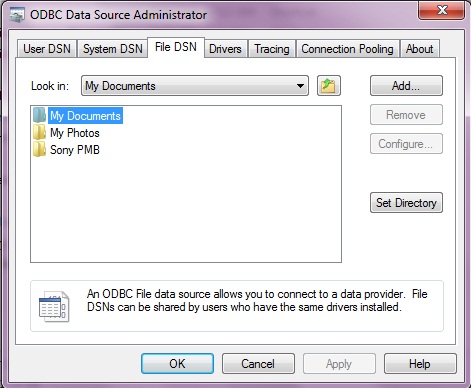
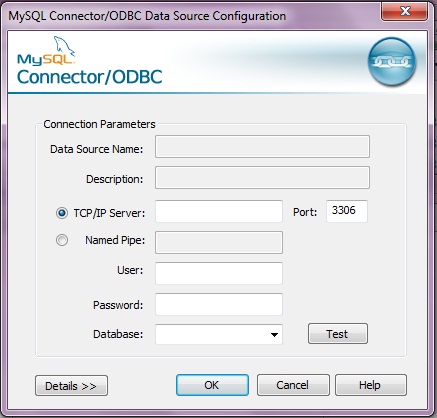
From Create New Data Source dialogue box select MySQL ODBC 5.1 Driver , click Next and you can save the file connection at desire location. Once you click Finish you will be presented with a Dialogue box where Connection Parameters can be stored. After entering the MySQL login ID and password you can select one database from the drop down list. These details can be changed in future while exporting other tables also. There is a Test button to check the connection after entering the details. Obviously you need to keep your MySQL database in running condition.
MS Excel to Access
Open the access table you want to expert , if you want to use one Excel table then first open the excel table in Access. To open Excel table in Access , in Access go to File Open dialogue box, select Excel Workbook or MS Excel in drop down list and then select the excel file you want to open. Then a link Spreadsheet Wizard will appear, in the second tab you can specify if first row is the column head ( field name ) of the table. Finish this wizard and return to main page.MS Access to MySQL database
Now we are ready with our Access table to be exported to MySQL. In Access top tabs go to External Data and then click More and select ODBC Database (Expert selected object to an ODBC database , such as SQL server ), you will be asked to enter a name in a text box. This is going to be the name of the table in our MySQL database once the exporting process is over.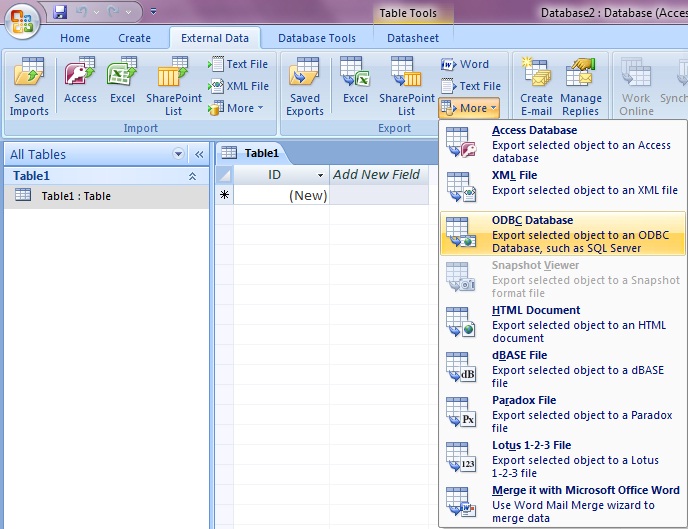
Then Select Data Source box will appear. Select the File Data Source as we have stored previously ( explained above in Installing ODBC connector ). Click OK . You will be presented with the MySQL Connector / ODBC where all details of previously feed will be available. We can change them and select a database from the dropdown list box after adding password for our connection . Finish this step and with this the excel table will be exported to MySQL database. Your field names will be the first column of the excel table ( if selected while copying excel to Access )

Subhendu Mohapatra
Author & Instructor at plus2net
I write and maintain practical tutorials on Python, PHP, SQL, JavaScript, HTML, jQuery, and web development at plus2net. The tutorials focus on clear explanations, working examples, and code that readers can test and adapt while learning.
Connect:


Subscribe to our YouTube Channel here
This article is written by plus2net.com team.
https://www.plus2net.com

29-12-2020 | |
| Really good article well written | |
 SQL Video Tutorials