SQL INNER join query for MySQL
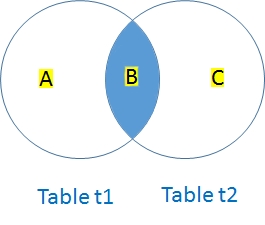 Inner Join will return common records appearing in tables.
 INNER JOIN is also known as JOIN.
Inner Join requires two tables to be joined by linking with ON condition. We can add more condition by using WHERE clause.
Area as per venn diagram B
These two table we will use for our examples
| Table one ( t1 ) | Table two ( t2) | ||||||||||||||||
|
|
Joining tables Using SQL LEFT Join, RIGHT Join and Inner Join
QUERY using Inner Join
The common records between two tables will be returned.SELECT * from t1 INNER JOIN t2 on t1.id=t2.id| id | name1 | id | name2 | |
|---|---|---|---|---|
| 1 | one1 | 1 | one2 | 2 | two1 | 2 | two2 |
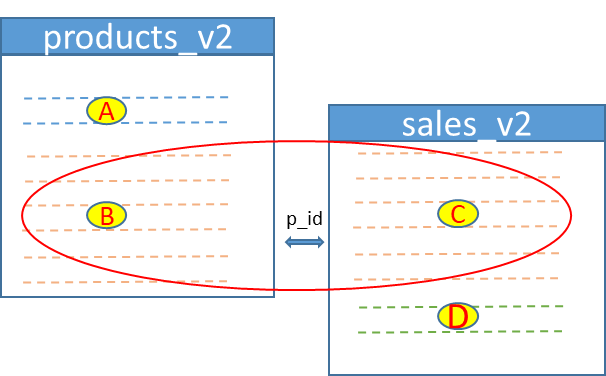
Example : products & sales table
| Area | Description |
|---|---|
| B & C | There are matching values in both tables for p_id column |
| A | These products ( table 1 ) have no matching p_id in sales ( table 2 ) |
| D | These sales (table 2 ) have no matching p_id in products ( table 1 ) |
| Type | Table 1 | Table 2 | Details |
|---|---|---|---|
| LEFT | A + B | C | All from Left ( Table 1 ) and matching from right (Table 2 ) |
| RIGHT | B | C + D | All from Right ( Table 2 ) and matching from left (Table 1 ) |
| INNER | B | C | Matching from Left ( Table 1 ) and right (Table 2 ) |
| CROSS | A + B | C + D | All from Left ( Table 1 ) join to all from right (Table 2 ) |
SELECT * from products_v2 a INNER JOIN sales_v2 b on a.p_id=b.p_id| p_id | product | price | sale_id | c_id | p_id | product | qty | store |
|---|---|---|---|---|---|---|---|---|
| 3 | Monitor | 75 | 1 | 2 | 3 | Monitor | 2 | ABC |
| 4 | CPU | 55 | 2 | 2 | 4 | CPU | 1 | DEF |
| 3 | Monitor | 75 | 3 | 1 | 3 | Monitor | 3 | ABC |
| 2 | RAM | 90 | 4 | 4 | 2 | RAM | 2 | DEF |
| 3 | Monitor | 75 | 5 | 2 | 3 | Monitor | 3 | ABC |
| 3 | Monitor | 75 | 6 | 3 | 3 | Monitor | 2 | DEF |
| 2 | RAM | 90 | 7 | 2 | 2 | RAM | 3 | ABC |
| 2 | RAM | 90 | 8 | 3 | 2 | RAM | 2 | DEF |
| 3 | Monitor | 75 | 9 | 2 | 3 | Monitor | 2 | ABC |
Above list includes only those rows where p_id is matching in both tables.
INNER JOIN using three tables
We will add customers_v2 table along with products_v2 and sales_v2 tableSELECT * from sales_v2 a
INNER JOIN products_v2 b on a.p_id=b.p_id
INNER JOIN customers_v2 c on a.c_id=c.c_id| sale_id | c_id | p_id | product | qty | store | p_id | product | price | c_id | customer |
|---|---|---|---|---|---|---|---|---|---|---|
| 4 | 4 | 2 | RAM | 2 | DEF | 2 | RAM | 90 | 4 | Rani |
| 7 | 2 | 2 | RAM | 3 | ABC | 2 | RAM | 90 | 2 | Raju |
| 8 | 3 | 2 | RAM | 2 | DEF | 2 | RAM | 90 | 3 | Alex |
| 1 | 2 | 3 | Monitor | 2 | ABC | 3 | Monitor | 75 | 2 | Raju |
| 3 | 1 | 3 | Monitor | 3 | ABC | 3 | Monitor | 75 | 1 | Rabi |
| 5 | 2 | 3 | Monitor | 3 | ABC | 3 | Monitor | 75 | 2 | Raju |
| 6 | 3 | 3 | Monitor | 2 | DEF | 3 | Monitor | 75 | 3 | Alex |
| 9 | 2 | 3 | Monitor | 2 | ABC | 3 | Monitor | 75 | 2 | Raju |
| 2 | 2 | 4 | CPU | 1 | DEF | 4 | CPU | 55 | 2 | Raju |
Example: Find out students who have paid fees
We will use inner join to list out students who have paid fees.student6
Student detils
id, name,class,sex ( 5 records)
id, name,class,sex ( 5 records)
student_fee
Payment details
fee id, student id , paid date, amount
fee id, student id , paid date, amount
You can download SQL Dump of these two tables ( with other tables) here.
SELECT a.id, name,class, sex, dt,amount from student6 a
INNER JOIN student_fee b ON a.id=b.id| id | name | class | sex | dt | amount |
|---|---|---|---|---|---|
| 1 | John Deo | Four | female | 2013-01-08 | 200 |
| 1 | John Deo | Four | female | 2013-01-10 | 100 |
| 2 | Max Ruin | Three | male | 2013-01-24 | 120 |
| 3 | Arnold | Three | male | 2013-02-02 | 211 |
| 2 | Max Ruin | Three | male | 2013-02-07 | 150 |
| 3 | Arnold | Three | male | 2013-02-06 | 135 |
| 4 | Krish Star | Four | female | 2013-02-14 | 100 |
Subscribe to our YouTube Channel here
This article is written by plus2net.com team.
https://www.plus2net.com

| sajid | 29-03-2009 |
| this is very easy sum | |
| Lane | 11-06-2009 |
| thank you, this was very helpful. | |
| Niyas | 21-08-2009 |
| Your Website is Very Helpful for programmers like us, The way of giving examples was superb. | |
| lavanya | 27-08-2009 |
| gud website for beginners | |
| Ptarmigan | 11-10-2009 |
| a fave website: love anti-style style: craiglist for webbies | |
| Vinod | 09-11-2009 |
| Thanks a lot, i got the complete idea of Inner join. | |
| Karu | 24-11-2009 |
| How to create Main Table or Inner joint. Please give sql in table level | |
| vimal | 03-02-2010 |
| Thanks i got the complete idea of Inner join. | |
| Zameer | 16-02-2010 |
| Plus2net is one of the best source to learn :) | |
| fei | 02-03-2010 |
| this all tutorial in your web in very helpfull for me. and for beginner programers, thanks | |
| ann | 11-03-2010 |
| thanks..!!gud website for beginners... | |
| Narasimha Varman | 12-04-2010 |
| thank you plus2net. Its very helpful. Examples shown here are live one. | |
| Garrettraj | 16-04-2010 |
| Thanks.....i got the complete idea of Limits.Examples shown here are live one. | |
| jacob | 25-07-2010 |
| thanks a lot its wonderful explanation of inner join ................. | |
| ashoks | 09-10-2010 |
| Thanks i got the complete idea of Inner join. | |
| PJ4YOU | 31-10-2010 |
| This is a brilliant way to explain,But I have a question.What is the difference between INNER and SELF Join? | |
| priyalogasamy | 18-03-2011 |
| i need to select account numbers from 1 table by checking conditions in other 2 tables | |
| surendra | 23-09-2011 |
| Thank you ,i got the full idea about inner join | |
| Prashant Sahu | 24-11-2011 |
| Can you tell me differnce between self join, equi join and inner join? | |
| Vikas Yadav | 15-05-2012 |
| The representation method is superb..Every biggner can understand easily...Very very thanks ...Vikas | |
| Jyodentist | 03-08-2012 |
| Thank you,Good explanation with example. | |
| Subhash Patel | 16-08-2012 |
| its learnt by me easily from here.......nicee.... | |
| Mainuddin Bhuiyan | 31-01-2014 |
| Go ahead...........Don't think ...site is useless I am use this site 3to 5 times in every week. | |
 SQL Video Tutorials