Using Session array to maintain data across the pages
 Array can store more items or data in a single variable but these are not available in different pages for use. Any ordinary ( or normal ) array will loose its data as page execution ends. We have to transfer the array each time the visitor moves away from one page to other. In some applications we need to retain the data as long as the visitor is active at site. Shopping cart is the best example for this. Visitor moves between different pages and adds items to the shopping cart. We have to carry the shopping cart to all the pages along with the visitor. Visitor can add or remove items from the cart from any page.
PHP Session variable creating checking and destroying using session_start() using userid and name
Demo shopping cart using session array
We need a session array to retain the data in different pages. Session arrays are like session variables which maintain a unique link between user's web page and the server. You can read more on session management here.
Let us start with declaring a session array. Before that we have to start the session by adding this line at the top of the page
session_start();$_SESSION[cart]=array();array_push($_SESSION[cart],$prod_id);$_SESSION[cart]=array_diff($_SESSION[cart],$prod_id);Multidimensional Session Array
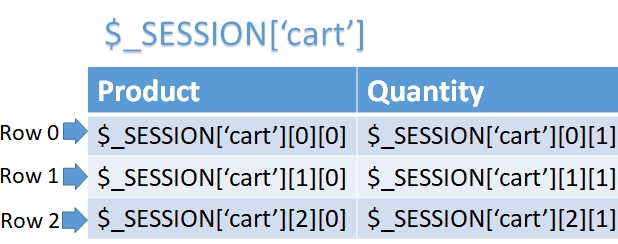
We can use multidimensional array to store more than one attributes of an element. We may require to store a product along with the user selection of quantity ( or colour ) in a session array.
Here is how to create multidimensional session array
$_SESSION['cart']=array(array("product"=>"apple","quantity"=>2),
array("product"=>"Orange","quantity"=>4),
array("product"=>"Banana","quantity"=>5),
array("product"=>"Mango","quantity"=>7),
);
Display elements of the array
$max=sizeof($_SESSION['cart']);
for($i=0; $i<$max; $i++) {

while (list ($key, $val) = each ($_SESSION['cart'][$i])) {
echo "$key -> $val ,";
} // inner array while loop
echo "<br>";
} // outer array for loop
Add element to this array
$b=array("product"=>"$product","quantity"=>$quantity);
array_push($_SESSION['cart'],$b); // Items added to cart
Remove elements to this array
unset($_SESSION['cart'][$val1]);// $val1 is the key of the elementQuestions
- How do you create and initialize a session array in PHP?
- What is the syntax for adding elements to a session array in PHP?
- How do you access and retrieve values from a session array in PHP?
- Can you modify the values of a session array after it has been created?
- How do you check if a specific key exists in a session array?
- What is the process of removing an element from a session array in PHP?
- Can you iterate over the elements of a session array using a loop?
- How do you count the number of elements in a session array?
- What precautions should be taken when using session arrays to ensure data integrity and security?
- How do you destroy or unset a session array in PHP?
ARRAY REFERENCE Shopping Cart using Session Array

Subscribe to our YouTube Channel here
This article is written by plus2net.com team.
https://www.plus2net.com

| restroika | 29-05-2010 |
| How max limit of the Array Session and Array? Where can i test if the one variable is more than the max. limir? Thank. | |
| Mohamed Yousufdeen | 08-08-2014 |
| sir,let me know how to create associative session array and how to manipulate that | |
| ravi | 10-03-2015 |
| $_SESSION is it self array or we have to make it array | |
| smo | 13-03-2015 |
| Yes , you can loop through and display all elements of the session array check the last part. | |
| uday kiran | 11-04-2016 |
| if i m writing array_push($_SESSION[cart],$prod_id); in this manner the second pushed element is overwriting the first element | |
| smo1234 | 11-04-2016 |
| No that can never happen, array_push($_SESSION['cart'],'AAA','BBB','CCC'); array_push($_SESSION['cart'],'Orange'); Second line ads fourth element to the array of cart, it is not removing any item. | |
| frank | 20-04-2016 |
| uday kiran is right, though it is not actually overwriting. Every time the array is declared, a new empty array is created, so array_push() is in fact pushing the first $prod_id to that empty array. This can be avoid by declaring the array only if it was not already set: if(!isset($_SESSION[cart])) $_SESSION[cart]=array(); | |
| smo1234 | 09-05-2016 |
| No that is not correct. To make it clear one more page cart-add.php is added to the script.
This page shows one input box and user can enter product through this to the cart. This will not overwrite any previously stored elements in the cart. It is adding a new one. This explanation is added in demo script also. You can download a fresh copy of the script and check. Note that we are declaring the array only once, in cart.php page. This is not to be declared in any other page. If you want to destroy this cart then you can use unset($_SESSION['cart']); Check the demo page. | |
| Chan | 28-11-2018 |
| Could you help to do it with the codeigniter? | |
