SQL PHP HTML ASP JavaScript articles and free scripts to download
HOME
PhotoShop Tutorial
Gradient Tool
Marquee Tool
Site Map
ASP Tutorial
JavaScript Tutorial
SQL Tutorial
PHP Tutorial
HTML Tutorial
Articles
Knowledge Management
Page Rank Check
Contact Us
Subscribe
Submit your email address and receive article and product notifications. Your email is safe with us.


Measure tool to know the length of an area or image

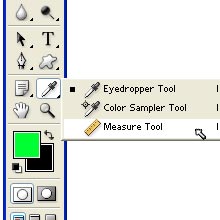
Measure Tool is just below the shape tools and beside the pen tool.With the help of Measure Tool we can calculate the distance between any two points in the work area.When we measure from one point to another. we can see a nonprinting line and options bar and information palette in which we can see starting X-location, Y-location,

horizontal and vertical distances travelled from x and y axis, total distance travelled. This is the Measure Tool.Just go onto this tool and click on it to select it. measure tool
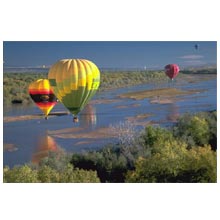
For example, we have imported this image.We want to measure its length. example of image for measure tool
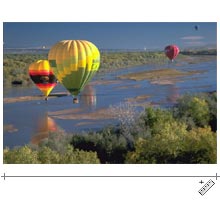
Now Select the measure tool and drag from starting point to ending point like this.We can see all its informaton in the options bar. example of use of measure tool



Water Mark Image  | Gradient Tool  | Marquee tool  | Crop tool  | Move tool  | Magic tool  | Lasso tool  | Anchor Point tool  | Clone Stamp Tool  | Color Sampler Tool  | Custom shape tool  | Ellipse Tool  | Eye Dropper Tool  | Hand Tool  | Measure Tool  | Pen Tool  | Polygon Tool  | Rectangle Tool  | Rounded Rectangle Tool  | Zoom Tool  | Convert Point Tool  | Free form pen tool  | Delete Anchor point Tool  | Making an EyeBall  | Creating a 3DBall  | Removing Background of an Image  | Creating a Glassy Button  | Creating Impression Effect

Subscribe
Submit your email address and receive article and product notifications. Your email is safe with us.

Scripts
PHP
JavaScript