MySQL SQRT() Function: Calculate a square root
SQRT() returns the nonnegative square root of a number. It can also be combined with POW() to compute lengths.
SQRT(): Quick SQL Example
Run this SELECT query directly in MySQL or phpMyAdmin. It uses fixed inputs so you can verify the result without creating a table.
SELECT SQRT(81) AS root_value;| root_value |
|---|
| 9 |
On this page — Show page sectionsHide page sections
More SQL Examples and Explanations
SELECT SQRT(16); -- 4
SELECT SQRT(20); -- 4.47213595499958SELECT SQRT(-25); -- NULLExample of sqrt function with update query
We know how to find out hypotenuse of a right angle triangle.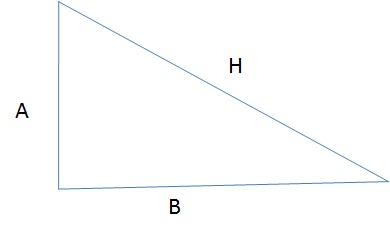
H² = A² + B²
H = √(A² + B²)Here it is
UPDATE sql_sqrt
SET H = SQRT(POW(A, 2) + POW(B, 2));require 'config.php'; // Database connection
$query = 'UPDATE sql_sqrt SET H = SQRT(POW(A, 2) + POW(B, 2))';
$stmt = $dbo->prepare($query);
$stmt->execute();
echo 'Successfully updated H';Download SQL dump file of this table
How to Interpret the Result
SQRT() returns NULL for a negative argument. Existing table-update examples should be tested on sample data first.
Common Question
What happens with SQRT(-25)?
MySQL returns NULL because a negative real number has no real square root.
UPDATE caution: Run the sample table update only against disposable test data after reviewing affected rows.
Related: EXP()
More related tutorials: All math functions, STDDEV(), AVG()

Subhendu Mohapatra
Author & Instructor at plus2net
I write and maintain practical tutorials on Python, PHP, SQL, JavaScript, HTML, jQuery, and web development at plus2net. The tutorials focus on clear explanations, working examples, and code that readers can test and adapt while learning.


Subscribe to our YouTube Channel here

 SQL Video Tutorials