Database, Tables and Records
A relational database stores related information in tables. A table has named columns that define the structure and rows (records) that hold the data.
A table, a row and a SELECT query
For a concrete example, suppose a student table has the columns id, name, class and mark. Each student occupies a separate row. Use this query after creating and populating the table:
SELECT id, name, class, mark
FROM student
ORDER BY id
LIMIT 3;
Illustrative output (your rows depend on what you inserted)
| id | name | class | mark |
|---|---|---|---|
| 1 | Alex | Four | 78 |
| 2 | Maria | Five | 82 |
| 3 | Ravi | Four | 76 |
The SELECT list chooses columns; FROM specifies the table; ORDER BY controls the order; and LIMIT restricts the result. The CREATE TABLE, INSERT and SELECT lessons show the next steps.
On this page — Show page sections
Table and record
A table combines a defined structure with records. For example, an employee table can store one row per employee and columns such as employee ID, name, department and joining date.
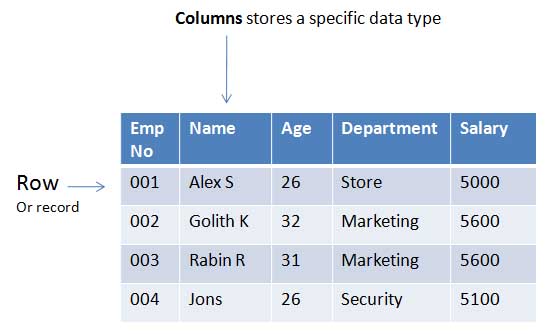
Database
A database groups related tables. A student-management database may contain separate student, marks and fee-payment tables that are linked by keys.

Users and privileges
Database accounts should receive only the privileges they need. For example, an HR application can be allowed to read or update HR tables without receiving access to unrelated marketing data.
Why use a database?
Compared with manually maintained files, a database provides structured storage, controlled concurrent access, querying, constraints, indexing, backup options and centralized authorization.
Column, record and primary key: differences
| Term | Example | Purpose |
|---|---|---|
| Table | student | Groups records that describe the same kind of thing |
| Column / field | mark | Defines one attribute and its data type |
| Row / record | 1, Alex, Four, 78 | Stores one student's values |
| Primary key | id | Uniquely identifies each row |
From a new database to a result
When learning with a local MySQL database, work in this order: select a test database, create the student table, insert a few rows, then retrieve the values. Avoid running DROP TABLE or destructive SQL on a live database.
Common beginner questions
Is a record different from a row?
For an ordinary relational table, these terms usually refer to the same thing: one set of column values.
Do rows come back in the order they were inserted?
Not reliably. SQL queries do not promise an order unless you specify ORDER BY.

Subhendu Mohapatra
Author & Instructor at plus2net
I write and maintain practical tutorials on Python, PHP, SQL, JavaScript, HTML, jQuery, and web development at plus2net. The tutorials focus on clear explanations, working examples, and code that readers can test and adapt while learning.


Subscribe to our YouTube Channel here

 SQL Video Tutorials