DatePicker Widget using ipywidgets in Google Colab for SQLite query
The
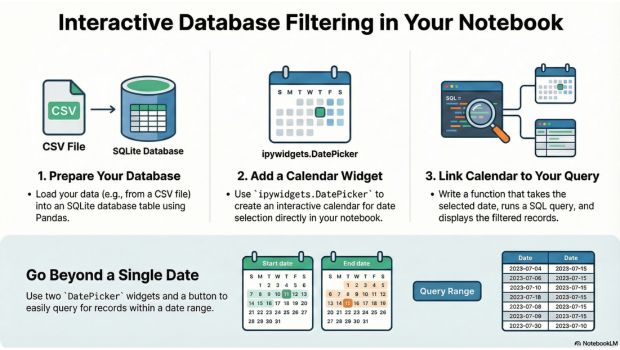
DatePicker widget in ipywidgets provides a calendar-based input element in Google Colab and Jupyter notebooks. It's ideal for user interaction where a date is required — such as filtering reports, scheduling, or data analysis.
---
Example: Using DatePicker in Google Colab
When run inside Colab, this widget shows an inline calendar. The user can select a date, and its value will be displayed.import ipywidgets as widgets
from IPython.display import display, clear_output
dp = widgets.DatePicker(
description='Pick a Date',
disabled=False
)
output_date_picker = widgets.Output()
def on_date_change(change):
with output_date_picker:
clear_output()
if change['name'] == 'value' and change['new'] is not None:
print("Selected Date: ", change['new'])
dp.observe(on_date_change, names='value')
display(dp, output_date_picker)
Using DatePicker in ipywidgets to Filter Data in Python (Google Colab Demo)
Downlaod Data in CSV file
From the URL we are getting the csv file and storing the same in Colab run-time.!wget -O dt_table.csv https://www.plus2net.com/sql_tutorial/dt_table.php- Downloads a CSV file named dt_table.csv from the URL.
- -O tells wget to save it with the specified filename.
Creating Pandas DataFrame
import pandas as pd
df=pd.read_csv('dt_table.csv')  # use your system path if different
print(df.head())- Loads the CSV file dt_table.csv into a DataFrame by using read_csv().
- Displays the first 5 rows for preview.
Create SQLite database using the DataFrame
import sqlite3

# Name of the table within the SQLite database
table_name = 'dt_table'

# Create an SQLite database connection
my_conn = sqlite3.connect('my_db.db')

# Write the DataFrame to an SQLite table
df.to_sql(table_name, my_conn, if_exists='replace', index=False)

# Close the connection
my_conn.close()
What this code does:
- Imports the
sqlite3module to interact with an SQLite database. - Creates a database file named
my_db.db(or connects to it if it exists). - Uses the
dfDataFrame (previously created from a CSV) and writes it to a table nameddt_tableinside the database. - If the table already exists, it will be replaced.
- Closes the database connection after writing the data.
Get 5 records from SQLite Database
To test the creation of database with data , this sample code will display 5 records from our table.import sqlite3
my_path='my_db.db' # Change the path of your database
try:
my_conn = sqlite3.connect(my_path) # connect to the database
except sqlite3.Error as my_error:
print("error: ",my_error)
else:
print("Connected to database successfully")
try:
query="SELECT * FROM dt_table LIMIT 0,5" # SQL to get first 5 rows
r_set=my_conn.execute(query) # execute the query
for row in r_set:
print(row) # Print each row
except sqlite3.Error as my_error:
print("error: ",my_error)What this code does:
- Attempts to connect to an SQLite database file named
my_db.db. - If the connection is successful, a message is printed.
- Executes a SQL query to retrieve the first 5 records from the
dt_tabletable. - Each row fetched from the query result is printed to the output.
- Any errors (during connection or execution) are caught and displayed using exception handling.
Get the record of current date ( today )
try:
    query="SELECT * FROM dt_table WHERE `date`=date('now')" # select rows where date is today
    r_set = my_conn.execute(query)  # execute the query
    for row in r_set:
        print(row)    # print each matching row
except sqlite3.Error as my_error:
    print("error: ", my_error)
What this code does:
- Queries the
dt_tableto retrieve records where the value in thedatecolumn matches today’s date using SQLite’s built-indate('now')function. - Executes the SQL query and iterates over the result set.
- Prints each matching row to the output.
- Handles and displays any SQLite errors that occur during execution.
Integrating Datepicker for selection of Date
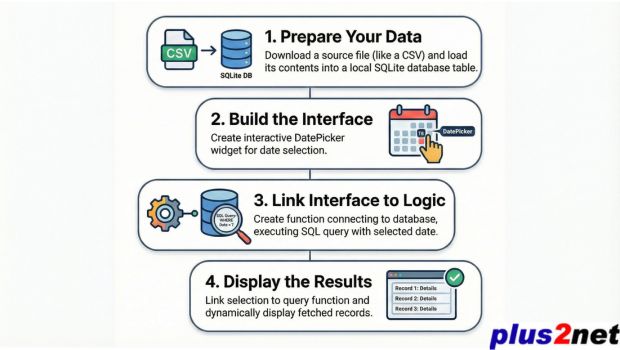
import ipywidgets as widgets
from IPython.display import display
import sqlite3
from datetime import datetime
What this code does:
ipywidgets: Used to create interactive widgets in Jupyter or Colab notebooks.display: Enables rendering widgets and outputs inline in notebook cells.sqlite3: Python's built-in module to work with SQLite databases.datetime: Imports the current date and time functionality, useful for timestamp-based filtering.
Path the Database.
This line sets the file path to your SQLite database named my_db.db.my_path = 'my_db.db'Function to get data from Single selection of data
def get_records_by_single_date(date_str):
    my_conn = None
    try:
        my_conn = sqlite3.connect('my_db.db')
        cursor = my_conn.cursor()
        query = "SELECT * FROM dt_table WHERE date = ?"
        cursor.execute(query, (date_str,))
        records = cursor.fetchall()

        if records:
            print(f"Records for date {date_str}:")
            for row in records:
                print(row)
        else:
            print(f"No records found for date {date_str}.")

    except sqlite3.Error as my_error:
        print(f"Database error: {my_error}")
    finally:
        if my_conn:
            my_conn.close()
print("Database connection closed.")-
Step 1: Define the function
get_records_by_single_date(date_str)to accept a date string as input. -
Step 2: Initialize the database connection variable
my_conntoNone. -
Step 3: Use
sqlite3.connect()to connect to the database file'my_db.db'. -
Step 4: Create a cursor object using
my_conn.cursor()to execute SQL queries. -
Step 5: Define a parameterized SQL query to fetch records from the table
dt_tablewhere thedatematches the given value. -
Step 6: Execute the query using
cursor.execute()and pass the date value as a parameter. -
Step 7: Fetch all matching records using
fetchall(). - Step 8: If records are found, print them using a loop; otherwise, display a message indicating no records were found.
-
Step 9: Handle any database errors using
exceptblock and display the error message. -
Step 10: Use
finallyblock to ensure the database connection is closed, whether an error occurred or not.
To display the datepicker ( single )
single_date_picker = widgets.DatePicker(
    description='Select Date',
    disabled=False,
    value=datetime.now().date()
)

output_single_date = widgets.Output()

def on_date_change_single(change):
    with output_single_date:
        output_single_date.clear_output()
        if change['name'] == 'value' and change['new'] is not None:
            selected_date = change['new'].strftime('%Y-%m-%d')
            get_records_by_single_date(selected_date)

single_date_picker.observe(on_date_change_single, names='value')

display(single_date_picker, output_single_date)
Records from a range of date ( two datepickers )
Function to get data from a range of dates.def get_records_by_date_range(start_date_str, end_date_str):
my_conn = None
try:
my_conn = sqlite3.connect('my_db.db')
cursor = my_conn.cursor()
query = "SELECT * FROM dt_table WHERE date BETWEEN ? AND ?"
cursor.execute(query, (start_date_str, end_date_str))
records = cursor.fetchall()
if records:
print(f"Records from {start_date_str} to {end_date_str}:")
for row in records:
print(row)
else:
print(f"No records found between {start_date_str} and {end_date_str}.")
except sqlite3.Error as my_error:
print(f"Database error: {my_error}")
finally:
if my_conn:
my_conn.close()
print("Database connection closed.")start_date_picker = widgets.DatePicker(
description='Start Date',
disabled=False,
value=datetime.now().date()
)
end_date_picker = widgets.DatePicker(
description='End Date',
disabled=False,
value=datetime.now().date()
)
query_button = widgets.Button(description="Query Records")
output_date_range = widgets.Output()
def on_button_click(b):
with output_date_range:
output_date_range.clear_output()
start_date = start_date_picker.value
end_date = end_date_picker.value
if start_date and end_date:
get_records_by_date_range(start_date.strftime('%Y-%m-%d'), end_date.strftime('%Y-%m-%d'))
else:
print("Please select both start and end dates.")
query_button.on_click(on_button_click)
display(start_date_picker, end_date_picker, query_button, output_date_range)
What this code does:
This script creates an interactive date range filter using
This script creates an interactive date range filter using
ipywidgets.DatePicker in Google Colab or Jupyter Notebook.
- Two date pickers are used for selecting start and end dates.
- A button triggers the query logic.
- When clicked, the button runs a function to fetch records from a database within the selected date range using the
get_records_by_date_range()function. - The output is displayed dynamically using an
Outputwidget.
Download the above full source code from Github or run the code in your Google colab platform.
Datepicker for Database query
https://github.com/plus2net/Python-basics/blob/main/Date_time_1b.ipynb
Datepicker for Database query
https://github.com/plus2net/Python-basics/blob/main/Date_time_1b.ipynb
Tip: You can use the selected date in downstream logic — such as filtering pandas DataFrames, labeling outputs, or storing metadata about user input.
Back to ipywidgets main page ⟵ Colab Overview ➜

Subhendu Mohapatra
Author & Instructor at plus2net
I write and maintain practical tutorials on Python, PHP, SQL, JavaScript, HTML, jQuery, and web development at plus2net. The tutorials focus on clear explanations, working examples, and code that readers can test and adapt while learning.
Connect:


Subscribe to our YouTube Channel here
This article is written by plus2net.com team.
https://www.plus2net.com

 Python Video Tutorials