NumPy append(): Add Values, Rows and Columns
np.append() returns a new array with values added at the end. Use axis=0 to add rows and axis=1 to add columns in a 2D table. If axis is omitted, both inputs are flattened into a 1D result.
| Parameter | Meaning |
|---|---|
arr | Original array or array-like input; unchanged by the operation |
values | Values to add; with an axis, rank and non-join dimensions must match |
axis=None | Default flattens both inputs; an integer preserves other dimensions |
Append One Value without Changing the Original
Call np.append() and keep its returned array. NumPy append allocates a new array; it does not extend the source in place. A scalar can be appended to a 1D array when axis is omitted.
import numpy as np

def sample_array():
    return np.array([[0, 1, 2, 4], [3, 4, 5, 6], [6, 7, 8, 9]])

def expect_value_error(label, operation):
    try:
        operation()
    except ValueError:
        print(label + ': ValueError')
    else:
        raise AssertionError('Expected ValueError')

npr = np.array([5, 8, 3])
npr1 = np.append(npr, 10)
print("Original:", npr)
print("Returned:", npr1)
assert npr.size == 3 and npr1.size == 4
assert not np.shares_memory(npr, npr1)
Expected output
Original: [5 8 3]
Returned: [ 5  8  3 10]
Append Several Values
Pass a list or array for several new values. Unlike Python list.append, NumPy append returns a new array. A NumPy ndarray has no list-style append method.
a = np.array([5, 8, 3])
result = np.append(a, [10, 11, 12])
print(result)
np.testing.assert_array_equal(result, [5, 8, 3, 10, 11, 12])
items = [5, 8, 3]
returned = items.append(10)
print("Python list:", items, "return value:", returned)
assert returned is None
Expected output
[ 5  8  3 10 11 12]
Python list: [5, 8, 3, 10] return value: None
Append a Row with axis=0
For a 2D table, axis=0 adds rows. Both inputs must be 2D and have the same column count; their row counts can differ. See shape and axis meanings.
npr = sample_array()
new_row = np.array([[10, 11, 12, 13]])
result = np.append(npr, new_row, axis=0)
print("Original dimensions:", npr.ndim, "shape:", npr.shape)
print(result)
assert result.shape == (4, 4)
np.testing.assert_array_equal(result[-1], [10, 11, 12, 13])
Expected output
Original dimensions: 2 shape: (3, 4)
[[ 0  1  2  4]
 [ 3  4  5  6]
 [ 6  7  8  9]
 [10 11 12 13]]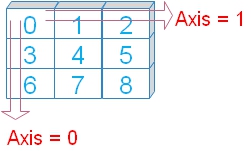
Fix a One-Dimensional Row before Appending
A row shaped (4,) has a different rank from a (3, 4) array. Add a leading singleton dimension to make (1, 4). This is a shape requirement, not automatic arithmetic broadcasting. Read shape errors.
a = sample_array()
row = np.array([10, 11, 12, 13])
expect_value_error('Different ranks', lambda: np.append(a, row, axis=0))
fixed = np.append(a, row[None, :], axis=0)
print("Added row shape:", row[None, :].shape)
print("Result shape:", fixed.shape)
assert fixed.shape == (4, 4)
Expected output
Different ranks: ValueError
Added row shape: (1, 4)
Result shape: (4, 4)
Append Blocks along Either Axis
The join-axis size may differ; all other dimensions must match. These original sample blocks share shape (3, 4), so they can be joined vertically or horizontally.
a = sample_array()
b = np.array([[10, 11, 12, 13], [21, 22, 23, 24], [31, 32, 34, 35]])
vertical = np.append(a, b, axis=0)
horizontal = np.append(a, b, axis=1)
print("axis=0:")
print(vertical)
print("axis=1:")
print(horizontal)
assert vertical.shape == (6, 4) and horizontal.shape == (3, 8)
np.testing.assert_array_equal(horizontal[:, 4:], b)
Expected output
axis=0:
[[ 0  1  2  4]
 [ 3  4  5  6]
 [ 6  7  8  9]
 [10 11 12 13]
 [21 22 23 24]
 [31 32 34 35]]
axis=1:
[[ 0  1  2  4 10 11 12 13]
 [ 3  4  5  6 21 22 23 24]
 [ 6  7  8  9 31 32 34 35]]
Add One or Two Columns per Row
For axis=1, match the row count. A column vector is shaped (rows, 1); two new columns are shaped (rows, 2). Choose the shape that reflects the meaning of the values.
a = sample_array()
one_column = np.array([[10], [11], [12]])
two_columns = np.array([[10, 5], [11, 6], [12, 7]])
one = np.append(a, one_column, axis=1)
two = np.append(a, two_columns, axis=1)
print("One column:")
print(one)
print("Two columns:")
print(two)
assert one.shape == (3, 5) and two.shape == (3, 6)
Expected output
One column:
[[ 0  1  2  4 10]
 [ 3  4  5  6 11]
 [ 6  7  8  9 12]]
Two columns:
[[ 0  1  2  4 10  5]
 [ 3  4  5  6 11  6]
 [ 6  7  8  9 12  7]]
Reshape Incoming Values only When Their Order Is Known
Reshape a flat block into the intended row layout when the element count and ordering are known. A compatible shape does not prove that columns have the correct meanings. See reshape().
a = sample_array()
flat = np.array([10, 11, 12, 13, 21, 22, 23, 24, 31, 32, 34, 35])
block = flat.reshape(a.shape)
result = np.append(a, block, axis=1)
print(result)
np.testing.assert_array_equal(result[1, 4:], [21, 22, 23, 24])
Expected output
[[ 0  1  2  4 10 11 12 13]
 [ 3  4  5  6 21 22 23 24]
 [ 6  7  8  9 31 32 34 35]]
Omitting axis Flattens Both Inputs
axis=None is the default. A 2D input becomes a 1D result, even if the other input has a different shape. Use an explicit axis when you want to preserve rows and columns.
a = sample_array()
b = np.array([[10, 11], [12, 13]])
result = np.append(a, b)
print(result)
print("Result shape:", result.shape)
assert result.shape == (16,)
np.testing.assert_array_equal(result, np.concatenate([a.ravel(), b.ravel()]))
Expected output
[ 0  1  2  4  3  4  5  6  6  7  8  9 10 11 12 13]
Result shape: (16,)
Non-Join Dimensions Must Match
append does not stretch an input across rows or columns. To add one value per existing row, supply the values explicitly as a column. Do not repeat values merely to hide an error unless repetition is the intended operation.
a = sample_array()
bad_row = np.array([[10, 11, 12]])
bad_column = np.array([[10], [11]])
expect_value_error('Wrong column count', lambda: np.append(a, bad_row, axis=0))
expect_value_error('Wrong row count', lambda: np.append(a, bad_column, axis=1))
print("Valid column join:", np.append(a, [[10], [11], [12]], axis=1).shape)
Expected output
Wrong column count: ValueError
Wrong row count: ValueError
Valid column join: (3, 5)
Appending Can Change dtype
NumPy chooses a common dtype for the combined values. Appending fractional values to an integer array can produce floats; appending text can produce a text array. Inspect dtype before arithmetic and preserve identifiers as text when needed. See data types.
a = np.array([1, 2, 3], dtype=np.int32)
numeric = np.append(a, [4.5])
text = np.append(a, ['unknown'])
print("Numeric:", numeric, numeric.dtype)
print("Text:", text, "kind:", text.dtype.kind)
assert numeric.dtype.kind == 'f'
assert text.dtype.kind == 'U'
assert a.dtype == np.dtype(np.int32)
Expected output
Numeric: [1.  2.  3.  4.5] float64
Text: ['1' '2' '3' 'unknown'] kind: U
Empty Values Can Still Change dtype
An empty Python list becomes a float64 array during conversion. Appending it to an integer input may change the output dtype despite adding no elements. Construct a typed empty array to preserve the intended type.
a = np.array([1, 2], dtype=np.int32)
untyped = np.append(a, [])
typed = np.append(a, np.array([], dtype=a.dtype))
print("Untyped empty:", untyped, untyped.dtype)
print("Typed empty:", typed, typed.dtype)
assert untyped.dtype == np.dtype(np.float64)
assert typed.dtype == a.dtype
Expected output
Untyped empty: [1. 2.] float64
Typed empty: [1 2] int32
An Empty Table Still Needs Its Column Shape
Initialize an empty 2D table with shape (0, columns), not (0,). This preserves the rank needed for an axis=0 join. Use the same dtype as the incoming rows.
empty = np.empty((0, 3), dtype=np.int32)
rows = np.array([[2, 3, 1], [0, 4, 2]], dtype=np.int32)
result = np.append(empty, rows, axis=0)
print("Empty / result shapes:", empty.shape, result.shape)
print(result)
np.testing.assert_array_equal(result, rows)
Expected output
Empty / result shapes: (0, 3) (2, 3)
[[2 3 1]
 [0 4 2]]
For Many Batches, Collect and Concatenate Once
Repeated append calls allocate and copy the growing array each time. For many equal-sized additions, the total copied work can grow quadratically. Keep incoming blocks in a Python list, then concatenate once. If the final size is known, preallocate and fill slices instead. No timing claim is needed to understand the allocation pattern.
blocks = [np.full((2, 3), i, dtype=np.int32) for i in range(3)]
combined = np.concatenate(blocks, axis=0)
preallocated = np.empty((6, 3), dtype=np.int32)
for i, block in enumerate(blocks):
    preallocated[2*i:2*i+2] = block
print(combined)
np.testing.assert_array_equal(combined, preallocated)
assert combined.shape == (6, 3)
Expected output
[[0 0 0]
 [0 0 0]
 [1 1 1]
 [1 1 1]
 [2 2 2]
 [2 2 2]]
Practical Sales Import: Add Days in the Same Product Order
This synthetic table has days down rows and Books, Pens and Gifts across columns. A batch must use the same product order as the existing table. Shape checks alone would not catch swapped columns. Validate dimensions, schema and nonnegative integer counts before joining.
products = ['Books', 'Pens', 'Gifts']
batch_products = ['Books', 'Pens', 'Gifts']
sales = np.array([[2, 3, 1], [0, 4, 2]], dtype=np.int64)
batch = np.array([[1, 0, 3], [3, 2, 0]], dtype=np.int64)
assert products == batch_products
assert sales.ndim == batch.ndim == 2
assert batch.shape[1] == sales.shape[1] == len(products)
assert batch.dtype.kind in 'iu' and (batch >= 0).all()
all_days = np.append(sales, batch, axis=0)
print("All days:")
print(all_days)
print("Product unit totals:", all_days.sum(axis=0))
np.testing.assert_array_equal(all_days.sum(axis=0), [6, 9, 6])
assert sales.shape == (2, 3)
Expected output
All days:
[[2 3 1]
 [0 4 2]
 [1 0 3]
 [3 2 0]]
Product unit totals: [6 9 6]
Add a Derived Revenue Column
Use product prices in the same order and keep the daily total as (days, 1) before appending a column. The result becomes a mixed-measure numeric table, so preserve its column names separately. For labelled tables, Pandas may be more convenient.
units = np.array([[2, 3, 1], [0, 4, 2], [1, 0, 3], [3, 2, 0]], dtype=np.int64)
prices = np.array([10, 2, 5], dtype=np.int64)
revenue = (units * prices).sum(axis=1, keepdims=True)
report = np.append(units, revenue, axis=1)
columns = ['Books units', 'Pens units', 'Gifts units', 'Revenue']
print("Columns:", columns)
print(report)
np.testing.assert_array_equal(report[:, -1], [31, 18, 25, 34])
assert report.shape == (4, 4)
assert revenue.sum() == 108
Expected output
Columns: ['Books units', 'Pens units', 'Gifts units', 'Revenue']
[[ 2  3  1 31]
 [ 0  4  2 18]
 [ 1  0  3 25]
 [ 3  2  0 34]]
append, concatenate, stack and insert
Use append for a simple end join of two inputs. concatenate joins a sequence along an existing axis. stack adds a new axis and requires equal input shapes. insert() adds at specified positions. A Python list append changes the list itself. Avoid flattening accidentally or using reshape as a substitute for understanding the data.
Exercise: Append Days and a Total Column
Start with [[2, 3], [0, 4]] for Books and Pens. Add [[1, 0], [3, 2]] as two new days, then add one column containing each day’s total units. Predict shape (4, 3), daily totals [5, 4, 1, 5] and 15 units overall.
Exercise Solution
First append rows along axis zero, then append a (4, 1) total column along axis one. Sum only the original product columns for the grand total; including the derived total column would double-count units.
sales = np.array([[2, 3], [0, 4]], dtype=np.int64)
new_days = np.array([[1, 0], [3, 2]], dtype=np.int64)
joined = np.append(sales, new_days, axis=0)
daily = joined.sum(axis=1, keepdims=True)
report = np.append(joined, daily, axis=1)
print(report)
print("Total product units:", joined.sum())
assert report.shape == (4, 3)
np.testing.assert_array_equal(report[:, -1], [5, 4, 1, 5])
assert joined.sum() == 15
Expected output
[[2 3 5]
 [0 4 4]
 [1 0 1]
 [3 2 5]]
Total product units: 15
Practice in Google Colab
Open in Google Colab View on GitHub
All sample data is embedded. Run the examples and practise adding values, rows and columns. Save a copy in Drive to keep your changes.
Continue with NumPy tutorials, insert(), shape errors and sum(). Reference: NumPy append documentation.

Subhendu Mohapatra
Author & Instructor at plus2net
I write and maintain practical tutorials on Python, PHP, SQL, JavaScript, HTML, jQuery, and web development at plus2net. The tutorials focus on clear explanations, working examples, and code that readers can test and adapt while learning.


Subscribe to our YouTube Channel here

 Python Video Tutorials