NumPy eye(): Identity Matrices and Shifted Diagonals
np.eye() creates a 2D array with ones on one diagonal and zeros elsewhere. Choose rows, columns and the diagonal offset to create identity matrices, rectangular arrays or Boolean selection masks.
| Parameter | Meaning |
|---|---|
N | Number of rows; nonnegative integer |
M=None | Number of columns; defaults to N |
k=0 | Diagonal offset: positive above, negative below the main diagonal |
dtype=float | Element type; default float64 |
order='C' | C row-major or F column-major storage |
device=None | Keyword-only; explicit cpu supported from NumPy 2.0 |
like=None | Keyword-only dispatch to compatible array implementations |
Create a Square Identity Matrix
With M=None and k=0, eye creates a square identity matrix. The default dtype is floating point. Its diagonal entries are one and all other entries are zero.
import numpy as np
my_data = np.eye(3)
print(my_data)
print("Shape:", my_data.shape, "Dimensions:", my_data.ndim)
np.testing.assert_array_equal(my_data.diagonal(), [1, 1, 1])
assert my_data.shape == (3, 3)
Expected output
[[1. 0. 0.]
 [0. 1. 0.]
 [0. 0. 1.]]
Shape: (3, 3) Dimensions: 2
Choose Rows and Columns with N and M
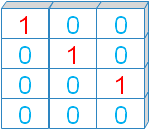
N is the row count; M is the column count. Both outputs below are 2D, even though they are rectangular. Extra rows or columns can contain only zeros. A rectangular eye array is not a square identity matrix. Review array shapes.
for rows, columns in [(3, 4), (4, 3)]:
    a = np.eye(rows, M=columns)
    print("Shape:", a.shape)
    print(a)
    assert a.shape == (rows, columns)
    assert a.sum() == 3
Expected output
Shape: (3, 4)
[[1. 0. 0. 0.]
 [0. 1. 0. 0.]
 [0. 0. 1. 0.]]
Shape: (4, 3)
[[1. 0. 0.]
 [0. 1. 0.]
 [0. 0. 1.]
 [0. 0. 0.]]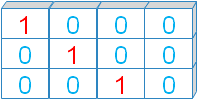
Positive k Selects an Upper Diagonal
For a one at row r and column c, c - r == k. Positive k moves the diagonal above the main diagonal. This controls positions, not the value stored there.
a = np.eye(4, k=2)
print(a)
rows, columns = np.nonzero(a)
print("Positions:", list(zip(rows.tolist(), columns.tolist())))
np.testing.assert_array_equal(columns - rows, [2, 2])
Expected output
[[0. 0. 1. 0.]
 [0. 0. 0. 1.]
 [0. 0. 0. 0.]
 [0. 0. 0. 0.]]
Positions: [(0, 2), (1, 3)]
Negative k Selects a Lower Diagonal
Negative k places ones below the main diagonal. For k=-1, each selected column is one less than its row.
a = np.eye(4, k=-1)
print(a)
rows, columns = np.nonzero(a)
print("Positions:", list(zip(rows.tolist(), columns.tolist())))
np.testing.assert_array_equal(columns - rows, [-1, -1, -1])
Expected output
[[0. 0. 0. 0.]
 [1. 0. 0. 0.]
 [0. 1. 0. 0.]
 [0. 0. 1. 0.]]
Positions: [(1, 0), (2, 1), (3, 2)]
Out-of-Range Diagonals Return Zeros
A diagonal outside the array has no selected positions, so the result is all zeros. With shape (N, M) and positive dimensions, a nonempty diagonal requires -(N-1) <= k <= M-1. Rectangular boundaries depend on both dimensions.
for k in [-3, -2, 3, 4]:
    a = np.eye(3, 4, k=k, dtype=np.int32)
    print("k:", k, "number of ones:", np.count_nonzero(a))
assert not np.eye(3, 4, k=-3).any()
assert not np.eye(3, 4, k=4).any()
Expected output
k: -3 number of ones: 0
k: -2 number of ones: 1
k: 3 number of ones: 1
k: 4 number of ones: 0
Choose Integer, Float or Boolean dtype
Set dtype according to the next operation: integers for counts, floats for numerical calculations and Boolean arrays for selection masks. See dtype and conversion.
for dtype in [np.int32, np.float64, bool]:
    a = np.eye(3, dtype=dtype)
    print("dtype:", a.dtype)
    print(a)
    assert np.count_nonzero(a) == 3
Expected output
dtype: int32
[[1 0 0]
 [0 1 0]
 [0 0 1]]
dtype: float64
[[1. 0. 0.]
 [0. 1. 0.]
 [0. 0. 1.]]
dtype: bool
[[ True False False]
 [False  True False]
 [False False  True]]
String dtype Uses Empty Strings off the Diagonal
With dtype=str, zero-initialized entries become empty strings, while diagonal ones become the text "1". If you want the text "0" elsewhere, create a numeric array first and convert it. Text arrays are not numeric identity matrices.
a = np.eye(4, dtype=str)
b = np.eye(4, dtype=np.int32).astype(str)
print("Direct string dtype:")
print(a)
print("Numeric then converted:")
print(b)
assert a[0, 1] == '' and b[0, 1] == '0'
Expected output
Direct string dtype:
[['1' '' '' '']
 ['' '1' '' '']
 ['' '' '1' '']
 ['' '' '' '1']]
Numeric then converted:
[['1' '0' '0' '0']
 ['0' '1' '0' '0']
 ['0' '0' '1' '0']
 ['0' '0' '0' '1']]
C and Fortran Order Change Storage, Not Values
C order stores a contiguous array by rows; F order stores it by columns. Neither option transposes the matrix or changes the diagonal. Choose storage order when an interfacing library requires it.
c = np.eye(3, 4, order='C')
f = np.eye(3, 4, order='F')
print("C array: C contiguous / F contiguous:", c.flags.c_contiguous, c.flags.f_contiguous)
print("F array: C contiguous / F contiguous:", f.flags.c_contiguous, f.flags.f_contiguous)
np.testing.assert_array_equal(c, f)
assert c.flags.c_contiguous and f.flags.f_contiguous
Expected output
C array: C contiguous / F contiguous: True False
F array: C contiguous / F contiguous: False True
eye versus identity and diag
Use eye for rectangles or shifted diagonals. identity creates a square main-diagonal identity matrix. diag creates a diagonal matrix from supplied values, or extracts a diagonal from a 2D array.
print("identity:")
print(np.identity(3, dtype=np.int32))
print("Custom diagonal:")
print(np.diag([2, 4, 6]))
np.testing.assert_array_equal(np.eye(3), np.identity(3))
np.testing.assert_array_equal(np.diag(np.diag([2, 4, 6])), [2, 4, 6])
Expected output
identity:
[[1 0 0]
 [0 1 0]
 [0 0 1]]
Custom diagonal:
[[2 0 0]
 [0 4 0]
 [0 0 6]]
Identity Preserves Values under Matrix Multiplication
For A shaped (2, 3), a (3, 3) identity belongs on the right and a (2, 2) identity on the left. Use @ for matrix multiplication. Elementwise * is a different operation. See broadcasting for elementwise shape rules.
a = np.array([[2, 4, 6], [1, 3, 5]])
right = a @ np.eye(3, dtype=np.int32)
left = np.eye(2, dtype=np.int32) @ a
print("Right identity:")
print(right)
print("Left identity:")
print(left)
np.testing.assert_array_equal(right, a)
np.testing.assert_array_equal(left, a)
Expected output
Right identity:
[[2 4 6]
 [1 3 5]]
Left identity:
[[2 4 6]
 [1 3 5]]
Use a Boolean Eye as a Diagonal Mask
This synthetic table records product comparisons. Select diagonal entries with a Boolean mask, then make a separate array in which self-comparisons are hidden. Indexing returns a 1D selection here; np.where() retains the original shape.
comparisons = np.array([[1.0, 0.2, 0.4], [0.2, 1.0, 0.6], [0.4, 0.6, 1.0]])
mask = np.eye(3, dtype=bool)
print("Self comparisons:", comparisons[mask])
without_self = np.where(mask, np.nan, comparisons)
print("Off-diagonal report:")
print(without_self)
assert np.isnan(without_self.diagonal()).all()
np.testing.assert_array_equal(comparisons[mask], [1, 1, 1])
Expected output
Self comparisons: [1. 1. 1.]
Off-diagonal report:
[[nan 0.2 0.4]
 [0.2 nan 0.6]
 [0.4 0.6 nan]]
Combine Shifted Diagonals into a Band Matrix
A simple synthetic chain model connects each position to its immediate neighbours. Combine the main and adjacent diagonals to make a tridiagonal matrix. Dense eye arrays allocate every element; large sparse problems need a sparse representation instead.
n = 4
band = 2 * np.eye(n, dtype=np.int32) - np.eye(n, k=1, dtype=np.int32) - np.eye(n, k=-1, dtype=np.int32)
print(band)
np.testing.assert_array_equal(band.diagonal(), [2, 2, 2, 2])
np.testing.assert_array_equal(band.diagonal(1), [-1, -1, -1])
assert np.array_equal(band, band.T)
Expected output
[[ 2 -1  0  0]
 [-1  2 -1  0]
 [ 0 -1  2 -1]
 [ 0  0 -1  2]]
Add a Diagonal Adjustment without Changing Other Entries
This synthetic example adds 0.5 to each diagonal entry of a square matrix. Such a construction appears in regularized linear systems, but the correct adjustment depends on the mathematical model. Match the identity size to the square input.
a = np.array([[4.0, 1.0], [1.0, 3.0]])
adjustment = 0.5
changed = a + adjustment * np.eye(a.shape[0])
print(changed)
np.testing.assert_allclose(changed.diagonal(), [4.5, 3.5])
assert changed[0, 1] == a[0, 1]
assert changed[1, 0] == a[1, 0]
Expected output
[[4.5 1. ]
 [1.  3.5]]
Zero Dimensions and Invalid Sizes
A zero row or column count creates an empty 2D array. Negative dimensions and non-integer sizes are invalid. For user-supplied sizes, validate dimensions and a memory budget before allocation.
for shape in [(0, 3), (3, 0)]:
    a = np.eye(*shape)
    print("Shape:", a.shape, "Size:", a.size)
    assert a.ndim == 2 and a.size == 0
for size in [-1, 2.5]:
    try:
        np.eye(size)
    except (ValueError, TypeError) as error:
        print("Rejected:", size, type(error).__name__)
    else:
        raise AssertionError("Expected an invalid size")
Expected output
Shape: (0, 3) Size: 0
Shape: (3, 0) Size: 0
Rejected: -1 ValueError
Rejected: 2.5 TypeError
device and like: Advanced Interoperability Options
NumPy 2.0 added the keyword-only device option. For NumPy eye, the permitted explicit device is "cpu". The like option supports dispatch to compatible array implementations; it does not copy the reference array values or automatically inherit its dtype. Most tutorial examples need neither option.
Common eye Mistakes
Check N and M when a result has the wrong shape. Check the sign of k when the diagonal is on the wrong side. Use a numeric dtype for arithmetic and bool for masks. A rectangular eye is not a square identity; C/F order does not transpose it. For large dimensions, estimate dense storage as rows times columns times itemsize. Continue with ones(), arange(), linspace() and bincount().
Exercise: Select the Upper Diagonal of a Rectangular Table
Create a Boolean mask of shape (4, 5) with k=1. Apply it to the values 0 through 19 arranged in four rows. Predict selected values 1, 7, 13 and 19, and their total 40. Use sum() to check the total.
Exercise Solution
The selected positions are (0, 1), (1, 2), (2, 3) and (3, 4). Boolean selection follows row order for this 2D mask.
data = np.arange(20).reshape(4, 5)
mask = np.eye(4, 5, k=1, dtype=bool)
selected = data[mask]
print("Mask:")
print(mask)
print("Selected:", selected)
print("Total:", selected.sum())
np.testing.assert_array_equal(selected, [1, 7, 13, 19])
assert selected.sum() == 40
Expected output
Mask:
[[False  True False False False]
 [False False  True False False]
 [False False False  True False]
 [False False False False  True]]
Selected: [ 1  7 13 19]
Total: 40
Practice in Google Colab
Open in Google Colab View on GitHub
All sample data is embedded. Run the examples and practise creating diagonals and applying Boolean masks. Save a copy in Drive to keep your changes.
Continue with NumPy tutorials, data types and axis reduction. Reference: NumPy eye documentation.

Subhendu Mohapatra
Author & Instructor at plus2net
I write and maintain practical tutorials on Python, PHP, SQL, JavaScript, HTML, jQuery, and web development at plus2net. The tutorials focus on clear explanations, working examples, and code that readers can test and adapt while learning.


Subscribe to our YouTube Channel here

 Python Video Tutorials