Fetch Mutual Fund NAV with Python and MFAPI
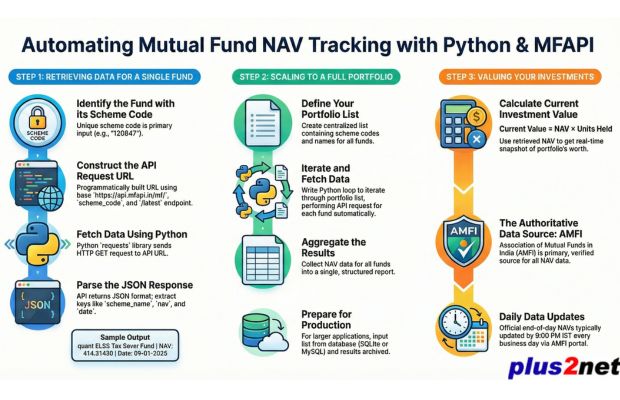
Python can be used to retrieve the latest available mutual fund NAV, store the result, compare several schemes, plot historical NAV values and calculate the current value of units held.
This tutorial uses the MFAPI endpoints shown throughout the examples. The API response provides scheme information, NAV values and their corresponding published dates.
- What We Will Build
- Install Required Python Libraries
- Part 1: Fetch Latest NAV
- Understanding the MFAPI Response
- Add Error Handling
- Part 2: Track Multiple Mutual Funds
- Part 3: Plot Historical NAV Data
- Part 4: Calculate Portfolio Value
- Add Retry with Exponential Backoff
- Part 5: Read Portfolio from Excel or CSV
- Part 6: Run the Tracker on a Schedule
- Important Limitations
- Frequently Asked Questions
- Summary
What We Will Build 🔝
The tutorial develops the project in stages.
- Fetch the latest NAV for one mutual fund scheme.
- Retrieve NAV values for several scheme codes.
- Download historical NAV records and plot them with Matplotlib.
- Multiply NAV by units held to calculate the latest portfolio value.
- Read scheme codes and units from an Excel or CSV file using Pandas.
- Add retry logic for network failures.
- Run the Python script automatically on a schedule.
Install Required Python Libraries 🔝
The complete project uses Requests, Pandas, Matplotlib and OpenPyXL.
pip install requests pandas matplotlib openpyxlIf you are using Google Colab, some of these packages may already be available in the notebook environment.
Part 1: Fetch the Latest Mutual Fund NAV 🔝
Each scheme is requested using its scheme code.
For the latest available NAV, the URL pattern used in this tutorial is:
https://api.mfapi.in/mf/SCHEME_CODE/latestThe following function retrieves the scheme name, latest NAV and NAV date.
import requests

def get_latest_nav(scheme_code):

    url=f"https://api.mfapi.in/mf/{scheme_code}/latest"

    response=requests.get(
        url,
        timeout=10
    )

    response.raise_for_status()

    data=response.json()

    latest=data['data'][0]

    fund_name=data['meta']['scheme_name']
    nav=latest['nav']
    nav_date=latest['date']

    return fund_name, nav, nav_date


# Sample scheme code
name, nav, nav_date=get_latest_nav("120847")

print(
    f"Fund: {name}"
)

print(
    f"NAV: {nav}"
)

print(
    f"NAV Date: {nav_date}"
)
The actual NAV and date depend on the latest data available when the script is run.
Understanding the MFAPI Response 🔝
The script works with the JSON returned by the API.
The scheme name is read from:
data['meta']['scheme_name']The latest NAV record is read from:
data['data'][0]The NAV and date can then be accessed using:
latest['nav']
latest['date']
The JSON response is converted to a Python dictionary by:
response.json()For more examples of working with JSON in Python, see the Python JSON tutorial.
Add Error Handling 🔝
The first example demonstrates the basic API flow. A practical script should also handle network errors, invalid responses and missing data.
import requests

def get_latest_nav(scheme_code):

    url=f"https://api.mfapi.in/mf/{scheme_code}/latest"

    try:

        response=requests.get(
            url,
            timeout=10
        )

        response.raise_for_status()

        data=response.json()

        if (
            'data' not in data
            or not data['data']
        ):
            return None

        latest=data['data'][0]

        return {
            'scheme_name':
                data['meta']['scheme_name'],

            'nav':
                float(latest['nav']),

            'date':
                latest['date']
        }

    except (
        requests.exceptions.RequestException,
        ValueError,
        KeyError,
        IndexError
    ) as e:

        print(
            f"Could not retrieve NAV: {e}"
        )

        return None
Using raise_for_status() allows HTTP errors to be handled rather than silently continuing with an unsuccessful response.
Open the Mutual Fund NAV Tracking Notebook
Part 2: Track Multiple Mutual Funds 🔝
Instead of calling the API for one scheme, store several scheme codes in a Python list and process them in a loop.
input_schemes=[
    {
        "schemeCode": 120251,
        "schemeName": "ICICI Prudential Equity & Debt Fund Direct Growth"
    },
    {
        "schemeCode": 118955,
        "schemeName": "HDFC Flexi Cap Direct Plan Growth"
    },
    {
        "schemeCode": 120334,
        "schemeName": "ICICI Prudential Multi Asset Fund Direct Growth"
    }
]
The names are included to make the local portfolio list easier to understand. The API response can also provide the scheme name.
import requests

def fetch_latest_navs(scheme_list):

    base_url="https://api.mfapi.in/mf/"

    final_report=[]

    for scheme in scheme_list:

        code=scheme['schemeCode']

        try:

            response=requests.get(
                f"{base_url}{code}/latest",
                timeout=10
            )

            response.raise_for_status()

            data=response.json()

            if not data.get('data'):

                print(
                    f"No NAV data for scheme code {code}"
                )

                continue

            latest=data['data'][0]

            final_report.append({
                'code': code,
                'name':
                    data['meta']['scheme_name'],
                'nav':
                    float(latest['nav']),
                'date':
                    latest['date']
            })

        except (
            requests.exceptions.RequestException,
            ValueError,
            KeyError,
            IndexError
        ) as e:

            print(
                f"Could not retrieve {code}: {e}"
            )

    return final_report


results=fetch_latest_navs(input_schemes)

for row in results:

    print(
        row['name'],
        row['nav'],
        row['date']
    )
The NAV values and dates will depend on the latest API response when the program is executed.
Part 3: Plot Historical Mutual Fund NAV Data 🔝
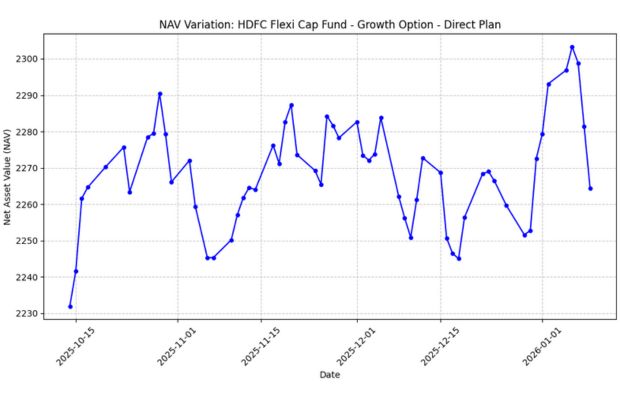
Removing /latest from the endpoint retrieves the available NAV history returned by the API.
https://api.mfapi.in/mf/SCHEME_CODEThe following example retrieves the latest 60 available NAV records, converts the date strings to Python datetime objects and plots the values using Matplotlib.
import requests
import matplotlib.pyplot as plt
from datetime import datetime


def fetch_and_plot_nav(scheme_code):

    api_url=f"https://api.mfapi.in/mf/{scheme_code}"

    try:

        response=requests.get(
            api_url,
            timeout=10
        )

        response.raise_for_status()

        data=response.json()

        nav_data=data.get(
            'data',
            []
        )

        if not nav_data:

            print(
                'No NAV history returned.'
            )

            return

        scheme_name=data['meta']['scheme_name']

        # Latest 60 available NAV records
        subset=nav_data[:60]

        dates=[
            datetime.strptime(
                item['date'],
                '%d-%m-%Y'
            )
            for item in subset
        ]

        nav_values=[
            float(
                item['nav']
            )
            for item in subset
        ]

        plot_data=sorted(
            zip(
                dates,
                nav_values
            )
        )

        dates, nav_values=zip(
            *plot_data
        )

        plt.figure(
            figsize=(10, 6)
        )

        plt.plot(
            dates,
            nav_values,
            marker='o'
        )

        plt.title(
            f"NAV History: {scheme_name}"
        )

        plt.xlabel(
            'Date'
        )

        plt.ylabel(
            'NAV'
        )

        plt.grid(
            True
        )

        plt.xticks(
            rotation=45
        )

        plt.tight_layout()

        plt.show()


    except requests.exceptions.RequestException as e:

        print(
            f"Network error: {e}"
        )


    except (
        ValueError,
        KeyError,
        IndexError
    ) as e:

        print(
            f"Data error: {e}"
        )


scheme_code=input(
    'Enter scheme code: '
).strip()

if scheme_code.isdigit():

    fetch_and_plot_nav(scheme_code)

else:

    print(
        'Enter a numeric scheme code.'
    )
Why Sort the Data Before Plotting?
The API data used by this tutorial is processed with the most recent records first. For a left-to-right historical chart, the selected records are sorted by date before plotting.
Part 4: Calculate Current Portfolio Value 🔝
Once the latest NAV is available, the current value of units held can be calculated using:
For example, if a portfolio contains 100.02 units, the current value is:
current_value=nav * unitsThe following program calculates the value of several holdings.
import requests
import time


def fetch_nav_with_retry(scheme_code):

    url=f"https://api.mfapi.in/mf/{scheme_code}/latest"

    retries=5
    delay=1

    for attempt in range(retries):

        try:

            response=requests.get(
                url,
                timeout=10
            )

            response.raise_for_status()

            data=response.json()

            if not data.get('data'):

                return None

            latest=data['data'][0]

            return {
                'nav':
                    float(latest['nav']),

                'date':
                    latest['date']
            }


        except (
            requests.exceptions.RequestException,
            ValueError,
            KeyError,
            IndexError
        ):

            if attempt == retries - 1:

                return None

            time.sleep(delay)

            delay *= 2


def calculate_portfolio():

    input_schemes=[
        {
            'schemeCode': 120251,
            'schemeName':
                'ICICI Prudential Equity & Debt Fund Direct Growth',
            'Units': 100.02
        },

        {
            'schemeCode': 118955,
            'schemeName':
                'HDFC Flexi Cap Direct Plan Growth',
            'Units': 250.589
        },

        {
            'schemeCode': 120334,
            'schemeName':
                'ICICI Prudential Multi Asset Fund Direct Growth',
            'Units': 200.567
        }
    ]

    results=[]
    total_value=0.0

    for scheme in input_schemes:

        nav_info=fetch_nav_with_retry(
            scheme['schemeCode']
        )

        if nav_info:

            current_value=(
                nav_info['nav']
                *
                scheme['Units']
            )

            total_value += current_value

            results.append({
                'Date':
                    nav_info['date'],

                'Fund Name':
                    scheme['schemeName'],

                'NAV':
                    nav_info['nav'],

                'Units':
                    scheme['Units'],

                'Value':
                    current_value
            })

        else:

            print(
                f"Could not fetch {scheme['schemeName']}"
            )


    print(
        f"TOTAL PORTFOLIO VALUE: INR {total_value:,.2f}"
    )


    for row in results:

        print(
            f"{row['Fund Name']} | "
            f"NAV: {row['NAV']:.4f} | "
            f"Units: {row['Units']:.3f} | "
            f"Value: INR {row['Value']:,.2f} | "
            f"Date: {row['Date']}"
        )


calculate_portfolio()Retry Failed Requests with Exponential Backoff 🔝
The portfolio example uses exponential backoff when a request fails.
With an initial delay of one second, successive retry waits are:
1 second
2 seconds
4 seconds
8 seconds
The script makes up to five attempts. There is no need to wait after the final failed attempt.
delay=1

for attempt in range(5):

    try:
        # Make request
        pass

    except requests.exceptions.RequestException:

        if attempt == 4:
            break

        time.sleep(delay)

        delay *= 2
Part 5: Store Scheme Codes and Units in Excel 🔝
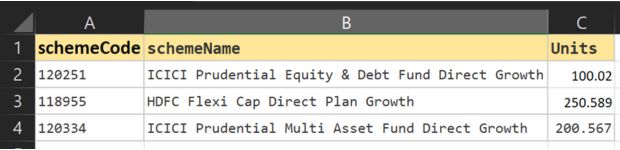
Hardcoding portfolio details inside the Python script becomes inconvenient when the holdings change.
A better approach is to store the following columns in an Excel file:
schemeCode
schemeName
Units
Pandas can load the file using
read_excel().
Read Portfolio Data from Excel
from pathlib import Path
import pandas as pd

file_path=(
    Path(__file__).parent
    /
    'input_schemes.xlsx'
)

df=pd.read_excel(
    file_path,
    sheet_name='Sheet1'
)

input_schemes=df.to_dict(
    'records'
)

print(input_schemes)
Complete Excel-Based Portfolio Tracker
import requests
import time
import pandas as pd
from pathlib import Path


def fetch_nav_with_retry(scheme_code):

    url=f"https://api.mfapi.in/mf/{scheme_code}/latest"

    retries=5
    delay=1

    for attempt in range(retries):

        try:

            response=requests.get(
                url,
                timeout=10
            )

            response.raise_for_status()

            data=response.json()

            if not data.get('data'):

                return None

            latest=data['data'][0]

            return {
                'nav':
                    float(
                        latest['nav']
                    ),

                'date':
                    latest['date']
            }


        except (
            requests.exceptions.RequestException,
            ValueError,
            KeyError,
            IndexError
        ):

            if attempt == retries - 1:

                return None

            time.sleep(delay)

            delay *= 2


def calculate_portfolio():

    try:

        file_path=(
            Path(__file__).parent
            /
            'input_schemes.xlsx'
        )

        df=pd.read_excel(
            file_path,
            sheet_name='Sheet1'
        )

        input_schemes=df.to_dict(
            'records'
        )


    except Exception as e:

        print(
            f"Error reading Excel file: {e}"
        )

        return


    results=[]
    total_value=0.0


    for scheme in input_schemes:

        nav_info=fetch_nav_with_retry(
            scheme['schemeCode']
        )

        if nav_info:

            current_value=(
                nav_info['nav']
                *
                scheme['Units']
            )

            total_value += current_value

            results.append({
                'Date':
                    nav_info['date'],

                'Fund Name':
                    scheme['schemeName'],

                'NAV':
                    nav_info['nav'],

                'Units':
                    scheme['Units'],

                'Value':
                    current_value
            })


    print(
        f"TOTAL PORTFOLIO VALUE: INR {total_value:,.2f}"
    )


    for row in results:

        print(
            f"{row['Date']} | "
            f"{row['Fund Name']} | "
            f"NAV: {row['NAV']:.4f} | "
            f"Units: {row['Units']:.3f} | "
            f"Value: INR {row['Value']:,.2f}"
        )


calculate_portfolio()
Using a CSV File Instead
If the same columns are stored in a CSV file, use
read_csv().
df=pd.read_csv(
    'input_schemes.csv'
)
Part 6: Run the Mutual Fund Tracker Automatically 🔝
Once the script works correctly, it can be scheduled to run automatically.
Choose a schedule that matches when you normally want to check for a newly published NAV.
Option 1: Windows Task Scheduler
A Windows Task Scheduler action can run the Python file at a chosen time.
Program/script : python
Arguments      : C:\your_folder\portfolio_tracker.py
For example, this command creates a daily task at 21:15:
schtasks /create /tn "MF NAV Tracker" /tr "python C:\your_folder\portfolio_tracker.py" /sc daily /st 21:15Option 2: Linux or macOS cron
Open the crontab:
crontab -eExample: run the script Monday through Friday at 21:15.
15 21 * * 1-5 /usr/bin/python3 /home/youruser/portfolio_tracker.py >> /home/youruser/nav_log.txt 2>&1
The log redirection saves both normal output and errors in nav_log.txt.
Option 3: Python schedule Library
Install the package:
pip install scheduleimport schedule
import time
def run_tracker():
calculate_portfolio()
schedule.every().monday.at(
'21:15'
).do(run_tracker)
schedule.every().tuesday.at(
'21:15'
).do(run_tracker)
schedule.every().wednesday.at(
'21:15'
).do(run_tracker)
schedule.every().thursday.at(
'21:15'
).do(run_tracker)
schedule.every().friday.at(
'21:15'
).do(run_tracker)
while True:
schedule.run_pending()
time.sleep(
60
)
This Python process must remain running for the schedule library to execute future jobs.
Important Limitations 🔝
- Always check the NAV date returned by the API. The latest available value may not be from the current calendar date.
- The portfolio value calculated here is NAV multiplied by units held.
- The script does not calculate actual investment profit, loss or return unless purchase cost or transaction data is also stored.
- The examples depend on an external API, so network failures, API changes or unavailable scheme codes must be handled.
- Scheme names and codes in the examples are sample inputs for demonstrating Python automation.
- Historical NAV movement does not by itself calculate investment returns because purchases, redemptions, dividends and other transactions are not included.
Frequently Asked Questions 🔝
How do I fetch the latest mutual fund NAV using Python?
Send a request to the scheme's MFAPI /latest endpoint, convert the response to JSON and read the first record in the returned data list.
What is a mutual fund scheme code?
The scheme code is the identifier used in the API URL to request data for a particular scheme.
How do I get the NAV date?
The examples read the date field from the latest record:
data['data'][0]['date']Can Python track several mutual funds at once?
Yes. Store the scheme codes in a list, loop through them and call the NAV retrieval function for each scheme.
How do I calculate the current value of mutual fund units?
Multiply the latest NAV by the number of units held.
current_value=nav * unitsCan I store the portfolio in Excel?
Yes. Store the scheme code, scheme name and units in an Excel file and load it with
pandas.read_excel().
Can the NAV tracker run automatically?
Yes. Windows Task Scheduler, cron or a Python scheduling library can run the script automatically at a chosen time.
Summary 🔝
-
Use the MFAPI
/latestendpoint when only the latest available NAV is required. -
Use
requests.get()to retrieve API data. -
Use
response.json()to convert the JSON response to Python data. - Check the returned NAV date instead of assuming the value belongs to the current date.
-
Use
raise_for_status()and exception handling for safer HTTP requests. - Multiple scheme codes can be stored in a Python list and processed in a loop.
- Historical NAV values can be plotted using Matplotlib.
- Current portfolio value is calculated by multiplying NAV by units held.
- Use exponential backoff to retry temporary request failures.
-
Use
read_excel()orread_csv()to manage portfolio data outside the Python code. -
Windows Task Scheduler, cron or the Python
schedulepackage can automate execution.
Use the mftool Library
The next tutorial shows another Python approach to retrieving mutual fund data using the mftool library.
Using mftool Library
Subhendu Mohapatra
Author & Instructor at plus2net
I write and maintain practical tutorials on Python, PHP, SQL, JavaScript, HTML, jQuery, and web development at plus2net. The tutorials focus on clear explanations, working examples, and code that readers can test and adapt while learning.


Subscribe to our YouTube Channel here

 Python Video Tutorials