Building a Real-Time Mutual Fund NAV Tracker: A Cross-Platform Guide
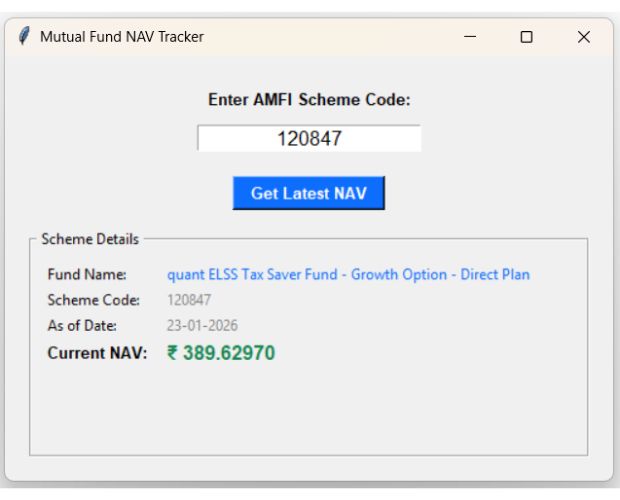
Before diving into this advanced application, you can check out our primary guide on basic Mutual Fund NAV automation to understand the core logic.
1. Dynamic URL Construction
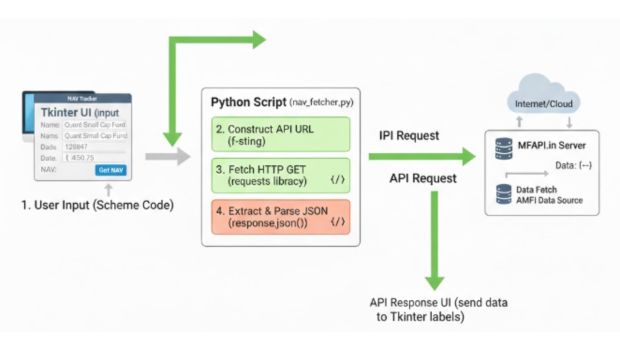
The script builds a targeted API request by injecting the user-provided scheme_code directly into the MFAPI endpoint. This ensures that instead of downloading a massive dataset of all mutual funds, we only request the specific bytes needed for the fund in question.
url = f"https://api.mfapi.in/mf/{scheme_code}/latest"2. The Request-Response Cycle
Using the requests library, the script performs an HTTP GET request. The .json() method is then used to convert the raw string response from the server into a Python dictionary, allowing us to access nested data points like the Fund Name and NAV using simple keys.
3. Data Extraction and Validation
Because API calls can fail (due to incorrect codes or server downtime), the script checks the status key. It then drills down into the meta section for the fund's identity and the data list (specifically index [0]) to grab the most recent pricing entry.
fund_name = data['meta']['scheme_name']
latest_nav = data['data'][0]['nav']
4. The Tkinter "MainLoop" and Event Handling
The GUI remains responsive because of the root.mainloop(). When the "Get Latest NAV" button is clicked, it triggers the fetch_data function. This is an event-driven architecture where the code waits for user interaction before executing the logic.
5. Label Updates and Formatting
To keep the interface clean, the script uses the .config() method to update the text of existing labels dynamically. We apply specific HEX color codes (like #0d6efd for blue) and font tuples to emphasize the financial data, making the output easy to read at a glance.
import tkinter as tk
from tkinter import messagebox
import requests

def fetch_data():
    scheme_code = entry_code.get().strip()

    if not scheme_code:
        messagebox.showwarning("Input Error", "Please enter a Scheme Code.")
        return

    try:
        url = f"https://api.mfapi.in/mf/{scheme_code}/latest"
        response = requests.get(url, timeout=10)
        data = response.json()

        # Check if the API returned a valid scheme
        if data.get('status') == 'SUCCESS' and data.get('data'):
            fund_name = data['meta']['scheme_name']
            latest_nav = data['data'][0]['nav']
            nav_date = data['data'][0]['date']

            # Updating labels with the correct font configuration
            lbl_res_name.config(text=fund_name, fg="#0d6efd")
            lbl_res_code.config(text=scheme_code)
            lbl_res_date.config(text=nav_date)
            lbl_res_nav.config(text=f"₹ {latest_nav}", font=("Arial", 12, "bold"))
        else:
            messagebox.showerror("Error", "Scheme code not found or invalid.")

    except Exception as e:
        messagebox.showerror("Connection Error", f"Could not connect to API.\n{e}")

# --- UI Setup ---
root = tk.Tk()
root.title("Mutual Fund NAV Tracker")
root.geometry("500x350")
root.configure(padx=20, pady=20)

tk.Label(root, text="Enter AMFI Scheme Code:", font=("Arial", 10, "bold")).pack(pady=5)
entry_code = tk.Entry(root, font=("Arial", 12), justify='center')
entry_code.pack(pady=5)
entry_code.insert(0, "120847")

btn_fetch = tk.Button(root, text="Get Latest NAV", command=fetch_data,
                      bg="#0d6efd", fg="white", font=("Arial", 10, "bold"), padx=10)
btn_fetch.pack(pady=15)

result_frame = tk.LabelFrame(root, text=" Scheme Details ", padx=10, pady=10)
result_frame.pack(fill="both", expand=True)

# Grid layout
tk.Label(result_frame, text="Fund Name:").grid(row=0, column=0, sticky="w")
lbl_res_name = tk.Label(result_frame, text="-", wraplength=350, justify="left", fg="gray")
lbl_res_name.grid(row=0, column=1, sticky="w", padx=10)

tk.Label(result_frame, text="Scheme Code:").grid(row=1, column=0, sticky="w")
lbl_res_code = tk.Label(result_frame, text="-", fg="gray")
lbl_res_code.grid(row=1, column=1, sticky="w", padx=10)

tk.Label(result_frame, text="As of Date:").grid(row=2, column=0, sticky="w")
lbl_res_date = tk.Label(result_frame, text="-", fg="gray")
lbl_res_date.grid(row=2, column=1, sticky="w", padx=10)

tk.Label(result_frame, text="Current NAV:", font=("Arial", 10, "bold")).grid(row=3, column=0, sticky="w")
lbl_res_nav = tk.Label(result_frame, text="-", font=("Arial", 12), fg="#198754")
lbl_res_nav.grid(row=3, column=1, sticky="w", padx=10)

root.mainloop()
Subhendu Mohapatra
Author & Instructor at plus2net
I write and maintain practical tutorials on Python, PHP, SQL, JavaScript, HTML, jQuery, and web development at plus2net. The tutorials focus on clear explanations, working examples, and code that readers can test and adapt while learning.


Subscribe to our YouTube Channel here

 Python Video Tutorials