For Loop in Python
For Loop in Python
For loop in Python is used to execute a block of code repeatedly.
In this tutorial, we will learn how to use range(),
break, continue, else and nested loops.
Watch this beginner-friendly Python for loop tutorial to understand how
range(), break, continue,
else with loops and nested for loops work with simple examples.
For loop with range
for x in range(5):
print(x)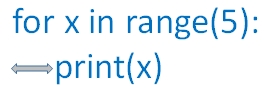 Note that the 2nd line print(x) is placed after an indente of one space. Without that we will get an error asking expectd an indented block . The code to be executed within the block is to be kept with indenting as there is no end of for loop like other languages.
 The output of above code is here
0
1
2
3
4for x in range(5):
print(x)
print("I am outside the loop")0
1
2
3
4
I am outside the loopLoop with range
Now we will define a range for the loopfor x in range(5, 10):
print(x)5
6
7
8
9for x in range(5, 25, 5):
print(x)5
10
15
20Break and continue in a for loop
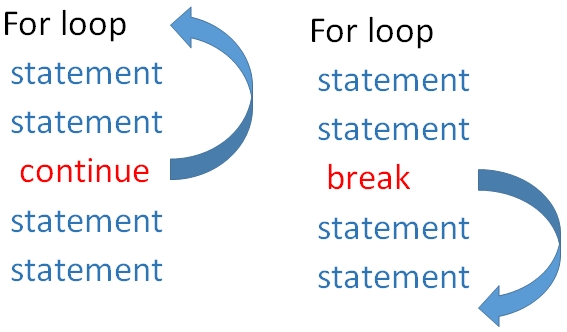
When break statement is encountered the execution comes out of the loop. In case of continue the execution returns to the starting of the loop skipping the rest of the statements ( after continue ) and continues again.In the codes give below , as soon as break is encountered the execution comes out of the loop, so 15 and 20 are not printed. But when continue is used in place of break the printing of 15 is skipped but the loop continues again so 20 is printed.
Using continue
for x in range(5, 25, 5):
    if (x == 15):
        continue
    print(x)
5
10
20for x in range(5, 25, 5):
if (x == 15):
break
print(x)5
10Using else with for loop
Here else part of the code is executed once the for loop execution is over. However if loop is terminated by using break then else part of the code is skipped.Using continue
for x in range(5, 25, 5):
if (x == 15):
continue
print(x)
else:
print("Out of loop but with else")
print("Out of loop")5
10
20
Out of loop but with else
Out of loopusing break
for x in range(5, 25, 5):
    if (x == 15):
        break
    print(x)
else:
print("Out of loop but with else")
print("Out of loop")5
10
Out of loopnum = 100 # change this value to get all prime numbers
for i in range(2, num - 1):
for j in range(2, i - 1):
if (i % j == 0):
break
else:
print(i, " is a prime number")2 is a prime number
3 is a prime number
5 is a prime number
7 is a prime number
-----
-----
83 is a prime number
89 is a prime number
97 is a prime numberUsing list
More on List.For simple cases where a loop is used to create a new list, see Python list comprehension.
names = ["King", "Queen", "Jack & others"]
for str1 in names:
print(str1)King
Queen
Jack & othersIterating with Index Numbers (enumerate)
When you need both the index position and the corresponding value during iteration, combine the for...in construct with Python's built-in enumerate() function.
# Program to loop through a list while tracking the index
names = ["Alice", "Bob", "Charlie"]

for index, name in enumerate(names):
    print(f"Index {index}: {name}")
Dictionary Iteration (Key-Value Pairs)
To unpack and iterate through dictionary key-value pairs seamlessly, use the .items() method inside the for...in structure.
# Program to iterate over keys and values in a dictionary
student = {"name": "John", "age": 20, "grade": "A"}

for key, value in student.items():
    print(f"{key}: {value}")
Nested for loop
We can keep one for loop inside anotherfor i in range(5):
for j in range(5):
print('*', end='')
print("")*****
*****
*****
*****
*****Using list
names=["King","Queen","Jack & others"]
ages=["child","Young","old"]
for str1 in names:
    for str2 in ages:
print(str1,str2)King child
King Young
King old
Queen child
Queen Young
Queen old
Jack & others child
Jack & others Young
Jack & others oldKey Differences between for and while loops
-
for loop (Definite Iteration): Used when you know in advance how many times the code block needs to run, or when iterating through a sequence or collection (such as a
list,tuple,string,dictionary, orrange()). -
while loop (Indefinite Iteration): Used when execution needs to continue repeatedly as long as a specified boolean condition remains
True. The exact number of iterations is often unknown beforehand.
Comparison Summary
| Feature | for Loop |
while Loop |
|---|---|---|
| Control Mechanism | Iterates over items in an iterable or range() |
Evaluates a boolean condition (True / False) |
| Iteration Count | Predetermined by the sequence length | Variable / dependent on condition evaluation |
| Counter Variable | Handled and updated automatically by Python | Must be initialized and modified manually |
| Primary Use Cases | Traversal of lists, ranges, strings, and datasets | Handling user input, game loops, dynamic conditions |
| Infinite Loop Risk | Very low | High (if condition fails to evaluate to False) |
Questions only
https://github.com/plus2net/Python-basics/blob/main/online_class_for_loop_v1.ipynb
- Python Basics - for loop #forloop #python
20-Feb-2024
View and Download for_loop ipynb file ( .html format )


Subhendu Mohapatra
Author & Instructor at plus2net
I write and maintain practical tutorials on Python, PHP, SQL, JavaScript, HTML, jQuery, and web development at plus2net. The tutorials focus on clear explanations, working examples, and code that readers can test and adapt while learning.


Subscribe to our YouTube Channel here

 Python Video Tutorials