Tkinter Webpage SEO Auditor using Python and BeautifulSoup
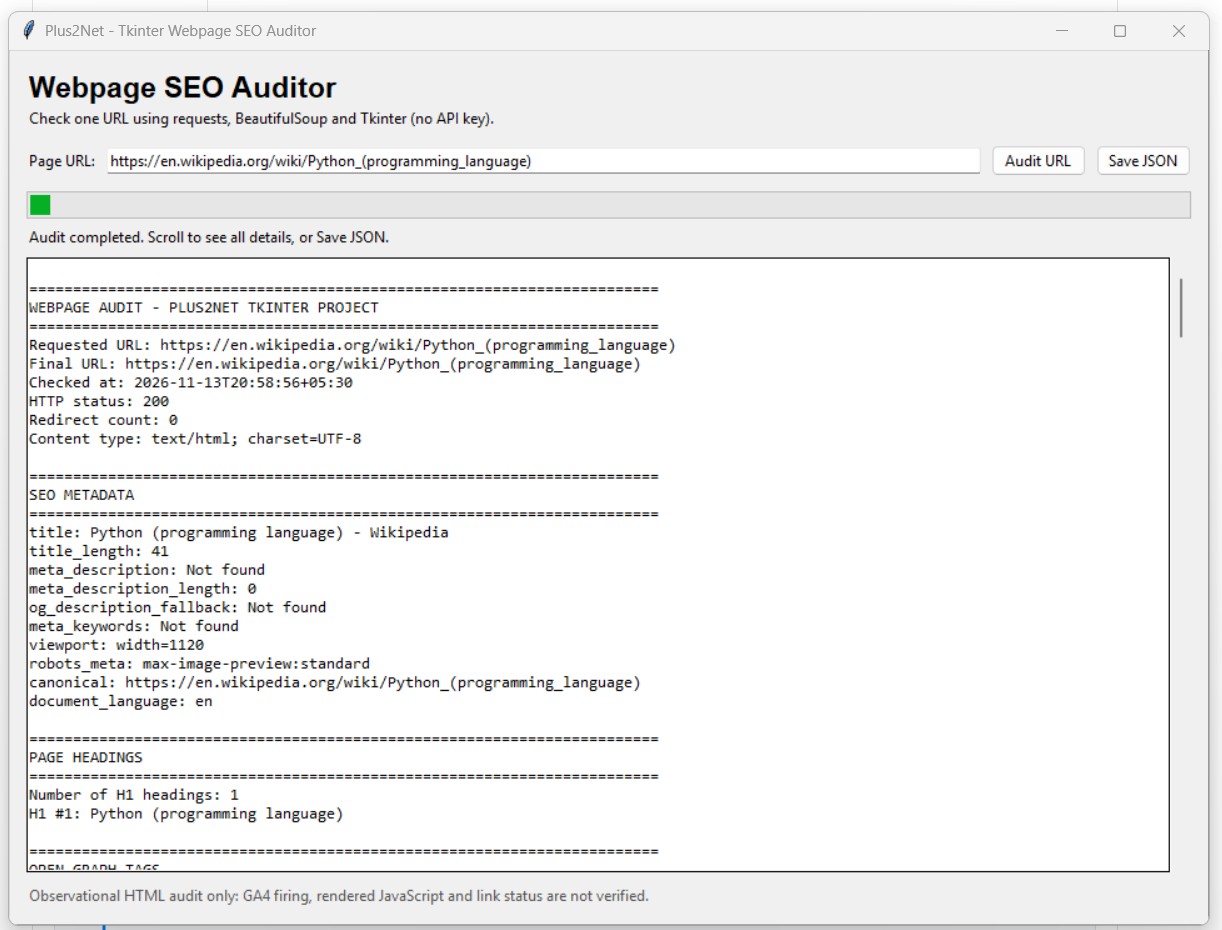
Enter a webpage URL in a Tkinter window and display the audit results underneath it. This desktop project extends the Python BeautifulSoup webpage auditor by adding an Entry field, an Audit URL button, a scrollable report, and a Save JSON button. It does not require a Google API key.
Enter a URL, run the audit once, and inspect the title, description, canonical, Open Graph tags, GA4 ID strings, JSON-LD types, image attributes, and internal/external links in the same window.
Start with one URL
The application opens with this sample address already entered. You can replace it with any permitted public http:// or https:// URL:
https://en.wikipedia.org/wiki/Python_(programming_language)Click Audit URL and scroll through the results. The request happens in a background thread so the Tkinter interface remains responsive. The results depend on the HTML the site returns at the time of your request.
On this page — Show page sectionsHide page sections
Install the required packages
Use Python 3.9 or newer with Tkinter available on your computer. Tkinter is commonly included with Python desktop installations; on some Linux distributions, a separate python3-tk package is required.
python -m pip install requests beautifulsoup4The script uses BeautifulSoup's built-in html.parser, so installing lxml is optional. An internet connection is necessary to fetch a live webpage.
What the Tkinter auditor displays
| Area | Details shown in the scrollable report |
|---|---|
| HTTP response | Status code, final URL, redirect count, content type, audit time |
| SEO metadata | Title and length, description and length, canonical, keywords, viewport, robots meta, HTML language |
| Headings | H1 count and all H1 text values |
| Social tags | Open Graph and Twitter/X meta properties found in HTML |
| GA4 | Any G-... ID strings found in fetched source; not event or traffic verification |
| Structured data | JSON-LD block count, parsable @type values, malformed JSON-LD block count |
| Images | Total images, nonempty alt text, empty decorative alt attributes and missing alt attributes |
| Links | Unique internal and external URLs (first 100 shown in window; full lists in JSON) |
| Other markup | Breadcrumb indicators and sitemap declarations found in robots.txt |
The program reads the server-returned HTML. It does not visit every extracted link, test link status, validate schema against Google's rules, or confirm live GA4 data collection.
Complete Python source: tkinter_webpage_auditor.py
The file contains the fetch and analysis functions, the Tkinter layout, a worker thread and a JSON export function. Download it above or expand the source below to copy the full example.
Show the complete runnable Python code (404 lines)
"""Plus2Net Tkinter Webpage Auditor.
A desktop extension of https://www.plus2net.com/python/bs4-auditor.php
Audit one public webpage at a time; requires requests and beautifulsoup4.
Python 3.9+ recommended. No Google API key or notebook is required.
"""
import json
import queue
import re
import threading
import tkinter as tk
from datetime import datetime
from tkinter import filedialog, messagebox, scrolledtext, ttk
from urllib.parse import urldefrag, urljoin, urlparse
import requests
from bs4 import BeautifulSoup
EXAMPLE_URL = "https://en.wikipedia.org/wiki/Python_(programming_language)"
USER_AGENT = (
"Plus2NetWebpageAuditor/1.0 "
"(+https://www.plus2net.com/python/bs4-auditor.php)"
)
REQUEST_TIMEOUT = (6, 20) # connect seconds, read seconds
MAX_LINKS_DISPLAY = 100 # display limit; all unique links remain in JSON export
def normalise_url(raw_url):
"""Accept only an explicit HTTP or HTTPS URL."""
url = raw_url.strip()
parsed = urlparse(url)
if parsed.scheme.lower() not in {"http", "https"} or not parsed.hostname:
raise ValueError("Enter a complete http:// or https:// URL.")
if parsed.username or parsed.password:
raise ValueError("URLs containing embedded login details are not supported.")
return url
def get_meta(soup, key, attr="name"):
"""Read a meta value without assuming attribute case."""
key_lower = key.lower()
for tag in soup.find_all("meta"):
if str(tag.get(attr, "")).lower() == key_lower:
return (tag.get("content") or "").strip() or None
return None
def get_meta_collection(soup, prefix, attr):
items = {}
for tag in soup.find_all("meta"):
name = str(tag.get(attr, "")).strip()
value = (tag.get("content") or "").strip()
if name.lower().startswith(prefix.lower()) and value:
items[name] = value
return items
def get_json_ld(soup):
"""Extract JSON-LD types and flag invalid JSON, without validating schema."""
types = set()
invalid_blocks = 0
block_count = 0
for tag in soup.find_all("script"):
if (tag.get("type") or "").split(";")[0].strip().lower() != "application/ld+json":
continue
block_count += 1
try:
document = json.loads(tag.string or tag.get_text() or "")
except (ValueError, TypeError):
invalid_blocks += 1
continue
stack = [document]
while stack:
item = stack.pop()
if isinstance(item, list):
stack.extend(item)
elif isinstance(item, dict):
value = item.get("@type")
if isinstance(value, str):
types.add(value)
elif isinstance(value, list):
types.update(x for x in value if isinstance(x, str))
if "@graph" in item:
stack.append(item["@graph"])
return {
"block_count": block_count,
"invalid_json_blocks": invalid_blocks,
"types_found": sorted(types),
"faqpage_present": "FAQPage" in types,
"howto_present": "HowTo" in types,
"videoobject_present": "VideoObject" in types,
}
def extract_links(soup, base_url):
host = (urlparse(base_url).hostname or "").lower()
internal, external = set(), set()
for tag in soup.find_all("a", href=True):
href = tag["href"].strip()
if not href or href.startswith("#"):
continue
destination = urldefrag(urljoin(base_url, href)).url
parts = urlparse(destination)
if parts.scheme.lower() not in {"http", "https"} or not parts.hostname:
continue
if parts.hostname.lower() == host:
internal.add(destination)
else:
external.add(destination)
return sorted(internal), sorted(external)
def check_robots_sitemap(session, page_url):
parts = urlparse(page_url)
root = f"{parts.scheme}://{parts.netloc}"
robots_url = urljoin(root, "/robots.txt")
try:
r = session.get(robots_url, timeout=REQUEST_TIMEOUT)
if not r.ok:
return {"url": robots_url, "status": f"HTTP {r.status_code}", "sitemap_urls": []}
entries = []
for line in r.text.splitlines():
if re.match(r"^\s*sitemap\s*:", line, re.I):
value = line.split(":", 1)[1].strip()
if value:
entries.append(value)
return {"url": robots_url, "status": "Fetched", "sitemap_urls": entries}
except requests.RequestException as exc:
return {"url": robots_url, "status": f"Not checked: {exc}", "sitemap_urls": []}
def analyze_page(url, fetch_robots=True, session=None):
"""Fetch a single HTML page and return observed metadata and on-page elements."""
url = normalise_url(url)
own_session = session is None
if own_session:
session = requests.Session()
session.headers.update({"User-Agent": USER_AGENT, "Accept": "text/html,application/xhtml+xml"})
try:
response = session.get(url, timeout=REQUEST_TIMEOUT, allow_redirects=True)
content_type = response.headers.get("Content-Type", "")
if content_type and not any(x in content_type.lower() for x in ("html", "xml", "text/plain")):
raise ValueError("The URL returned a non-HTML resource: " + content_type)
final_url = response.url
html = response.text
soup = BeautifulSoup(html, "html.parser")
title = soup.title.get_text(" ", strip=True) if soup.title else None
description = get_meta(soup, "description")
og_description = get_meta(soup, "og:description", "property")
canonical = None
for tag in soup.find_all("link", href=True):
rel_values = tag.get("rel") or []
if any(str(item).lower() == "canonical" for item in rel_values):
canonical = urljoin(final_url, tag["href"].strip())
break
all_h1s = [tag.get_text(" ", strip=True) for tag in soup.find_all("h1")]
images = soup.find_all("img")
images_with_nonempty_alt = sum(bool((img.get("alt") or "").strip()) for img in images)
images_missing_alt_attribute = [
urljoin(final_url, img.get("src", "")) if img.get("src") else "[no src]"
for img in images if not img.has_attr("alt")
]
images_empty_alt_attribute = sum(img.has_attr("alt") and not (img.get("alt") or "").strip() for img in images)
internal_links, external_links = extract_links(soup, final_url)
json_ld = get_json_ld(soup)
ga4_ids = sorted(set(re.findall(r"\bG-[A-Z0-9]{6,12}\b", html, re.I)))
robots = check_robots_sitemap(session, final_url) if fetch_robots else {
"url": None, "status": "Not checked", "sitemap_urls": []
}
breadcrumbs = bool(soup.select('[itemtype*="BreadcrumbList" i], .breadcrumb, nav[aria-label*="breadcrumb" i]'))
return {
"requested_url": url,
"final_url": final_url,
"audited_at_local": datetime.now().astimezone().isoformat(timespec="seconds"),
"http": {
"status": response.status_code,
"redirects": len(response.history),
"content_type": content_type or None,
},
"metadata": {
"title": title,
"title_length": len(title) if title else 0,
"meta_description": description,
"meta_description_length": len(description) if description else 0,
"og_description_fallback": og_description,
"meta_keywords": get_meta(soup, "keywords"),
"viewport": get_meta(soup, "viewport"),
"robots_meta": get_meta(soup, "robots"),
"canonical": canonical,
"document_language": (soup.html.get("lang") if soup.html else None),
},
"headings": {"h1_count": len(all_h1s), "h1_texts": all_h1s},
"open_graph": get_meta_collection(soup, "og:", "property"),
"twitter_cards": get_meta_collection(soup, "twitter:", "name"),
"ga4": {"id_strings_found": ga4_ids, "tracking_verified": False},
"structured_data": json_ld,
"images": {
"total": len(images),
"nonempty_alt": images_with_nonempty_alt,
"empty_alt_attribute": images_empty_alt_attribute,
"missing_alt_attribute_count": len(images_missing_alt_attribute),
"missing_alt_attribute_sources": images_missing_alt_attribute,
"nonempty_alt_percentage": round(100 * images_with_nonempty_alt / len(images), 1) if images else None,
},
"links": {
"internal_unique_count": len(internal_links),
"external_unique_count": len(external_links),
"internal_urls": internal_links,
"external_urls": external_links,
"linked_destinations_tested": False,
},
"breadcrumbs_detected": breadcrumbs,
"robots_txt_sitemap": robots,
}
finally:
if own_session:
session.close()
def format_report(report):
"""Create a readable, scrollable plain-text report for the Tkinter window."""
lines = []
def heading(name):
lines.extend(["", "=" * 72, name.upper(), "=" * 72])
def field(label, value):
if value is None or value == "":
value = "Not found"
lines.append(f"{label}: {value}")
def mapping(values):
if not values:
lines.append("No values found in the fetched HTML.")
else:
for key, value in values.items():
field(key, value)
heading("Webpage Audit - Plus2Net Tkinter Project")
field("Requested URL", report["requested_url"])
field("Final URL", report["final_url"])
field("Checked at", report["audited_at_local"])
field("HTTP status", report["http"]["status"])
field("Redirect count", report["http"]["redirects"])
field("Content type", report["http"]["content_type"])
heading("SEO metadata")
mapping(report["metadata"])
heading("Page headings")
field("Number of H1 headings", report["headings"]["h1_count"])
for i, value in enumerate(report["headings"]["h1_texts"], 1):
field(f"H1 #{i}", value)
heading("Open Graph tags")
mapping(report["open_graph"])
heading("Twitter / X card tags")
mapping(report["twitter_cards"])
heading("GA4 measurement IDs found in static HTML")
field("IDs", ", ".join(report["ga4"]["id_strings_found"]) or "None detected")
lines.append("NOTE: Presence of an ID string does NOT verify active GA4 collection.")
heading("JSON-LD structured data")
mapping(report["structured_data"])
lines.append("NOTE: Detected types do not prove structured-data validity or rich-result eligibility.")
heading("Images and alt attributes")
for key, value in report["images"].items():
if key != "missing_alt_attribute_sources":
field(key, value)
for value in report["images"]["missing_alt_attribute_sources"][:MAX_LINKS_DISPLAY]:
lines.append("No alt attribute: " + value)
lines.append("NOTE: alt=\"\" can be correct for decorative images.")
heading("Unique internal URLs (not crawled)")
field("Count", report["links"]["internal_unique_count"])
lines.extend(report["links"]["internal_urls"][:MAX_LINKS_DISPLAY])
if report["links"]["internal_unique_count"] > MAX_LINKS_DISPLAY:
lines.append("... More URLs available in Save JSON export.")
heading("Unique external URLs (not crawled)")
field("Count", report["links"]["external_unique_count"])
lines.extend(report["links"]["external_urls"][:MAX_LINKS_DISPLAY])
if report["links"]["external_unique_count"] > MAX_LINKS_DISPLAY:
lines.append("... More URLs available in Save JSON export.")
heading("Breadcrumbs and sitemap discovery")
field("Breadcrumb markup detected", report["breadcrumbs_detected"])
field("robots.txt URL", report["robots_txt_sitemap"]["url"])
field("robots.txt status", report["robots_txt_sitemap"]["status"])
field("Sitemap declarations", report["robots_txt_sitemap"]["sitemap_urls"] or "None found/available")
heading("Scope and limitations")
lines.extend([
"This inspects fetched HTML, not a rendered JavaScript/browser DOM.",
"It does not log in, inspect GA4 or Search Console data, or validate schema.",
"It does not visit every link and cannot certify that links are working.",
"Only user-requested page plus the site's robots.txt are fetched.",
])
return "\n".join(lines) + "\n"
class AuditorApp(tk.Tk):
def __init__(self):
super().__init__()
self.title("Plus2Net - Tkinter Webpage SEO Auditor")
self.geometry("960x700")
self.minsize(680, 500)
self.last_report = None
self.events = queue.Queue()
self.url_var = tk.StringVar(value=EXAMPLE_URL)
self.status_var = tk.StringVar(value="Enter one URL and click Audit URL.")
self._build_widgets()
self.after(100, self._read_events)
def _build_widgets(self):
frame = ttk.Frame(self, padding=14)
frame.pack(fill="both", expand=True)
ttk.Label(frame, text="Webpage SEO Auditor", font=("Arial", 17, "bold")).pack(anchor="w")
ttk.Label(frame, text="Check one URL using requests, BeautifulSoup and Tkinter (no API key).") .pack(anchor="w", pady=(0, 12))
bar = ttk.Frame(frame)
bar.pack(fill="x")
ttk.Label(bar, text="Page URL:").pack(side="left", padx=(0, 7))
self.entry = ttk.Entry(bar, textvariable=self.url_var)
self.entry.pack(side="left", fill="x", expand=True)
self.entry.bind("<Return>", lambda event: self.start_audit())
self.audit_button = ttk.Button(bar, text="Audit URL", command=self.start_audit)
self.audit_button.pack(side="left", padx=(8, 0))
self.save_button = ttk.Button(bar, text="Save JSON", command=self.save_json, state="disabled")
self.save_button.pack(side="left", padx=(8, 0))
self.progress = ttk.Progressbar(frame, mode="indeterminate")
self.progress.pack(fill="x", pady=(12, 5))
ttk.Label(frame, textvariable=self.status_var).pack(anchor="w", pady=(0, 7))
self.output = scrolledtext.ScrolledText(frame, wrap="word", font=("Consolas", 10), relief="solid", borderwidth=1)
self.output.pack(fill="both", expand=True)
self._display("Enter a page URL above and click Audit URL.\n\nExample:\n" + EXAMPLE_URL)
ttk.Label(frame, text="Observational HTML audit only: GA4 firing, rendered JavaScript and link status are not verified.", foreground="#555555").pack(anchor="w", pady=(9, 0))
def _display(self, content):
self.output.configure(state="normal")
self.output.delete("1.0", tk.END)
self.output.insert("1.0", content)
self.output.configure(state="disabled")
def start_audit(self):
try:
url = normalise_url(self.url_var.get())
except ValueError as exc:
messagebox.showerror("Invalid URL", str(exc))
return
self.audit_button.configure(state="disabled")
self.save_button.configure(state="disabled")
self.last_report = None
self.status_var.set("Fetching webpage and robots.txt; please wait...")
self._display("Auditing: " + url + "\n")
self.progress.start(12)
threading.Thread(target=self._audit_in_background, args=(url,), daemon=True).start()
def _audit_in_background(self, url):
try:
report = analyze_page(url)
self.events.put(("success", report))
except (requests.RequestException, ValueError) as exc:
self.events.put(("error", str(exc)))
except Exception as exc:
self.events.put(("error", f"Unexpected error: {exc}"))
def _read_events(self):
try:
while True:
result, payload = self.events.get_nowait()
self.progress.stop()
self.audit_button.configure(state="normal")
if result == "success":
self.last_report = payload
self._display(format_report(payload))
self.save_button.configure(state="normal")
self.status_var.set("Audit completed. Scroll to see all details, or Save JSON.")
else:
self.status_var.set("Audit failed; correct the URL or try another site.")
self._display("Unable to audit this URL:\n" + str(payload))
except queue.Empty:
pass
self.after(100, self._read_events)
def save_json(self):
if self.last_report is None:
return
path = filedialog.asksaveasfilename(
title="Save webpage audit", defaultextension=".json",
filetypes=[("JSON files", "*.json")], initialfile="webpage_audit.json"
)
if not path:
return
try:
with open(path, "w", encoding="utf-8") as file:
json.dump(self.last_report, file, indent=2, ensure_ascii=False)
self.status_var.set("Saved JSON report: " + path)
except OSError as exc:
messagebox.showerror("Save failed", str(exc))
if __name__ == "__main__":
app = AuditorApp()
app.mainloop()
How this Tkinter application works
- The user enters one URL in a Tkinter
ttk.Entryand selects Audit URL. normalise_url()checks that the input is a complete HTTP/HTTPS URL.- A background worker fetches the page with
requestsusing a descriptive User-Agent and request timeouts. - BeautifulSoup inspects HTML tags.
urllib.parse.urljoin()converts relative hyperlinks to absolute URLs. - A
queue.Queuereturns results to the Tkinter thread;after()checks the queue and updates the window safely. - The results appear in a
ScrolledTextwidget. Save JSON exports a structured report for later analysis.
The code checks only the selected page and that site's robots.txt. It does not automatically crawl an entire website.
Run the desktop app
Save the script as tkinter_webpage_auditor.py, open a terminal in the same folder, and run:
python tkinter_webpage_auditor.pyA desktop window opens with the Wikipedia example in the URL field. Click Audit URL; the lower panel fills with observed audit data. For sites that block automated requests, the panel will show the request error or response status instead of a fabricated success report.
Wikipedia note: Wikimedia requests a meaningful User-Agent with contact information for automated clients. This example identifies the Plus2Net auditor and links to the existing tutorial. If you adapt the code for your own project, replace the identification with your own project and contact page. See Wikimedia's User-Agent policy.
Save the results for Pandas or MySQL
Click Save JSON to write the complete audit data to a local file, including link lists that may be truncated in the visible report. This is a suitable first step toward a future batch workflow:
- Read a list of URLs from CSV or a directory.
- Fetch each permitted URL with delays and record individual failures.
- Normalize the results into Pandas DataFrames.
- Write results to MySQL with timestamps and unique URL keys.
- Compare audit changes through SQL queries and phpMyAdmin.
That is a separate extension; this version deliberately audits one URL per click. You can also compare the method with the existing non-GUI BeautifulSoup auditor.
Document the project with your own results
To show how this project was actually developed and tested, add screenshots and notes from your own runs: the URL entered, any status or timeout you encountered, what the auditor detected, and what you subsequently verified manually. Keep the raw audit JSON for comparisons across versions.
A useful project log is: problem observed → code change → test URL → output → what was learned. This turns a code sample into a record of hands-on work. The examples in this article are illustrative; actual screenshots and results should come from your own application.
What this auditor does and does not prove
- Static HTML: JavaScript-inserted metadata or tags may not appear in a
requestsresponse. - GA4: Finding a measurement ID string does not establish that the property receives events. For that, use GA4 debugging and reporting tools.
- Schema: JSON-LD
@typedetection is not a schema validation or rich-result eligibility test. - Links: This script lists links but does not check their HTTP status; a separate crawler would be required for broken-link detection.
- Image alt: Empty
alt=""is sometimes appropriate for decorative images. - robots.txt: Absence of a sitemap declaration does not mean a site has no sitemap.
- Responsible requests: Respect site terms, robots policies, rate limits, and
429/403responses. Do not repeatedly retry a blocked page.
Troubleshooting
| Problem | What to check |
|---|---|
No module named requests | Install dependencies into the same Python environment used to run the app. |
No module named tkinter | Install Tkinter for your OS; some Linux installations require python3-tk. |
| HTTP 403 or 429 | The server may limit automated traffic. Check its access policy; do not bypass restrictions. |
| SSL, timeout, or connection error | Check internet connection, URL, certificates and server response. Errors appear in the output panel. |
| Some results are missing | Metadata may be absent or generated only in the browser by JavaScript. |
| Wikipedia example unavailable | Try later or use another page you are permitted to inspect. A user-agent alone does not guarantee access. |
Frequently asked questions
Does this require an API key or Jupyter notebook?
No. It runs locally with Tkinter, Requests and BeautifulSoup, and it uses no paid API or Colab notebook.
Can I inspect my own website?
Yes. Replace the Wikipedia URL with a page you own or are authorized to test. It fetches only the URL you enter and the associated robots.txt file.
Can I use this with Google Search Console and GA4 later?
Yes, as a future application. The JSON data can be joined with exported GSC or GA4 data in Pandas using normalized landing-page URLs. Accessing actual analytics requires a separate authorized export or API connection.

Subhendu Mohapatra
Author & Instructor at plus2net
I write and maintain practical tutorials on Python, PHP, SQL, JavaScript, HTML, jQuery, and web development at plus2net. The tutorials focus on clear explanations, working examples, and code that readers can test and adapt while learning.


Subscribe to our YouTube Channel here

 Python Video Tutorials