Online Survey with jQuery and PHP
An online survey can display one question at a time, POST the selected option to a backend, save the response, then return the next question as JSON.
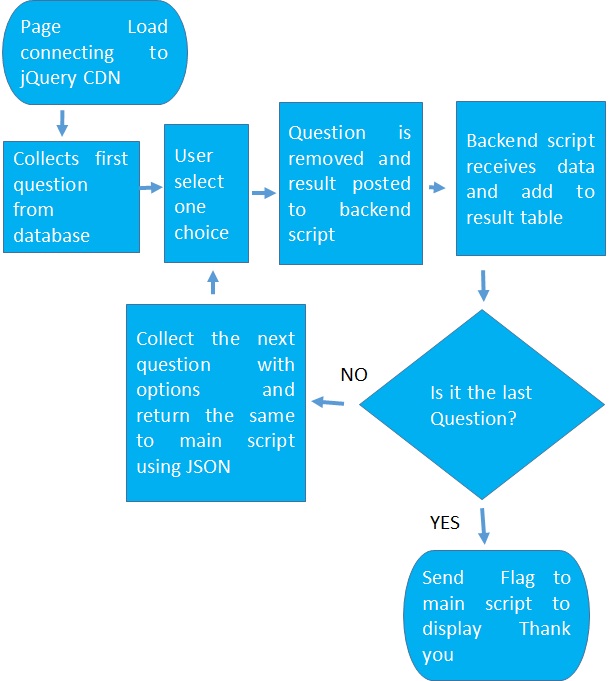
Question Markup Top ↑
<div id="survey-question">
  <h3 id="question-text"></h3>
  <input type="hidden"
         id="question-id">

  <label>
    <input type="radio"
           name="options"
           value="option1">
    <span class="option-label"></span>
  </label>
</div>
Submit the Selected Answer Top ↑
$( "#survey-question" ).on(
    "change",
    'input[name="options"]',
    function () {
        const $choice = $( this );

        $( "#survey-question" ).hide(
            "slide",
            {
                direction: "left"
            },
            400
        );

        $.post(
            "surveyck.php",
            {
                opt: $choice.val(),
                qst_id:
                    $( "#question-id" )
                        .val()
            },
            null,
            "json"
        )
        .done(showNextQuestion)
        .fail(function () {
            $( "#survey-question" )
                .show();

            $( "#survey-status" ).text(
                "Unable to save the response."
            );
        });
    }
);
Display the Next Question Top ↑
function showNextQuestion(
    response
) {
    if ( response.next !== "T" ) {
        $( "#survey-question" )
            .text(
                "Thanks for your views."
            )
            .show();
        return;
    }

    $( "#question-text" ).text(
        response.data.q1
    );

    $( ".option-label" ).each(
        function ( index ) {
            $( this ).text(
                response.data[
                    "opt" + (index + 1)
                ]
            );
        }
    );

    $( "#question-id" ).val(
        response.data.qst_id
    );

    $( 'input[name="options"]' )
        .prop( "checked", false );

    $( "#survey-question" ).show(
        "slide",
        {
            direction: "right"
        },
        400
    );
}
Backend: Validate and Save Top ↑
$questionId = filter_input(
    INPUT_POST,
    'qst_id',
    FILTER_VALIDATE_INT
);

$option =
    (string)($_POST['opt'] ?? '');

$allowedOptions = [
    'option1',
    'option2',
    'option3',
    'option4'
];

if (
    !$questionId ||
    !in_array(
        $option,
        $allowedOptions,
        true
    )
) {
    http_response_code(400);
    exit;
}

$stmt = $dbo->prepare(
    'INSERT INTO poll_answer
        (email, qst_id, opt)
     VALUES
        (:email, :qst_id, :opt)'
);

$stmt->execute([
    'email' =>
        (string)($_SESSION['email'] ?? ''),
    'qst_id' => $questionId,
    'opt' => $option
]);
Return the Next Question as JSON Top ↑
header(
    'Content-Type: application/json; charset=utf-8'
);

echo json_encode(
    [
        'next' => 'T',
        'data' => [
            'qst_id' => $row['qst_id'],
            'q1' => $row['qst'],
            'opt1' => $row['opt1'],
            'opt2' => $row['opt2'],
            'opt3' => $row['opt3'],
            'opt4' => $row['opt4']
        ]
    ],
    JSON_UNESCAPED_UNICODE
);
Download original survey project
jQuery POST · JSON formatting · PDO connection
Original Source Examples Retained for Migration Reference Top ↑
These source-page examples are preserved so no learner-purpose code is silently lost. Use the modern examples above as the recommended implementation.
Original example 1
<script src="//ajax.googleapis.com/ajax/libs/jquery/1.9.1/jquery.min.js"></script>
<script src="https://ajax.googleapis.com/ajax/libs/jqueryui/1.11.4/jquery-ui.min.js"></script>
Original example 2
$.post( "surveyck.php", {"opt":$(this).val(),"qst_id":$("#qst_id").val()},function(return_data,status){Original example 3
<?Php
require "config.php";
$count=$dbo->prepare("select * from poll_qst where qst_id=1");
if($count->execute()){
$row = $count->fetch(PDO::FETCH_OBJ);
}
echo "
<div id='maindiv' class='maindiv'>
<form id='f1'>
<table>
<tr><td>
<h3 id='q1'>$row->qst</h3></td></tr>
<tr><td>
<input type=hidden id=qst_id value=$row->qst_id>
<tr><td>
      <input type='radio' name='options' id='opt1' value='option1' > <label for='opt1' class='lb'>$row->opt1</label>
</td></tr>
<tr><td>
      <input type='radio' name='options' id='opt2' value='option2' >  <label for='opt2' class='lb'>$row->opt1</label>
</td></tr>

<tr><td>
      <input type='radio' name='options' id='opt3' value='option3' >  <label for='opt3' class='lb'>$row->opt1</label>
</td></tr>
<tr><td>
      <input type='radio' name='options' id='opt4' value='option4' >  <label for='opt4' class='lb'>$row->opt1</label>
</td></tr>

</table>
</form>
</div>
";
?>
Original example 4
$('#maindiv').hide('slide', {direction: 'left'}, 1000);Original example 5
$('#maindiv').show('slide', {direction: 'right'}, 1000);Original example 6
$("input:radio[name=options]").click(function() {
$('#maindiv').hide('slide', {direction: 'left'}, 1000);
$.post( "surveyck.php", {"opt":$(this).val(),"qst_id":$("#qst_id").val()},function(return_data,status){
Original example 7
if(return_data.next=='T'){
$('#q1').html(return_data.data.q1);
$('label[for=opt1]').html(return_data.data.opt1);
$('label[for=opt2]').html(return_data.data.opt2);
$('label[for=opt3]').html(return_data.data.opt3);
$('label[for=opt4]').html(return_data.data.opt4);
$("#qst_id").val(return_data.data.qst_id);
}
else{$('#maindiv').html("Thanks for your views");}

},"json");
Original example 8
$("#f1")[0].reset();Original example 9
$qst_id=$_POST['qst_id'];
$opt=$_POST['opt']; // User choice
Original example 10
$sql=$dbo->prepare("insert into poll_answer(email,qst_id,opt) values('$_SESSION[email]',$qst_id,:opt)");
$sql->bindParam(':opt',$opt,PDO::PARAM_STR, 50);
$sql->execute();
Original example 11
$qst_id=$qst_id+1;
$no_questions = $dbo->query("select count(qst_id) from poll_qst")->fetchColumn();

if($qst_id > $no_questions){
$next='F'; // Flag is set to display thank you message
}else{
$next='T'; // Flag is set to display next question

$count=$dbo->prepare("select * from poll_qst where qst_id=$qst_id");
if($count->execute()){
$row = $count->fetch(PDO::FETCH_OBJ);
}
}
Original example 12
select opt, count(ans_id) as no, opt1,opt2,opt3,opt4,qst from poll_answer left join poll_qst on poll_qst.qst_id=poll_answer.qst_id where poll_answer.qst_id=$i group by optOriginal example 13
for($i=1;$i<=10;$i++){ // loop for 10 questions
...
}
Original example 14
switch ($row['opt']){
case 'option1':
$opt1=$row['opt1'];
$no1=$row['no'];
break;

case 'option2':
$opt2=$row['opt2'];
$no2=$row['no'];
break;

case 'option3':
$opt3=$row['opt3'];
$no3=$row['no'];
break;

case 'option4':
$opt4=$row['opt4'];
$no4=$row['no'];
break;
}
Original example 15
$total=($no1+$no2+$no3+$no4);
$no1_p=number_format($no1*100/$total);
$no2_p=number_format($no2*100/$total);
$no3_p=number_format($no3*100/$total);
$no4_p=number_format($no4*100/$total);
Original example 16
echo "<b>$row[qst]</b> <br><br>";
echo "$opt1 ($no1) $no1_p%";
echo "<br><br>$opt2 ($no2) $no2_p% ";
echo "<br><br>$opt3 ($no3) $no3_p%";
echo "<br><br>$opt4 ($no4) $no4_p%";

echo "<br><br>Total answers : $total ";
Continue Learning jQuery

Subhendu Mohapatra
Author & Instructor at plus2net
I write and maintain practical tutorials on Python, PHP, SQL, JavaScript, HTML, jQuery, and web development at plus2net. The tutorials focus on clear explanations, working examples, and code that readers can test and adapt while learning.
Connect:


This article is written by plus2net.com team.

| sathya | 29-04-2016 |
| its very useful | |
| Yaseen | 19-01-2018 |
| Can i use this script in codeigniter...? | |
| Ferdinand Tugano | 21-08-2018 |
| thank you so much! | |