Integrating Database with ttkbootstrap Radiobuttons
We will explore how to integrate a database with ttkbootstrap radiobuttons to store and fetch user preferences dynamically. We will start with a dictionary data source and gradually transition to an SQLite database managed via SQLAlchemy.
Tutorial Breakdown:
- Part I: Using a dictionary as a data source for user role selection.
- Part II: Integrating an SQLite database to store and retrieve radiobutton selections.
- Part III: Connecting to MySQL instead of SQLite.
Part I: Using Dictionary as Data Source for User Role Selection
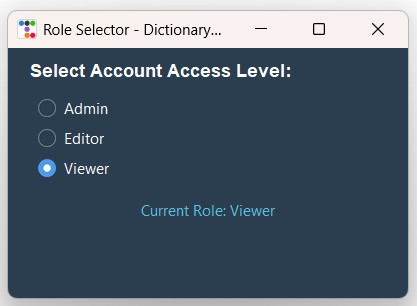 We used StringVar to store the user selection and used Pack layout manager.
Label label_status is used to display the active selection.
import ttkbootstrap as ttk
from ttkbootstrap.constants import *

# Dictionary holding available user roles and the default selection
user_settings = {
    "selected_role": "Editor",
    "available_roles": ["Admin", "Editor", "Viewer"]
}

def on_role_change():
    new_role = role_var.get()
    user_settings["selected_role"] = new_role
    label_status.config(text=f"Current Role: {new_role}")

app = ttk.Window(title="Role Selector - Dictionary Source", themename="superhero")
app.geometry("400x250")

role_var = ttk.StringVar(value=user_settings["selected_role"])

lbl_title = ttk.Label(app, text="Select Account Access Level:", font=("Helvetica", 11, "bold"))
lbl_title.pack(anchor=W, padx=20, pady=10)

for role in user_settings["available_roles"]:
    rb = ttk.Radiobutton(
        app,
        text=role,
        value=role,
        variable=role_var,
        command=on_role_change,
        bootstyle=PRIMARY
    )
    rb.pack(anchor=W, padx=30, pady=5)

label_status = ttk.Label(app, text=f"Current Role: {role_var.get()}", bootstyle=INFO)
label_status.pack(padx=20, pady=15)

app.mainloop()
Part II: Adding SQLite Database to Read and Update Preferences
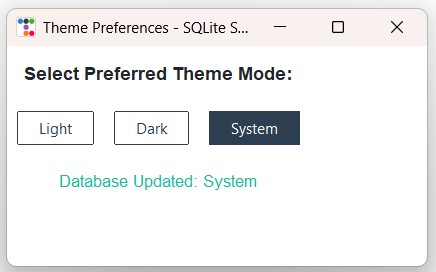 We used StringVar to store the user selection and used Grid layout manager.
Label label_msg displays real-time updates committed to SQLite.
Update the database path of your system for this DATABASE_URL
To persist user selections across application restarts, we connect to an SQLite database using SQLAlchemy. The initial value is loaded from the database, and any radiobutton change executes an immediate SQL UPDATE.
1️⃣ Creating SQLite Table & Inserting Default Data
from sqlalchemy import create_engine, text

# Database file path
DATABASE_URL = "sqlite:///F:\\testing\\user_preference.db"
engine = create_engine(DATABASE_URL, echo=False)

with engine.connect() as connection:
    connection.execute(text("CREATE TABLE IF NOT EXISTS settings (id INTEGER PRIMARY KEY, setting_name TEXT UNIQUE NOT NULL, setting_value TEXT NOT NULL)"))

    result = connection.execute(text("SELECT COUNT(*) FROM settings WHERE setting_name='theme_mode'"))
    if result.scalar() == 0:
        connection.execute(text("INSERT INTO settings (setting_name, setting_value) VALUES ('theme_mode', 'Dark')"))
        connection.commit()

print("Database initialized.")
2️⃣ Complete Application with Grid Layout & SQLite Sync
import ttkbootstrap as ttk
from ttkbootstrap.constants import *
from sqlalchemy import create_engine, text

DATABASE_URL = "sqlite:///F:\\testing\\user_preference.db"
engine = create_engine(DATABASE_URL, echo=False)
connection = engine.connect()

def get_stored_preference():
    result = connection.execute(text("SELECT setting_value FROM settings WHERE setting_name='theme_mode'"))
    row = result.fetchone()
    return row[0] if row else "Light"

def update_preference():
    selected_val = theme_var.get()
    connection.execute(text("UPDATE settings SET setting_value = :val WHERE setting_name='theme_mode'"),
                       {"val": selected_val})
    connection.commit()
    label_msg.config(text=f"Database Updated: {selected_val}")

root = ttk.Window(title="Theme Preferences - SQLite Sync", themename="flatly")
root.geometry("420x220")

initial_val = get_stored_preference()
theme_var = ttk.StringVar(value=initial_val)

lbl_heading = ttk.Label(root, text="Select Preferred Theme Mode:", font=("Helvetica", 11, "bold"))
lbl_heading.grid(row=0, column=0, columnspan=3, padx=15, pady=15, sticky="w")

theme_modes = ["Light", "Dark", "System"]

for col, mode in enumerate(theme_modes):
    rb = ttk.Radiobutton(
        root,
        text=mode,
        value=mode,
        variable=theme_var,
        command=update_preference,
        bootstyle="outline-toolbutton"
    )
    rb.grid(row=1, column=col, padx=10, pady=10, sticky="ew")

label_msg = ttk.Label(root, text=f"Loaded from DB: {initial_val}", font=("Helvetica", 10), bootstyle=SUCCESS)
label_msg.grid(row=2, column=0, columnspan=3, padx=15, pady=15)

root.mainloop()
connection.close()
Part III: Using MySQL Instead of SQLite
To switch from SQLite to a centralized MySQL database, update the connection URL string in SQLAlchemy. The rest of the Tkinter GUI and command execution code remains identical.
# SQLite Connection (Commented Out)
# DATABASE_URL = "sqlite:///F:\testing\user_preference.db"

# MySQL Connection string using PyMySQL
DATABASE_URL = "mysql+pymysql://username:password@localhost/student_db"

# Create SQLAlchemy engine for MySQL
engine = create_engine(DATABASE_URL, echo=False)
connection = engine.connect()
Common Errors & Troubleshooting
| Issue / Error | Cause | Recommended Solution |
|---|---|---|
| No Radiobutton Selected on Startup | The value retrieved from database query does not match any radiobutton `value` string. | Ensure database string values precisely match radiobutton `value` parameters (case-sensitive). |
| OperationalError: database is locked | Unclosed connections or uncommitted transactions holding write locks in SQLite. | Call `connection.commit()` immediately after execution and close connections cleanly. |
| Tkinter UI Freezes on Selection | Executing slow database queries synchronously inside the command callback function. | Use lightweight SQL queries with indexed columns or handle heavy I/O operations asynchronously. |
Frequently Asked Questions
ttk.IntVar() as your control variable, assign numeric values to each Radiobutton(value=1), and store integer columns in SQLite or MySQL.
None or empty results, and explicitly call variable.set(default_value) before rendering the window.

Subhendu Mohapatra
Author & Instructor at plus2net
I write and maintain practical tutorials on Python, PHP, SQL, JavaScript, HTML, jQuery, and web development at plus2net. The tutorials focus on clear explanations, working examples, and code that readers can test and adapt while learning.


Subscribe to our YouTube Channel here

 Python Video Tutorials