Tkinter ttkbootstrap Progressbar Widget Tutorial
The ttkbootstrap Progressbar widget extends standard Tkinter progress bars by offering vibrant theme-aware color palettes (`bootstyle`), determinate percentage tracking, and indeterminate animation modes.
Tutorial Breakdown:
- Part I: Basic Determinate & Indeterminate Progressbar Setup (`pack` Manager)
- Part II: Live Dynamic Theme Switcher (Flatly, Superhero, Cosmo, Darkly)
- Part III: SQLite Database Integration (Tracking Task Completion via SQLAlchemy)
- Part IV: Connecting to MySQL using SQLAlchemy
Part I: Basic Determinate & Indeterminate Progressbar Setup
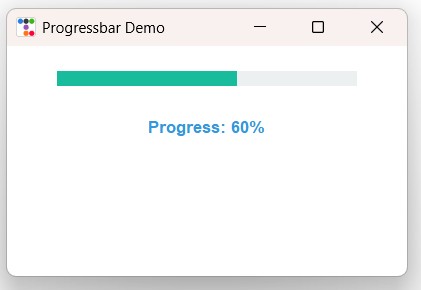 We tracked progression using IntVar and used Pack layout manager.
Progressbars support bootstyle=SUCCESS and mode="indeterminate" for background activity loops.
import ttkbootstrap as ttk
from ttkbootstrap.constants import *

app = ttk.Window(title="Progressbar Demo", themename="flatly")
app.geometry("400x230")

# Determinate progress bar
pb = ttk.Progressbar(
    app,
    orient=HORIZONTAL,
    length=300,
    mode="determinate",
    bootstyle=SUCCESS
)
pb.pack(padx=20, pady=25)
pb["value"] = 60  # Set progress to 60%

lbl = ttk.Label(app, text="Progress: 60%", font=("Helvetica", 10, "bold"), bootstyle=INFO)
lbl.pack(pady=5)

app.mainloop()
Practical Overview
The ttkbootstrap Progressbar widget visually communicates task completion status. Use mode="determinate" when progress percentages are calculable, or switch to mode="indeterminate" with pb.start() during asynchronous background loading operations.
Part II: Live Dynamic Theme Switcher
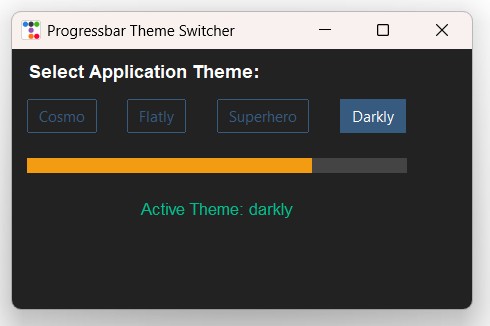 We used StringVar to track themes and used Grid layout manager.
Selecting theme radio buttons triggers live style regeneration across the progress bar via app.style.theme_use().
import ttkbootstrap as ttk
from ttkbootstrap.constants import *

def change_theme():
    selected_theme = theme_var.get()
    app.style.theme_use(selected_theme)
    label_info.config(text=f"Active Theme: {selected_theme}")

app = ttk.Window(title="Progressbar Theme Switcher", themename="superhero")
app.geometry("460x260")

theme_var = ttk.StringVar(value="superhero")
themes = ["cosmo", "flatly", "superhero", "darkly"]

lbl_title = ttk.Label(app, text="Select Application Theme:", font=("Helvetica", 11, "bold"))
lbl_title.grid(row=0, column=0, columnspan=4, padx=15, pady=10, sticky="w")

for idx, t_name in enumerate(themes):
    rb = ttk.Radiobutton(
        app,
        text=t_name.capitalize(),
        value=t_name,
        variable=theme_var,
        command=change_theme,
        bootstyle="outline-toolbutton"
    )
    rb.grid(row=1, column=idx, padx=5, pady=5)

pb_widget = ttk.Progressbar(app, orient=HORIZONTAL, length=380, value=75, bootstyle=WARNING)
pb_widget.grid(row=2, column=0, columnspan=4, padx=15, pady=20)

label_info = ttk.Label(app, text="Active Theme: superhero", bootstyle=SUCCESS, font=("Helvetica", 10))
label_info.grid(row=3, column=0, columnspan=4, padx=15, pady=5)

app.mainloop()
Part III: SQLite Database Integration (Tracking Task Progress)
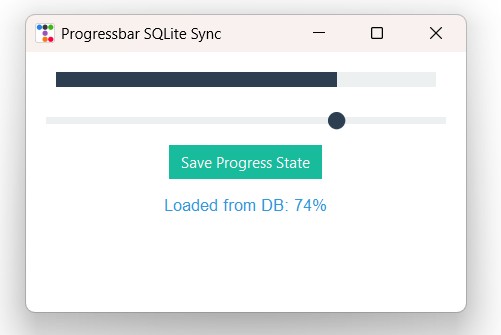 We used SQLite database and SQLAlchemy to load and save progress values.
Upon startup, the progress bar initializes from the database record and updates when modified.
1️⃣ Creating SQLite Table & Inserting Default Task Progress
from sqlalchemy import create_engine, text

# Use raw strings r"..." to prevent Unicode escape errors in Windows paths
DATABASE_URL = r"sqlite:///I:\My Drive\testing3\ttkbootstrap\tasks_db.db"
engine = create_engine(DATABASE_URL, echo=False)

with engine.connect() as connection:
    connection.execute(text("CREATE TABLE IF NOT EXISTS tasks (id INTEGER PRIMARY KEY, task_name TEXT UNIQUE NOT NULL, progress INTEGER NOT NULL)"))

    result = connection.execute(text("SELECT COUNT(*) FROM tasks WHERE task_name='installation'"))
    if result.scalar() == 0:
        connection.execute(text("INSERT INTO tasks (task_name, progress) VALUES ('installation', 45)"))
        connection.commit()

print("Tasks database initial setup completed.")
2️⃣ Dynamic GUI Syncing Progressbar with SQLite via SQLAlchemy
import ttkbootstrap as ttk
from ttkbootstrap.constants import *
from sqlalchemy import create_engine, text

DATABASE_URL = r"sqlite:///I:\My Drive\testing3\ttkbootstrap\tasks_db.db"
engine = create_engine(DATABASE_URL, echo=False)
connection = engine.connect()

def get_stored_progress():
    res = connection.execute(text("SELECT progress FROM tasks WHERE task_name='installation'"))
    row = res.fetchone()
    return row[0] if row else 0

def save_progress_db():
    val = int(scale_val.get())
    pb_db["value"] = val
    connection.execute(
        text("UPDATE tasks SET progress = :val WHERE task_name='installation'"),
        {"val": val}
    )
    connection.commit()
    lbl_status.config(text=f"Saved to DB: {val}%")

root = ttk.Window(title="Progressbar SQLite Sync", themename="flatly")
root.geometry("440x260")

init_prog = get_stored_progress()
scale_val = ttk.IntVar(value=init_prog)

pb_db = ttk.Progressbar(root, orient=HORIZONTAL, length=380, mode="determinate", bootstyle=PRIMARY)
pb_db.pack(padx=20, pady=20)
pb_db["value"] = init_prog

scale = ttk.Scale(
    root,
    from_=0,
    to=100,
    variable=scale_val,
    command=lambda v: pb_db.configure(value=int(float(v))),
    bootstyle=PRIMARY
)
scale.pack(padx=20, pady=5, fill=X)

btn_save = ttk.Button(root, text="Save Progress State", command=save_progress_db, bootstyle=SUCCESS)
btn_save.pack(pady=10)

lbl_status = ttk.Label(root, text=f"Loaded from DB: {init_prog}%", bootstyle=INFO, font=("Helvetica", 10))
lbl_status.pack(pady=5)

root.mainloop()
connection.close()
Part IV: Connecting to MySQL using SQLAlchemy
To connect your Progressbar application to a centralized MySQL database server, update the SQLAlchemy connection string:
# SQLite Connection (Commented Out)
# DATABASE_URL = r"sqlite:///I:\My Drive\testing3\ttkbootstrap\tasks_db.db"

# MySQL Connection string using PyMySQL
DATABASE_URL = "mysql+pymysql://username:password@localhost/student_db"

engine = create_engine(DATABASE_URL, echo=False)
Common Errors & Troubleshooting
| Issue / Error | Cause | Recommended Solution |
|---|---|---|
| Indeterminate bar fails to animate | pb.start() method was not invoked after initialization. |
Call pb.start(interval_ms) to start the infinite sliding bounce animation. |
| Progress value exceeds maximum limit | Setting value higher than the maximum property (default is 100). |
Ensure values stay within 0 and maximum or adjust pb["maximum"] = 200. |
Frequently Asked Questions
orient=VERTICAL when initializing the Progressbar widget (e.g., ttk.Progressbar(root, orient=VERTICAL, length=200)).

Subhendu Mohapatra
Author & Instructor at plus2net
I write and maintain practical tutorials on Python, PHP, SQL, JavaScript, HTML, jQuery, and web development at plus2net. The tutorials focus on clear explanations, working examples, and code that readers can test and adapt while learning.


Subscribe to our YouTube Channel here

 Python Video Tutorials