Mastering Tkinter: Build a Dynamic Search & Filter Data Grid in a Scrollable Frame
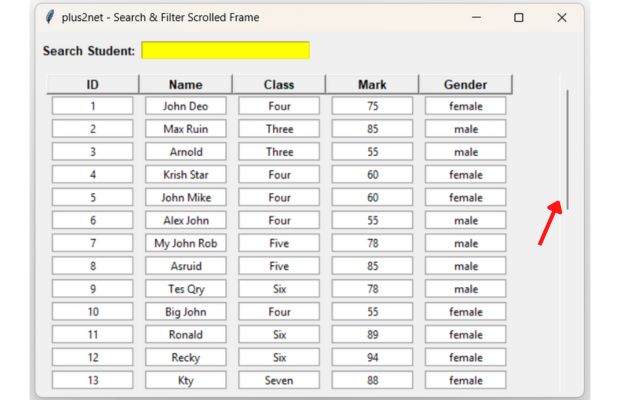
Managing large datasets in a desktop application requires more than just a scrollbar; it needs a functional way to find information quickly. In this tutorial, we demonstrate how to build a Dynamic Search & Filter System within a Tkinter Scrollable Frame. By leveraging the power of the Canvas widget and real-time event tracing, you can create a high-performance data grid that responds instantly to user input.
This implementation covers several essential GUI development concepts:
- Real-time Filtering: Using
StringVartracing to filter records as the user types. - Dynamic Grid Management: Efficiently showing and hiding rows using
grid()andgrid_forget()to avoid UI clutter. - Canvas Architecture: Building a robust scrollable container that handles hundreds of widgets without layout breaking.
- Data Set Integration: Populating the interface from a Python list of tuples, simulating a real-world database or CSV source.
- Enhanced UX: Native mouse wheel support integrated directly into the scrollable area for smooth navigation.
import tkinter as tk
from tkinter import ttk

# 1. List of Data Sets (Student Records)
data = [
    (1, 'John Deo', 'Four', 75, 'female'), (2, 'Max Ruin', 'Three', 85, 'male'),
    (3, 'Arnold', 'Three', 55, 'male'), (4, 'Krish Star', 'Four', 60, 'female'),
    (5, 'John Mike', 'Four', 60, 'female'), (6, 'Alex John', 'Four', 55, 'male'),
    (7, 'My John Rob', 'Five', 78, 'male'), (8, 'Asruid', 'Five', 85, 'male'),
    (9, 'Tes Qry', 'Six', 78, 'male'), (10, 'Big John', 'Four', 55, 'female'),
    (11, 'Ronald', 'Six', 89, 'female'), (12, 'Recky', 'Six', 94, 'female'),
    (13, 'Kty', 'Seven', 88, 'female'), (14, 'Bigy', 'Seven', 88, 'female'),
    (15, 'Tade Row', 'Four', 88, 'male'), (16, 'Gimmy', 'Four', 88, 'male'),
    (17, 'Tumyu', 'Six', 54, 'male'), (18, 'Honny', 'Five', 75, 'male'),
    (19, 'Tinny', 'Nine', 18, 'male'), (20, 'Jackly', 'Nine', 65, 'female'),
    (21, 'Babby John', 'Four', 69, 'female'), (22, 'Reggid', 'Seven', 55, 'female'),
    (23, 'Herod', 'Eight', 79, 'male'), (24, 'Tiddy Now', 'Seven', 78, 'male'),
    (25, 'Giff Tow', 'Seven', 88, 'male'), (26, 'Crelea', 'Seven', 79, 'male'),
    (27, 'Big Nose', 'Three', 81, 'female'), (28, 'Rojj Base', 'Seven', 86, 'female'),
    (29, 'Tess Played', 'Seven', 55, 'male'), (30, 'Reppy Red', 'Six', 79, 'female'),
    (31, 'Marry Toeey', 'Four', 88, 'male'), (32, 'Binn Rott', 'Seven', 90, 'female'),
    (33, 'Kenn Rein', 'Six', 96, 'female'), (34, 'Gain Toe', 'Seven', 69, 'male'),
    (35, 'Rows Noump', 'Six', 88, 'female')
]

# Storage for filtering references
row_storage = []

def update_search(*args):
    search_term = search_var.get().lower()
    for item in row_storage:
        for w in item['widgets']:
            w.grid_forget()

    current_row_idx = 1
    for item in row_storage:
        if search_term in item['name'].lower() or search_term in item['class'].lower():
            for col_idx, w in enumerate(item['widgets']):
                w.grid(row=current_row_idx, column=col_idx, padx=5, pady=2)
            current_row_idx += 1

def _on_mousewheel(event):
    canvas.yview_scroll(int(-1*(event.delta/120)), "units")

root = tk.Tk()
root.title("plus2net - Search & Filter Scrolled Frame")
root.geometry("600x500")

search_frame = tk.Frame(root, pady=10)
search_frame.pack(fill=tk.X)
tk.Label(search_frame, text=" Search (Name/Class): ", font=('Arial', 10, 'bold')).pack(side=tk.LEFT)

search_var = tk.StringVar()
search_var.trace_add("write", update_search)
tk.Entry(search_frame, textvariable=search_var, width=30).pack(side=tk.LEFT)

container = tk.Frame(root)
container.pack(fill=tk.BOTH, expand=True)

canvas = tk.Canvas(container)
scrollbar = ttk.Scrollbar(container, orient=tk.VERTICAL, command=canvas.yview)
scrollable_frame = tk.Frame(canvas)

scrollable_frame.bind("<Configure>", lambda e: canvas.configure(scrollregion=canvas.bbox("all")))
canvas.create_window((0, 0), window=scrollable_frame, anchor="nw")
canvas.configure(yscrollcommand=scrollbar.set)

canvas.pack(side=tk.LEFT, fill=tk.BOTH, expand=True)
scrollbar.pack(side=tk.RIGHT, fill=tk.Y)
canvas.bind_all("<MouseWheel>", _on_mousewheel)

headers = ["ID", "Name", "Class", "Mark", "Gender"]
for col, text in enumerate(headers):
    tk.Label(scrollable_frame, text=text, font=('Arial', 10, 'bold'), width=12, relief="raised").grid(row=0, column=col)

for i, student in enumerate(data, start=1):
    widgets_in_row = []
    for col_idx, value in enumerate(student):
        lbl = tk.Label(scrollable_frame, text=value, width=12, relief="groove", bg="white")
        lbl.grid(row=i, column=col_idx, padx=5, pady=2)
        widgets_in_row.append(lbl)

    row_storage.append({
        'widgets': widgets_in_row,
        'name': str(student[1]),
        'class': str(student[2])
    })

root.mainloop()
Check the above data source of students, we can replace the present souce by using different data source.
Expand Your Data Sources
While this tutorial uses a local list, you can connect your GUI to MySQL, SQLite, or JSON for real-time dynamic updates.
Learn about Dynamic Data Sources →Part II: Modernizing the Interface with Ttkbootstrap
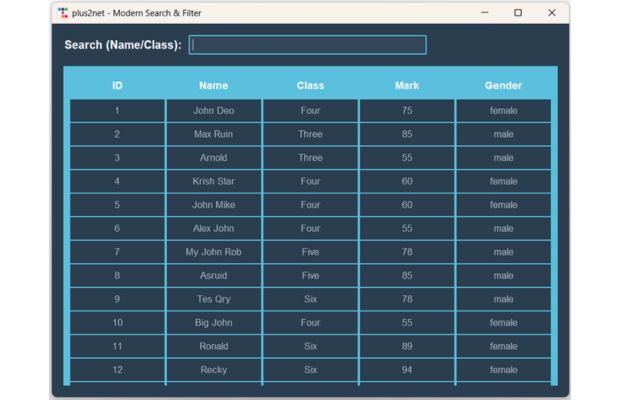
While the standard Tkinter library provides the functional foundation for scrollable frames, modern desktop applications demand a more polished, contemporary look. In this extended section, we demonstrate how to swap the native Tkinter widgets for Ttkbootstrap, a powerful library that brings responsive, CSS-like themes to your Python GUIs.
By migrating your search and filter tool to Ttkbootstrap, you gain several architectural and visual advantages:
- 🎨 Instant Professional Themes: Replace the "retro" look with modern themes like 'Superhero', 'Flatly', or 'Darkly' using a single line of code.
- 🧩 Simplified Scrolling: Use the
ScrolledFramewidget to eliminate the complex manual linking of Canvas, Scrollbars, and Mousewheel events. - ✨ State-Based Styling: Leverage
bootstyleattributes to define primary, success, or info colors that automatically adapt to your chosen theme. - 📱 Improved Readability: Benefit from built-in padding and modern typography that ensures your data rows remain legible even on high-resolution displays.
- ⚡ High-Contrast UI: Easily create alternating row colors or highlighted headers to help users navigate dense student records effortlessly.
New to Ttkbootstrap?
Before diving into the code below, you may want to review our comprehensive guide on installation, theme selection, and widget styling.
Explore Ttkbootstrap Basics →pip install ttkbootstrapimport ttkbootstrap as tb
from ttkbootstrap.constants import *
from ttkbootstrap.scrolled import ScrolledFrame
# 1. List of Data Sets (Student Records)
data = [
(1, 'John Deo', 'Four', 75, 'female'), (2, 'Max Ruin', 'Three', 85, 'male'),
(3, 'Arnold', 'Three', 55, 'male'), (4, 'Krish Star', 'Four', 60, 'female'),
(5, 'John Mike', 'Four', 60, 'female'), (6, 'Alex John', 'Four', 55, 'male'),
(7, 'My John Rob', 'Five', 78, 'male'), (8, 'Asruid', 'Five', 85, 'male'),
(9, 'Tes Qry', 'Six', 78, 'male'), (10, 'Big John', 'Four', 55, 'female'),
(11, 'Ronald', 'Six', 89, 'female'), (12, 'Recky', 'Six', 94, 'female'),
(13, 'Kty', 'Seven', 88, 'female'), (14, 'Bigy', 'Seven', 88, 'female'),
(15, 'Tade Row', 'Four', 88, 'male'), (16, 'Gimmy', 'Four', 88, 'male'),
(17, 'Tumyu', 'Six', 54, 'male'), (18, 'Honny', 'Five', 75, 'male'),
(19, 'Tinny', 'Nine', 18, 'male'), (20, 'Jackly', 'Nine', 65, 'female'),
(21, 'Babby John', 'Four', 69, 'female'), (22, 'Reggid', 'Seven', 55, 'female'),
(23, 'Herod', 'Eight', 79, 'male'), (24, 'Tiddy Now', 'Seven', 78, 'male'),
(25, 'Giff Tow', 'Seven', 88, 'male'), (26, 'Crelea', 'Seven', 79, 'male'),
(27, 'Big Nose', 'Three', 81, 'female'), (28, 'Rojj Base', 'Seven', 86, 'female'),
(29, 'Tess Played', 'Seven', 55, 'male'), (30, 'Reppy Red', 'Six', 79, 'female'),
(31, 'Marry Toeey', 'Four', 88, 'male'), (32, 'Binn Rott', 'Seven', 90, 'female'),
(33, 'Kenn Rein', 'Six', 96, 'female'), (34, 'Gain Toe', 'Seven', 69, 'male'),
(35, 'Rows Noump', 'Six', 88, 'female')
]
# row_storage stores references to widgets for real-time filtering
row_storage = []
def update_search(*args):
"""Filters the table rows based on the search entry"""
search_term = search_var.get().lower()
# Hide all rows (excluding header)
for item in row_storage:
for w in item['widgets']:
w.grid_forget()
# Re-display only matching rows
current_row_idx = 1
for item in row_storage:
if search_term in item['name'].lower() or search_term in item['class'].lower():
for col_idx, w in enumerate(item['widgets']):
w.grid(row=current_row_idx, column=col_idx, padx=2, pady=1, sticky='nsew')
current_row_idx += 1
# --- Initialize ttkbootstrap Window ---
# Increased width for better visibility
root = tb.Window(themename="superhero")
root.title("plus2net - Modern Search & Filter")
root.geometry("900x650")
# --- UI Layout: Search Section ---
search_frame = tb.Frame(root, padding=20)
search_frame.pack(fill=X)
search_label = tb.Label(search_frame, text="Search (Name/Class):", font=('Helvetica', 12, 'bold'))
search_label.pack(side=LEFT, padx=(0, 10))
search_var = tb.StringVar()
search_var.trace_add("write", update_search)
search_entry = tb.Entry(search_frame, textvariable=search_var, width=50, bootstyle="info")
search_entry.pack(side=LEFT)
search_entry.focus_set()
# --- UI Layout: ScrolledFrame ---
sf = ScrolledFrame(root, autohide=True, padding=10, bootstyle="info")
sf.pack(fill=BOTH, expand=YES, padx=20, pady=(0, 20))
# Configure column weights for the frame inside the canvas to ensure even spacing
for i in range(5):
sf.columnconfigure(i, weight=1)
# --- Building the Table ---
headers = ["ID", "Name", "Class", "Mark", "Gender"]
for col, text in enumerate(headers):
# 'inverse-info' provides a strong background with readable white text
h = tb.Label(sf, text=text, font=('Helvetica', 11, 'bold'),
width=18, anchor=CENTER, bootstyle="inverse-info", padding=10)
h.grid(row=0, column=col, sticky='nsew', padx=1, pady=1)
# Populate Data
for i, student in enumerate(data, start=1):
widgets_in_row = []
for col_idx, value in enumerate(student):
# 'light' bootstyle with dark text ensures contrast against 'superhero' dark bg
# Or use 'secondary' for a subtle grey that matches the theme better
lbl = tb.Label(sf, text=value, width=18, anchor=CENTER,
bootstyle="light", padding=8, font=('Helvetica', 10))
lbl.grid(row=i, column=col_idx, padx=1, pady=1, sticky='nsew')
widgets_in_row.append(lbl)
row_storage.append({
'widgets': widgets_in_row,
'name': str(student[1]),
'class': str(student[2])
})
root.mainloop()Current Limitations & Future Improvements
While the current script provides a functional foundation for dynamic data filtering in Tkinter, there are several technical constraints to keep in mind as you scale your application:
Technical Limitations
- Filtering Constraints: The current logic is limited to simple string matching across two columns. It cannot handle complex queries, such as filtering numeric values (e.g., highlighting or selecting marks greater than 70).
- Memory Management: We are using
grid_forget()to hide rows. While this removes them from the visual layout, the widgets still reside in memory. In a script with a very large dataset, this could lead to high RAM usage and performance degradation. - Data Source: The script uses a hardcoded local list. This is not ideal for real-world scenarios where data is dynamic or stored externally.
Future Experiments for Users
- Modular Architecture: Try refactoring the code into separate classes or modules to support connections to external databases like SQLite, MySQL, or cloud-based JSON APIs.
- Advanced Memory Handling: For large datasets, experiment with "Lazy Loading" or destroying/recreating widgets dynamically to optimize memory footprint.
- Enhanced Search Logic: Implement more robust filtering options, including range sliders for marks, dropdowns for class selection, and multi-column sorting.
- UI Responsiveness: Explore using the
Treeviewwidget for even more efficient handling of tabular data with built-in scrolling capabilities.

Subhendu Mohapatra
Author & Instructor at plus2net
I write and maintain practical tutorials on Python, PHP, SQL, JavaScript, HTML, jQuery, and web development at plus2net. The tutorials focus on clear explanations, working examples, and code that readers can test and adapt while learning.


Subscribe to our YouTube Channel here

 Python Video Tutorials